What is a phishing email?
Phishing email is a type of cyberattack where malicious actors impersonate trusted organizations such as banks, government agencies, or business partners to trick recipients into providing login credentials, transferring money, or downloading files containing malware.
Unlike ordinary spam mail, phishing is deliberately crafted with real logos, professional language, and sender addresses that appear legitimate. According to industry data, 94% of organizations globally were targeted by phishing attacks in 2024.
What makes phishing more dangerous than other attack types is the human factor. Hackers do not need to break through a firewall; they just need one employee to click the wrong link. According to the Verizon DBIR 2025, 60% of all data breaches involve a human element.
A quick distinction: spam mail is unwanted promotional email that is annoying but generally harmless. Phishing email is far more dangerous, designed to steal valuable information, sometimes through elaborate scenarios tailored to each individual target.
7 warning signs of phishing emails
1. Requests for sensitive information out of nowhere
This is the most common and obvious warning sign. No legitimate organization, whether a bank, a tax authority, or a technology platform, will ever send an email asking you to provide a password, credit card number, OTP code, or login credentials through a link in the email.
A real-world example: you receive an email from "noreply@vietcombank-secure.com" claiming your account has been locked and asking you to click a link and enter your PIN to verify. This is a classic phishing email. The actual Vietcombank would never send a request like this.
The golden rule: if an email asks you to verify your account, update your information, or log in immediately through a link, close the email and navigate directly to the official website by typing the URL into your browser.
2. Generic greetings with no personal name
Legitimate organizations always address you by your full name because they have your customer data on file. Phishing emails, sent in bulk to thousands of addresses simultaneously, can only use generic greetings such as "Dear Valued Customer", "Dear Valued Member", or "Hello User".
One important exception to keep in mind: sophisticated hacker groups can use your real name, harvested from social media or previous data breaches, to craft more personalized spear phishing emails. In those cases, always check for additional warning signs rather than relying on the greeting alone.
3. Suspicious sender email address
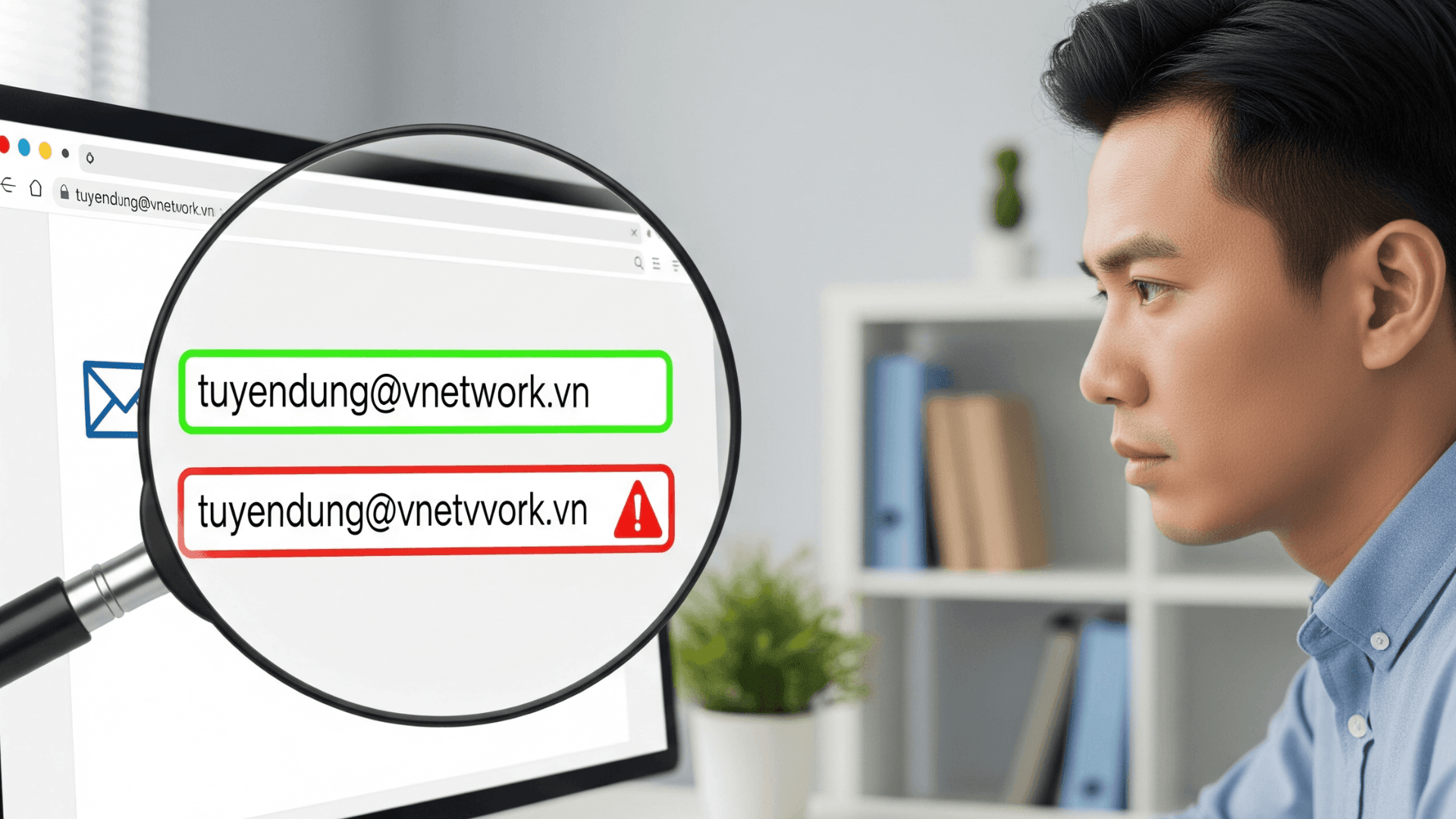
This is the most important check that many people skip. Hackers use several techniques to make an email address look legitimate. Typosquatting adds or removes characters, for example vnetwork.vn becomes vnet-work.vn. Subdomain spoofing creates addresses like support@vnetwork.com.phishing-site.com, where the actual domain is phishing-site.com, not vnetwork.com.
Another technique is homoglyph substitution, replacing characters with visually similar ones such as the letter O and the number 0, turning vnetwork.vn into vnetw0rk.vn. How to check: on a computer, hover your mouse over the sender name to reveal the full email address. On a phone, tap the sender name to see the actual address, then carefully inspect every character after the @ symbol.
4. Spelling errors or unusual phrasing
Emails from professional organizations are carefully drafted and go through multiple rounds of review. Phishing emails often contain spelling mistakes, grammatical errors, awkward phrasing especially in emails translated from another language, inconsistent fonts, or messy formatting.
That said, this is not an absolute indicator. With AI assistance, many phishing emails today are written with near-perfect quality, indistinguishable from a genuine business email. This is why you should always check multiple warning signs together rather than relying on any single criterion.
5. Artificial urgency or high-pressure scenarios
Social engineering, or psychological manipulation, is the core weapon of hackers. Phishing emails deliberately create a sense of urgency to pressure victims into acting immediately without thinking. Phrases like "your account will be locked in 24 hours", "suspicious login detected, verify now", or "overdue invoice, resolve immediately to avoid penalties" are classic red flags.
This is the most widely used technique in phishing attacks targeting businesses. Hackers know that busy employees tend to click impulsively on emails appearing to come from the IT department or from a CEO requesting an urgent wire transfer. The key principle: legitimate organizations will never pressure you to act within hours through an email.
6. Links that do not match the official domain
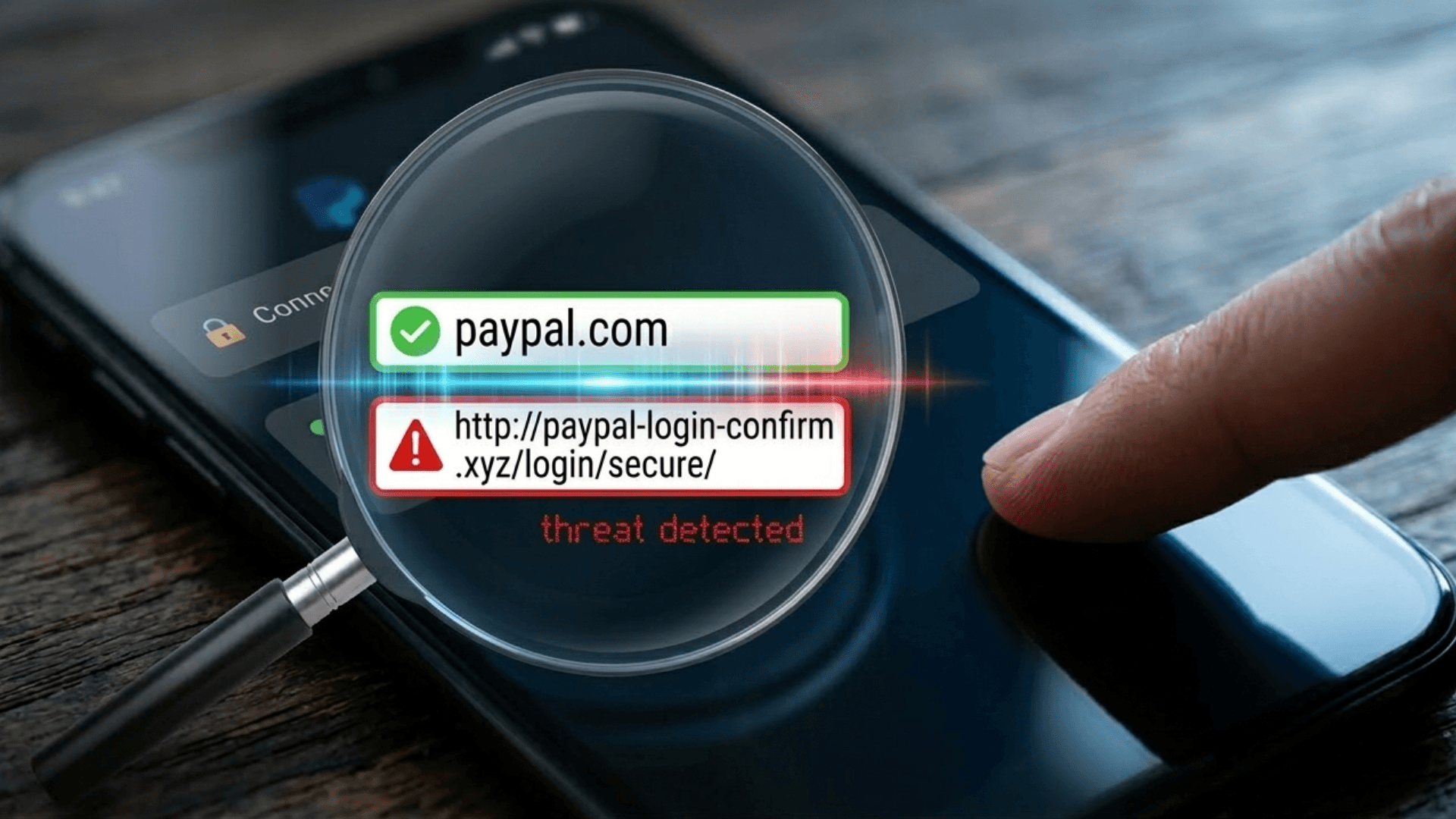
Before clicking any link in an email, hover your mouse over it to see the actual URL displayed at the bottom of your browser. Warning signs of phishing links include URLs starting with http instead of https, mismatched domains such as an email from Amazon linking to amazon-security-alert.ru, or the use of URL shorteners to hide the real destination.
A more sophisticated technique involves displaying legitimate-looking anchor text, such as vnetwork.vn, while the underlying link leads to a completely different malicious page. According to research by Avanan, links in emails are four times more dangerous than attachments because they bypass traditional email filters far more easily.
In enterprise environments, be especially vigilant about Business Email Compromise (BEC): attackers gain control of a real partner's email account and then send fraudulent links from that exact address. This is why you cannot rely solely on the sender address and must always verify the destination URL.
7. Unexpected attachments or unusual file formats
Legitimate organizations do not typically send file attachments without a clear reason. The most suspicious file formats include .exe, .scr, and .bat, which are executable files that can run malware immediately upon opening, .zip and .rar files commonly used to compress and conceal malicious content, and Office files such as .docx or .xlsx that prompt you to enable macros.
Even PDF files are not entirely safe. A PDF that looks normal but contains embedded links leading to a fraudulent page is an increasingly common attack vector. According to Hornetsecurity, HTML files were the most prevalent malicious attachment type in 2024, accounting for 37.1% of recorded cases.
The rule of thumb: if you receive an unexpected attachment from anyone, including a familiar partner, contact them to confirm via phone or a separate messaging channel before opening it. Be especially cautious about any file that asks you to enable content or allow editing.
Summary: phishing email warning signs at a glance
| # | Warning sign | Real-world example | Risk if missed | Severity |
|---|---|---|---|---|
| 1 | Requests for sensitive info | "Enter your PIN to verify your account" | Lost credentials, compromised bank account | High |
| 2 | Generic greeting | "Dear Valued Customer" | More susceptible when combined with other signs | Medium |
| 3 | Suspicious sender address | noreply@viet-c0mbank.com | Deceived by brand impersonation | High |
| 4 | Spelling errors, poor grammar | Awkward phrasing, inconsistent fonts | May miss AI-polished phishing emails | Medium |
| 5 | Artificial time pressure | "Account locked in 24 hours" | Rushed action, no time to verify | High |
| 6 | Mismatched link domain | amazon-support.ru instead of amazon.com | Redirected to fake page, credentials stolen | High |
| 7 | Unexpected or unusual attachments | .zip, .exe, .docx requesting Enable Macros | Malware and ransomware infection across systems | High |
What to do when you receive a phishing email
Spotting a phishing email is only the first step. Responding correctly is what determines whether any damage actually occurs. Below is a five-step process recommended for business environments.
- Do not click, download, or reply: No matter how urgent the email appears, never click any links, download attachments, or reply with any information. Even unsubscribing can confirm that your email address is active, which may result in even more attacks being directed at you.
- Report to your IT team immediately: In a business environment, every phishing email you catch is a potential threat to the entire organization, as the same campaign may already be targeting dozens of your colleagues. Forward the email to your IT team for analysis and company-wide alerts.
- Report directly within your email application: In Gmail, click the three-dot menu and select Report phishing. In Outlook, select the email, then choose Report and Report Phishing. These actions help improve the email filter for your entire organization and contribute to shared anti-phishing databases.
- Act fast if you already clicked: If you clicked a link or opened an attachment, disconnect the device from the internet immediately, change passwords for all related accounts from a separate device prioritizing your work email and banking accounts, run a full antivirus scan, and notify IT to check whether any data was accessed without authorization.
- Train and share with colleagues: The phishing email you received today may already be hitting other inboxes across your company. Share information about the attack campaign to raise awareness across your team, particularly those in finance or HR, as these are the most frequently targeted roles.
EG-Platform - Comprehensive email security solution for businesses
Employee training is a critical layer of defense, but it is not enough on its own. According to Proofpoint, only 18.3% of spoofed emails are correctly reported by employees, meaning more than 80% of the time the human defense line has already failed. Businesses need a technical protection layer at the email system level that stops threats before they ever reach an employee's inbox.
EG-Platform by VNETWORK is the world's only email security solution that fully meets 100% of the ITU-T X.1236 standards set by the International Telecommunication Union (ITU). Powered by AI and Machine Learning, the platform provides comprehensive two-way email protection, both inbound and outbound, detecting and blocking targeted attacks including APT, ransomware, phishing, and social engineering.
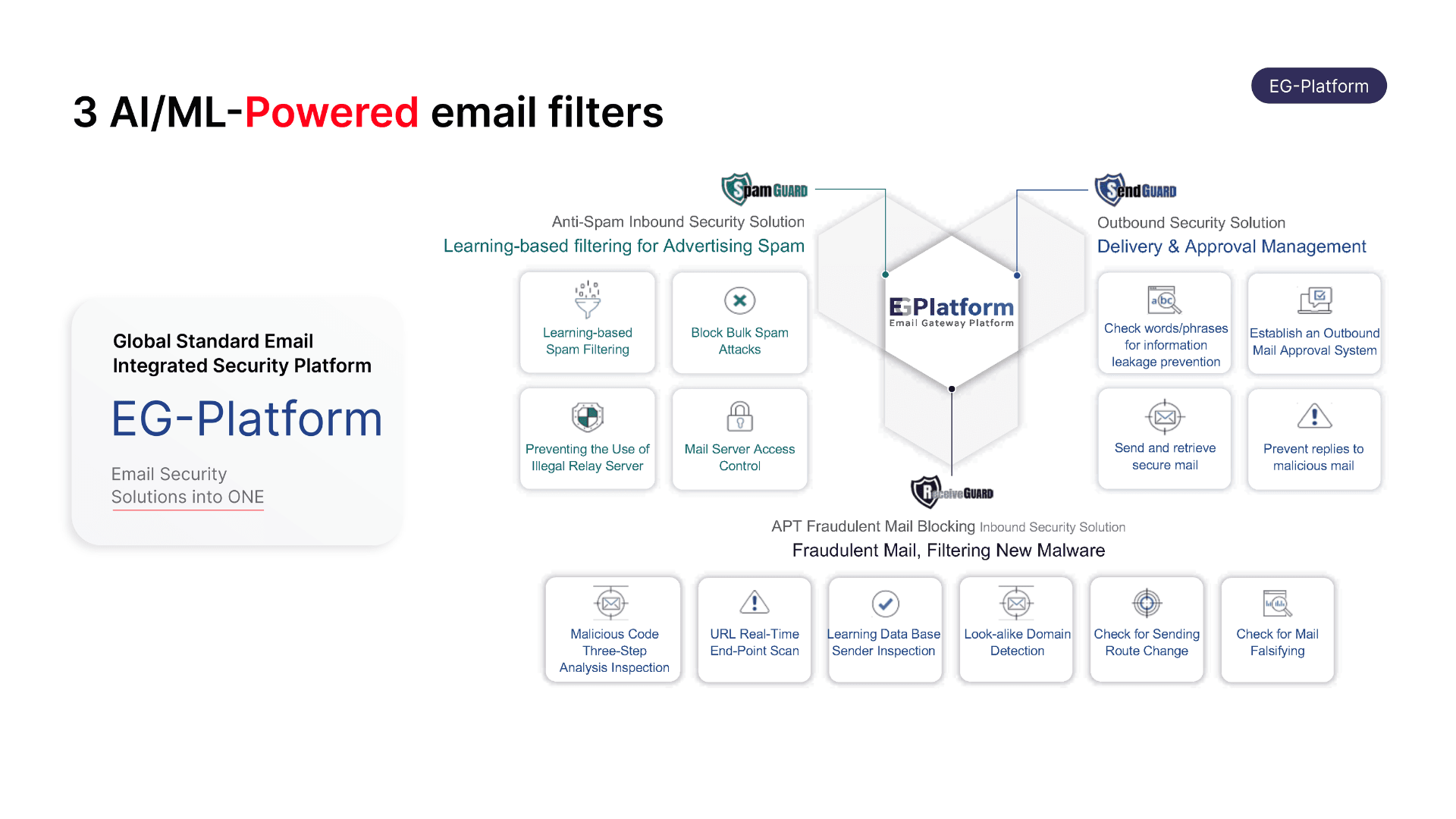
EG-Platform operates through three independent filtering layers that work in coordination to protect the entire lifecycle of an email within your organization.
- Spam Guard is the first filtering layer, using Machine Learning and a Bayesian filter to assign a risk score to each incoming email. It simultaneously verifies SPF, DKIM, and DMARC authentication standards, then automatically blocks spam, phishing mail, and malware-laden emails before they reach the inbox.
- Receive Guard is the specialized protection layer for inbound email, analyzing all content, attachments, and URL links inside a virtualized sandbox environment. The system cross-references IP addresses, email headers, and malware signatures against historical data to detect spoofed emails. When a threat is identified, Receive Guard either blocks the email outright or converts suspicious URLs into static images, preventing users from accidentally accessing malicious web pages.
- Send Guard monitors outbound email flow, protecting your mail server and internal data from being exploited. It blocks suspicious connections by IP or country, applies keyword filters to detect sensitive content, and requires manual approval before sending in cases that require tighter control.
Conclusion
Phishing emails are not just a personal concern; they represent one of the top security threats facing businesses of all sizes, particularly small and medium-sized enterprises that do not yet have a dedicated security team. The seven warning signs in this article provide a practical foundation for your team to build safe email habits every day.
That said, awareness training is only one piece of the puzzle. When an organization processes hundreds of emails daily, the risk of one accidental click is very real. Next-generation email security solutions like EG-Platform automate the technical defense layer, blocking phishing, malware, and spoofing before they ever reach your employees' inboxes.
Contact our hotline at (+84) 28 7306 8789 or email contact@vnetwork.vn to get advice on the email security solution that fits your business size and industry.
FAQ — phishing email questions answered
1. How is a phishing email different from spam?
Spam mail is unwanted promotional email that is annoying but generally harmless from a security standpoint. Phishing email is far more dangerous because it is deliberately designed to steal information, trick recipients into transferring money, or install malware on a system. A well-crafted phishing email can look identical to a genuine message from your bank or a business partner.
2. Why are small and medium-sized businesses the preferred target for hackers?
Employees at companies with fewer than 100 people face 350% more phishing attacks than those at large enterprises. The reason is that SMEs typically invest less in security, have less rigorous verification processes, and hackers are well aware of this. More than 68% of security breaches at small businesses begin with an employee who was not trained to recognize phishing emails.
3. What should I do if I already clicked a link in a phishing email?
Act immediately: disconnect the affected device from the internet, change passwords for all critical accounts from a separate device prioritizing your work email and bank accounts, run a full virus scan, and notify your IT department to assess and contain the impact. If banking card information may have been exposed, contact your bank right away to freeze the card.
4. Are SPF, DKIM, and DMARC enough to protect against phishing?
SPF, DKIM, and DMARC are essential email authentication standards, but they are not sufficient on their own. According to Egress, 84.2% of phishing attacks can still bypass DMARC validation. Businesses need to layer on an AI-powered email security solution like EG-Platform to analyze behavioral patterns and detect threats that domain authentication alone cannot stop.
5. How can businesses effectively train employees to recognize phishing emails?
The most effective approach combines multiple layers: conduct formal training at least twice a year with up-to-date real-world examples, run internal phishing simulation tests to measure actual vigilance levels, establish a clear reporting process so employees know exactly who to contact when they spot a suspicious email, and deploy technical security solutions to catch the emails that slip past the human defense layer.