
Bandwidth is the maximum amount of data that can be transmitted over a network connection within a given unit of time, typically one second. The most intuitive analogy for bandwidth is a highway: bandwidth is the number of lanes, determining how many vehicles can travel simultaneously. The more lanes, the higher the maximum traffic volume.
The most common unit for measuring bandwidth is bits per second (bps), representing the number of data bits transmitted each second. In practical deployments, bandwidth is typically expressed in larger multiples to match infrastructure scale.
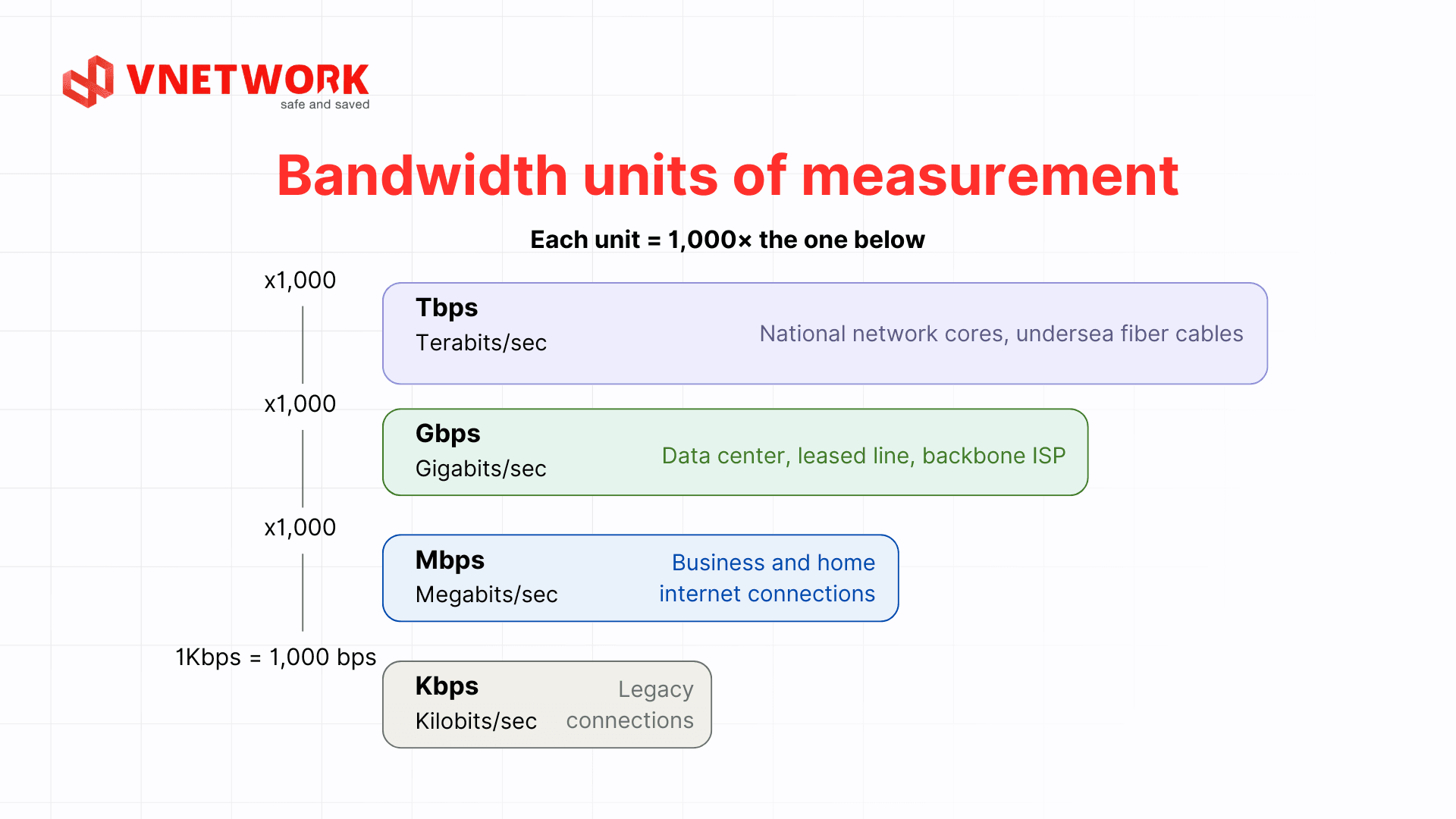
An important distinction to keep in mind is the difference between bit (lowercase b) and byte (uppercase B). Internet service providers typically publish speeds in Mbps (megabits), while file management software usually displays storage in MBps (megabytes). Since 1 byte equals 8 bits, a 100 Mbps connection can only transfer a maximum of around 12.5 MB of actual data per second under ideal conditions. Understanding this difference helps technical teams avoid confusion when planning infrastructure capacity.
Bandwidth, throughput, and latency often appear together in network performance discussions, but each metric measures a different dimension and carries its own operational meaning.
| Metric | Definition | Unit | Practical significance |
| Bandwidth | Maximum theoretical capacity of the connection | Mbps / Gbps | The figure the provider commits to, measured under ideal conditions |
| Throughput | Amount of data actually transmitted | Mbps / Gbps | Always lower than bandwidth; reflects real system performance |
| Latency | Time for a packet to travel from source to destination | ms | Critical for video calls, trading, gaming; not directly tied to bandwidth |
Bandwidth is the theoretical maximum capacity of a connection, representing the data ceiling that can be transmitted under ideal conditions. This is the figure a provider commits to and is typically advertised in internet service packages.
Throughput is the amount of data actually transmitted in practice, after accounting for losses caused by network errors, congestion, protocol overhead, and environmental factors. Throughput is always lower than theoretical bandwidth and is the metric that reflects true system performance.
Latency is the time it takes a packet to travel from its source to its destination, usually measured in milliseconds (ms). Low latency is critical for real-time applications such as video calls, trading, and gaming, but is not directly related to bandwidth. A high-bandwidth connection can still have high latency if it passes through many hops or uses suboptimal routing.
Monitoring all three metrics simultaneously matters because they interact in non-intuitive ways. High bandwidth does not guarantee high throughput if packet loss is significant. Low latency does not guarantee a good experience if bandwidth is insufficient to serve many concurrent users. Only when all three metrics are within appropriate thresholds will the network infrastructure perform as the enterprise expects.
Bandwidth directly affects every aspect of the user experience on a website, from page load speed to the ability to serve many visitors simultaneously. The following are specific impact dimensions that technical teams need to understand when planning infrastructure.
When a user visits a web page, the browser sends requests to load multiple resources simultaneously, including HTML, CSS, JavaScript, images, and fonts. Insufficient bandwidth causes these resources to queue up, increasing page load times as measured by Core Web Vitals such as LCP (Largest Contentful Paint) and FID (First Input Delay). Slow page load speeds negatively impact search rankings and conversion rates, particularly for e-commerce websites and advertising landing pages.
Each concurrent visitor to a website consumes a share of the server's bandwidth. When traffic exceeds the available bandwidth threshold, new requests begin to be rejected or receive very slow responses, leading to an unresponsive website that users often mistake for a server error. For high-traffic websites or seasonal marketing campaigns, having sufficient bandwidth headroom is a prerequisite for avoiding revenue loss at the most critical moments.
Websites integrating video, audio, or live streams require stable, continuous bandwidth in real time. Insufficient bandwidth causes buffering, automatic quality reduction, or mid-stream disconnection, significantly degrading the user experience. For online education platforms, media, and entertainment services, streaming quality is a key factor in determining user retention.
Modern websites typically integrate multiple external services via APIs, such as payment gateways, chatbots, analytics systems, and advertising platforms. Each API call consumes a portion of bandwidth. When bandwidth becomes saturated, API calls slow down or time out, affecting every business workflow that depends on these integrations. Monitoring bandwidth consumption per third-party service helps pinpoint the exact origin of incidents when they occur.
Upload bandwidth is bandwidth allocated for data traveling from the user's device to the network, such as uploading files to the cloud, sending video in an online meeting, or pushing backups to a remote server.
Download bandwidth is bandwidth for data arriving at the user's end, typically accounting for a larger share in digital content consumption models such as watching video, accessing web applications, and downloading documents.
Symmetric connections have equal upload and download bandwidth and are generally preferred in data center and enterprise environments to support bidirectional backup, database replication, and real-time synchronization between sites.
Dedicated bandwidth is a private connection not shared with any other subscriber, ensuring stable performance and the ability to commit to an SLA. This is the appropriate choice for financial institutions, healthcare organizations, and enterprises with strict uptime and performance requirements.
Shared bandwidth is a connection divided among multiple users in the same area or building. Costs are lower, but performance may degrade during peak hours and is not suitable for latency-sensitive applications or those requiring high availability.
Burstable bandwidth allows an organization to use bandwidth above the committed level for short periods to handle unexpected traffic spikes. This model is particularly useful for product launches, large-scale marketing campaigns, or seasonal peak periods.
When an organization deploys a content delivery network, CDN distributes bandwidth across multiple PoPs (Points of Presence) worldwide. Instead of all traffic converging on a single origin server, the CDN serves content from the node closest to the user, significantly reducing the load on central infrastructure.
The CDN model fundamentally changes how bandwidth needs are calculated. Organizations no longer need to provision a connection large enough to absorb all peak traffic at a single point; instead, they can distribute load across multiple edge nodes, optimizing infrastructure costs while maintaining end-user performance across all regions.
The quality of switches, routers, and network cabling directly affects real throughput, regardless of how large the uplink bandwidth is. A 100 Mbps switch port will become a bottleneck even when the ISP provides a 10 Gbps connection. Checking the entire path from end-user devices to the internet exit point is a step that cannot be skipped when evaluating infrastructure.
Beyond hardware, internal network architecture also has a significant impact. Large organizations typically have multiple switch layers, multiple VLANs, and multiple subnets. A well-designed hierarchical layout ensures that internal traffic does not unnecessarily traverse the external network, reducing load on the uplink and preserving bandwidth for connections that genuinely require internet access or cross-site connectivity.
Network protocols all carry a certain amount of overhead, meaning the bandwidth actually available for data payload is always lower than the physical bandwidth. TCP adds headers and a handshake mechanism, while SSL/TLS encryption layers also consume additional processing resources and bandwidth.
Protocol optimization is one of the most effective ways to make better use of existing bandwidth without investing in additional infrastructure. Enabling HTTP/2 or HTTP/3 reduces the number of connections required and makes better use of a single connection. Compressing data with gzip or brotli at the application layer directly reduces the volume of data that needs to be transmitted. Load balancing also plays an important role in distributing traffic evenly across connections, preventing a single link from becoming saturated while others remain underutilized.
A significant portion of bandwidth in many enterprise systems is consumed by illegitimate traffic. DDoS attacks can completely saturate a connection in just a few minutes, making all legitimate services unreachable. This is a risk that cannot be overlooked in bandwidth planning for large organizations.
Beyond DDoS, automated bot crawlers, continuous vulnerability scans, and spam traffic also consume a non-trivial amount of bandwidth if not filtered early at the network layer. Integrating rate limiting and access control mechanisms at the network layer helps organizations protect legitimate bandwidth for real users, reduce infrastructure costs, and improve service availability.
Effective bandwidth optimization requires a systematic approach. Simply upgrading the connection is usually only a temporary fix if the root causes around architecture and traffic management are not addressed.
Alongside technical measures, organizations also need clear network usage policies for employees. Rules around limiting personal streaming, scheduling large file transfers outside peak hours, and using VPN responsibly are simple steps with a positive impact on overall bandwidth infrastructure performance.
For large enterprises with high traffic volumes and strict uptime requirements, VNETWORK provides VNCDN, a content delivery network solution optimized specifically for the Vietnamese market and the Asia region.
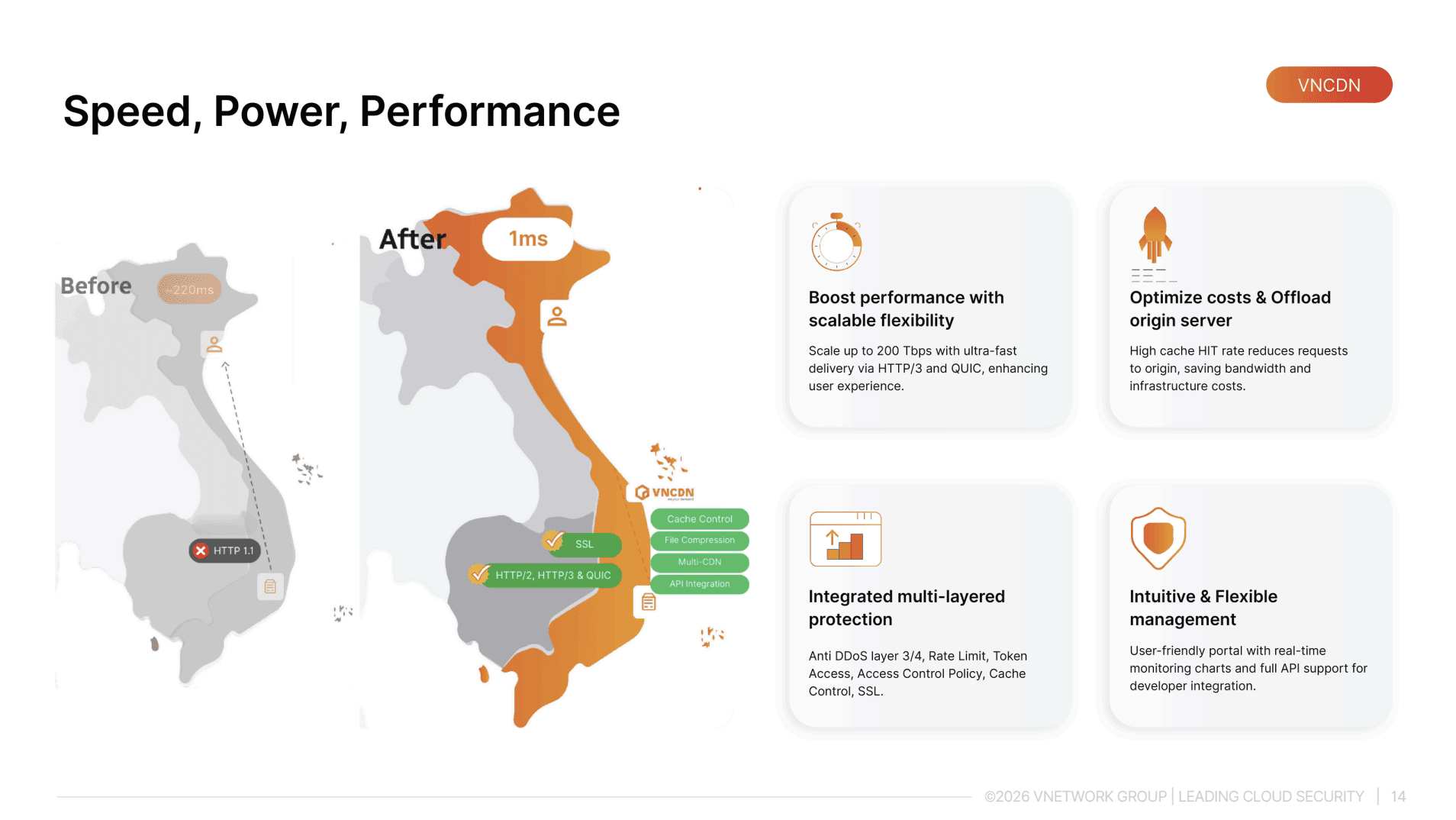
VNCDN provides a full suite of specialized solutions tailored to specific needs, including Web Acceleration, Multi-CDN, Live Media Service (LMS), Video on Demand (VOD), and Cloud Storage S3. The solution is well suited for enterprises in e-commerce, media, finance, online education, and gaming, particularly those that need to serve large numbers of concurrent users with rich content and require a consistent experience across multiple devices and ISPs.
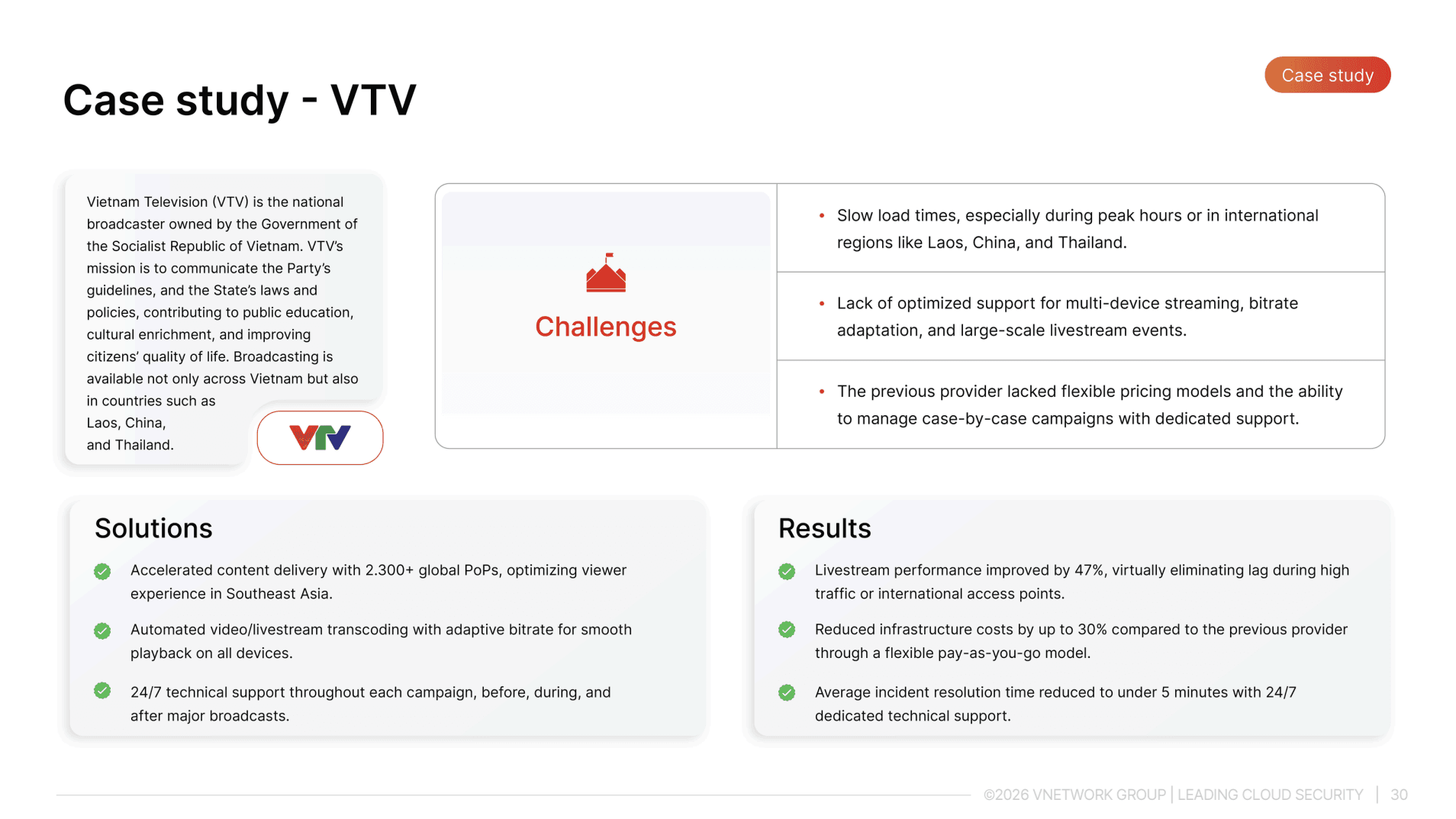
VTV Go is the official online television platform of Vietnam Television, serving millions of views per day across more than 40 channels. The defining bandwidth challenge for VTV Go is traffic that spikes around events rather than growing gradually day by day. The 2018 World Cup season recorded more than 11,300,000 concurrent accesses, placing extreme demands on the distribution infrastructure to handle massive peak loads in an extremely short window with zero tolerance for interruption.
VNETWORK deployed a solution suite for VTV Go comprising a distributed CDN, HLS livestreaming with latency under 3 seconds, SwiftTranscode for automatic transcoding with adaptive bitrate standards, and DRM for content rights protection. The entire operation runs on a single unified ecosystem, enabling the technical team to manage everything centrally rather than coordinating across multiple separate vendors.
After deployment, livestream performance improved by 47% and average incident resolution time dropped to under 5 minutes thanks to 24/7 per-broadcast-campaign support. The highlight was the live broadcast of the National Day parade on September 2nd, during which millions of viewers across the country followed the entire event on every device without a single interruption.
Bandwidth is the foundation of every modern digital infrastructure. Rather than focusing solely on upgrading the connection, enterprises should approach the bandwidth challenge comprehensively: from traffic auditing and QoS deployment to CDN integration and proactive monitoring. That is the path to sustainable, long-term bandwidth optimization.
Bandwidth is the maximum theoretical data transfer threshold that a provider commits to under ideal conditions. The actual speed a user experiences, known as throughput, is typically lower than the nominal bandwidth due to the effects of the internal network, the number of concurrent users, end-device quality, and the overhead of network protocols. When selecting a service plan, enterprises should ask providers to disclose actual throughput figures, not just the nominal bandwidth figure stated in the contract.
Shared bandwidth suits offices with standard web browsing needs that can tolerate some performance degradation during peak hours. Conversely, if an enterprise operates systems requiring continuous stability such as financial transactions, remote medical consultations, or multi-branch ERP systems, dedicated bandwidth is the better choice because it guarantees consistent performance and allows SLA commitments with the provider. Dedicated bandwidth is also a prerequisite for organizations with strict uptime requirements or those processing sensitive data under industry security standards.
DDoS attacks generate massive volumes of fake traffic designed to completely saturate the connection, making all services inaccessible to legitimate users even when the server infrastructure itself is operating normally. This is one of the most serious risks to bandwidth because the attack speed can saturate a connection in just a few minutes. The fundamental solution is to deploy a DDoS filtering and absorption system at the network layer, combined with rate limiting, before malicious traffic has the chance to consume the enterprise's legitimate bandwidth.
Absolutely, and this is the recommended approach before deciding to invest in infrastructure upgrades. Many organizations waste a significant portion of their bandwidth due to unoptimized current configurations. Measures such as enabling gzip or brotli data compression, deploying an internal proxy cache, configuring QoS to prioritize critical business applications, and integrating a CDN for static content can substantially reduce the volume of data that needs to travel over the primary connection. Combining these measures simultaneously helps extend the life of existing infrastructure before investment in a new connection becomes necessary.
The hallmark signs of bandwidth congestion are performance degradation that affects all users equally, most notably during peak hours, with spontaneous recovery once traffic subsides. In contrast, if only a subset of users experiences issues or errors occur randomly without following a time pattern, the cause usually lies in the server layer, database, or application. The most accurate diagnostic approach is to use a network monitoring tool to simultaneously measure bandwidth utilization, latency, and packet loss, which allows the team to pinpoint the exact layer causing the problem rather than troubleshooting based on guesswork.