
Hosting security is the set of measures that protect server infrastructure, websites, and data from unauthorized access, malware, cyberattacks, and incidents that disrupt service. This concept covers both the technical measures on the hosting provider's side and the configuration tasks the website owner needs to carry out.
Hosting provides the server environment and resources a website needs to run, but the specific implementation depends on the hosting model in use, such as shared hosting, VPS, or cloud hosting. As a result, the scope of hosting protection needs to be understood according to each website's actual deployment model, rather than applying a single generic template.
Hosting security isn't the sole responsibility of the service provider. It's part of the broader picture of website and server security, requiring close coordination between the infrastructure provider, the server administrator, and the website owner to achieve real protection.
If you're not sure your website already has the protection layers it needs, you can start right away with WAF Free, VNETWORK's free web application firewall, easy to deploy and requiring no dedicated security team.
Button;Try It Now;https://partner.vnetwork.vn/?utm_source=google&utm_medium=blog&utm_campaign=waf_free&utm_term=baomathosting_dinhnghia;_blank
Hosting security can be understood through two main groups of responsibility, depending on the hosting model and the scope of management.
| Protection Group | Responsible Party | Includes |
|---|---|---|
| Hosting provider | Service provider | DDoS protection, network firewall, data center protection, account and resource isolation |
| Website administrator | Administrator/website owner | WAF, SSL/TLS, software updates, account protection, backup, and server configuration |
With shared hosting, the provider usually handles most of the infrastructure and server management. With VPS or a dedicated server, on the other hand, the administrator has more control and therefore also needs to actively carry out more security measures.
In other words, the provider is responsible for protecting the hosting environment they manage, while the administrator is responsible for configuring and protecting their website, accounts, and data.

When either link in this chain of responsibility is left unattended, hosting can become the weak point that exposes a website to a range of risks, from service disruption and data loss to a full loss of system control:

Some of the risks above stem from malicious requests sent directly to the website. WAF Free by VNETWORK helps filter out these requests with a free web application firewall, quick to set up and requiring no dedicated security team.
Button;Try It Now;https://partner.vnetwork.vn/?utm_source=google&utm_medium=blog&utm_campaign=waf_free&utm_term=baomathosting;_blank
Beyond the security features a hosting provider puts in place, administrators need to actively protect their website through configuration, updates, and ongoing control of the components in use. Below are the key measures to maintain throughout website operation.
No system is completely immune to hardware failures or data-encrypting attacks. That's why maintaining an automated backup schedule for both the website's source code and its database is a requirement, not an option. Backups should be stored in a location fully separate from the live server. More importantly, the admin team shouldn't stop at creating backups, they need to regularly test the actual recovery process to ensure the website can be restored quickly when an incident occurs.

Configuring an SSL/TLS certificate across the entire website encrypts the traffic exchanged between the user's browser and the server. This eliminates the risk of login credentials, personal data, or payment information being intercepted or tampered with in transit. Beyond boosting brand credibility and supporting SEO rankings, HTTPS is a fundamental layer of protection, but it can't replace deeper security measures like source code updates or access control.
Attackers commonly use automated tools to scan for and exploit disclosed vulnerabilities in outdated software versions. Administrators therefore need to regularly update the server's operating system, CMS, plugins, and themes to the latest versions. For websites running a CMS like WordPress, unused components should be fully removed rather than just deactivated, alongside regular source code reviews to catch malicious backdoors early and shrink the attack surface as much as possible.

A WAF (Web Application Firewall) is an essential defense layer operating at the application layer (Layer 7), responsible for monitoring and analyzing all HTTP/HTTPS traffic before it reaches the origin server. A WAF can analyze and filter out requests showing signs of malicious intent based on the OWASP Top 10, including SQL Injection, Cross-Site Scripting (XSS), and automated vulnerability scanning behavior. A WAF can help reduce the risk of certain application-layer vulnerabilities being exploited while a patch is still pending.
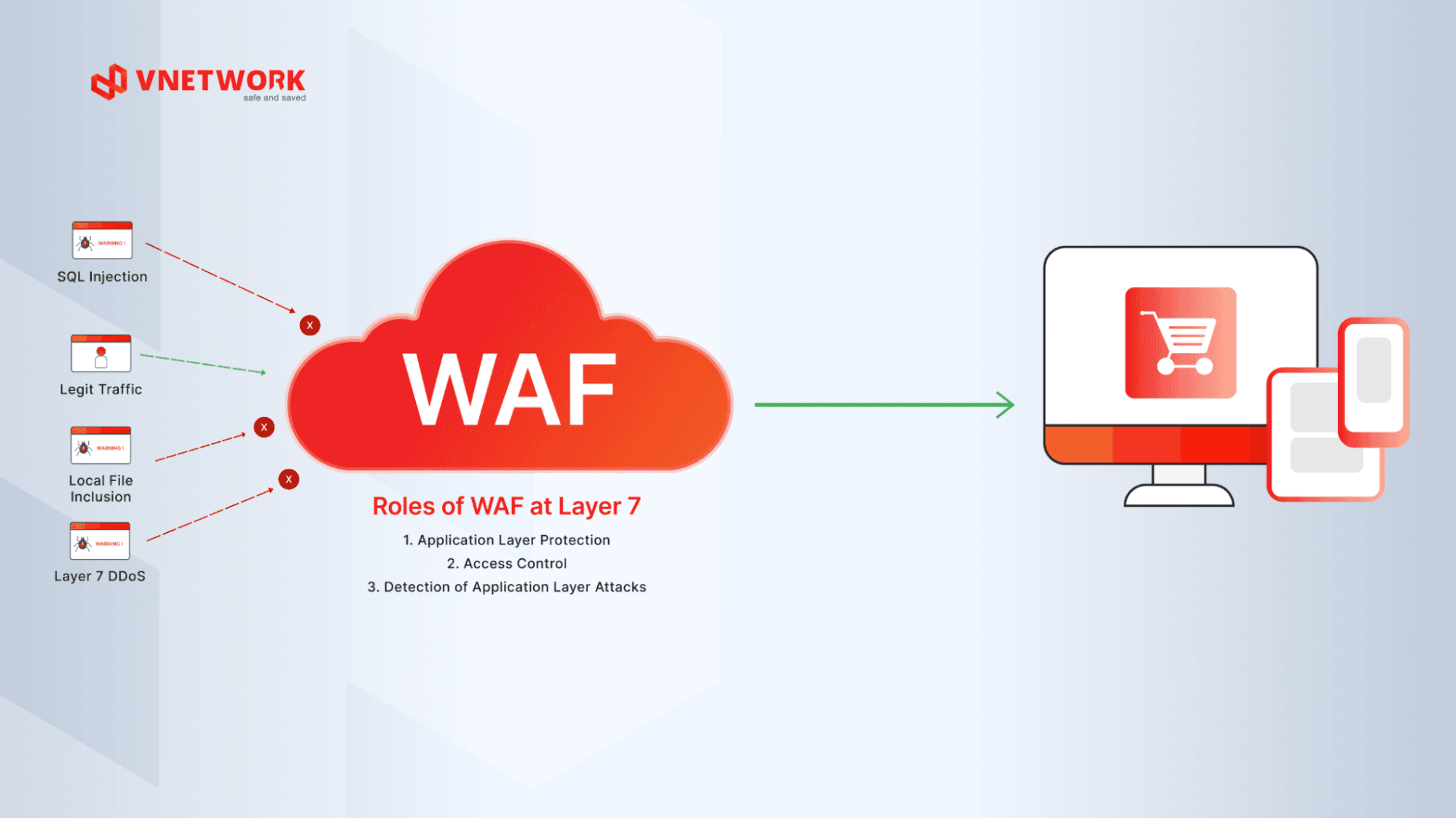
Equip your website with an application-layer shield today with WAF Free from VNETWORK, set up in minutes, completely free, and requiring no dedicated team.
Button;Try It Now;https://partner.vnetwork.vn/?utm_source=google&utm_medium=blog&utm_campaign=waf_free&utm_term=baomathosting;_blank
Admin accounts are always a prime target for brute-force password-guessing attacks. Administrators should enforce strong password policies, enable multi-factor authentication (MFA/2FA), and limit failed login attempts. Apply user permissions based on the principle of least privilege, granting only the access each role actually needs and never sharing accounts. For VPS or dedicated servers, disable root login, prioritize SSH key authentication, and use SFTP for secure file transfers.
Hosting providers are responsible for protecting the infrastructure and services within their scope of management, areas administrators can rarely intervene in directly. The five measures below are the provider's part of the job.
A Distributed Denial-of-Service (DDoS) attack can cripple a system in a short amount of time through a sudden surge of fake traffic. A reliable hosting provider needs built-in Anti-DDoS mechanisms to automatically detect and filter out junk traffic, reducing the risk of server overload. Businesses should verify the provider's actual DDoS absorption capacity and check whether the feature is enabled by default or only available on premium plans.
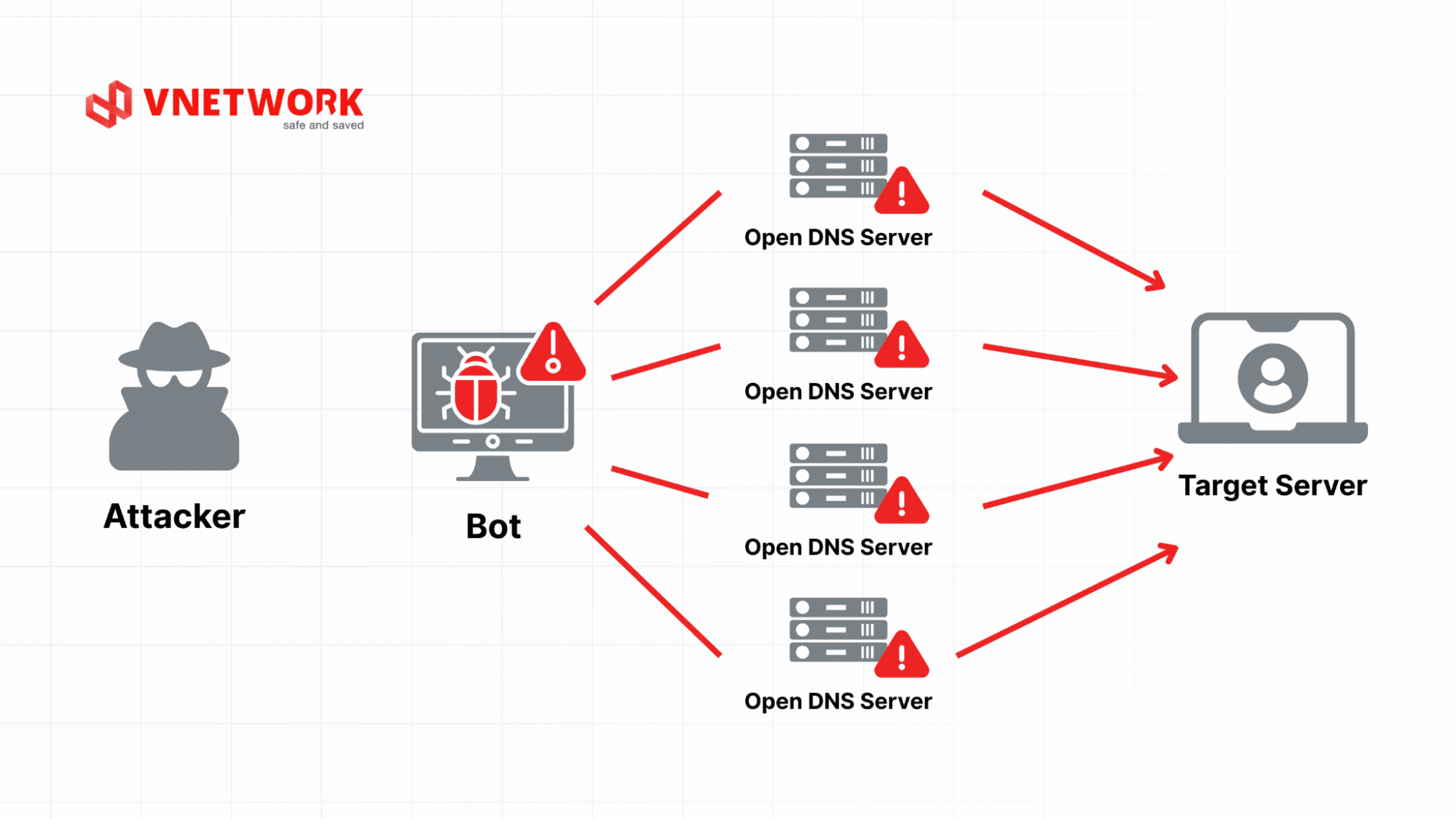
Providers must operate a network firewall to tightly control connections in and out of their server clusters and block suspicious traffic sources. At the same time, the entire infrastructure needs continuous, real-time monitoring to catch early signs of unusual activity. Businesses should favor providers with clear SLA commitments on uptime and a fast incident response process.
Server infrastructure should run in data centers that meet appropriate infrastructure and information security standards, such as Tier III certification or ISO 27001. Data centers should also have physical safeguards in place, including card or biometric access control, 24/7 surveillance cameras, dedicated fire suppression systems, and backup power. These measures reduce the risk of unauthorized physical access to server areas, protect storage equipment, and keep the system running during infrastructure-related incidents.

On shared hosting, providers must have partitioning and resource isolation mechanisms in place between customer accounts. This ensures that if a website on the same server is compromised or infected with malware, the incident stays contained and doesn't spread or drain resources from other websites on the same system.
Hosting providers should have an automated backup policy with a clear schedule (daily or weekly), store backup data in a separate server cluster, and be able to execute a fast recovery process when an incident occurs. Response time and 24/7 technical support from the provider's security engineering team are also key criteria that help businesses minimize service disruption.
If you're currently running a website, use the checklist below for a quick review of your current security setup:
| # | Item to Check | Security Standard to Meet |
|---|---|---|
| 1 | HTTPS | SSL/TLS certificate is active and HTTPS redirection is enforced across the entire website. |
| 2 | SSH configuration | Direct root login disabled, password authentication disabled, SSH key authentication only. |
| 3 | Port management | Default-deny policy applied, only the ports actually required by running services are open. |
| 4 | System updates | OS, CMS, plugins, and themes are all running the latest version. |
| 5 | Backups | Website has an automated backup stored off-server and the recovery process has been tested. |
| 6 | Infrastructure DDoS protection | Hosting infrastructure has an Anti-DDoS mechanism that automatically mitigates attack traffic. |
| 7 | Network firewall | A network firewall monitors and blocks suspicious traffic before it reaches the server. |
| 8 | Web application firewall (WAF) | Website is protected by a WAF at the application layer against attacks like SQLi, XSS, and vulnerability-scanning bots. |
| 9 | Monitoring and alerting | System has continuous monitoring in place and sends alerts when abnormal behavior is detected. |
| 10 | Admin account protection | All admin accounts use strong passwords and have multi-factor authentication (MFA) enforced. |
If this checklist shows your website doesn't have a WAF yet, you can add one right away with WAF Free from VNETWORK to block common application-layer attacks like SQLi, XSS, and vulnerability-scanning bots.
Button;Try It Now;https://partner.vnetwork.vn/?utm_source=google&utm_medium=blog&utm_campaign=waf_free&utm_term=baomathosting_checklist;_blank

Not every hosting service offers the same level of security. When choosing one, businesses should check the actual protection mechanisms in place rather than comparing storage, bandwidth, or price alone.
| # | Security Criterion | Why It Matters | Question to Ask the Provider |
|---|---|---|---|
| 1 | Always-on DDoS protection | DDoS attacks strike suddenly and at scale; opt-in activation usually reacts too slowly, easily leading to network congestion and server crashes. | Is DDoS protection enabled by default 24/7? Does it apply to all plans or only premium ones? |
| 2 | Network firewall | Acts as the first filter at the network edge, blocking malicious traffic before it reaches the OS and VPS. | Is the firewall available and configurable by users, or entirely dependent on the network provider? |
| 3 | Admin rights and configuration ability | Lets administrators apply their own security standards (SSH hardening, closing ports, custom firewall rules). | Does the plan grant sufficient admin rights for the business to configure its own required security policies? |
| 4 | Resource isolation (hypervisor/resource isolation) | Prevents a compromised account from reading data or consuming resources belonging to other websites on the same physical infrastructure. | What virtualization technology (e.g., KVM) does the provider use to isolate tenant resources and data? |
| 5 | Data center standards and certifications | Shows the data center is built and operated to meet redundancy, availability, and infrastructure requirements for its stated tier. | Does the provider hold information security certifications (such as ISO 27001) or publish periodic data center audits? |
| 6 | Independent backup policy (backup & recovery) | The key fallback for recovering operations after ransomware, malware, or an admin error. | How often are backups taken? Is backup data stored off-server (object storage), and how long does recovery take? |
| 7 | Dedicated team and incident response capability (24/7 support & SLA) | Ensures the website gets immediate technical support from security engineers during an attack or outage. | Does the provider have a clear SLA on uptime? Is the security incident support team available 24/7/365? |
| 8 | Configuration and system management autonomy | Lets the business fully control software configuration, customize the operating environment, and apply its own security standards without being limited by the provider's defaults. | Does the plan support an unmanaged option, letting the technical team freely install, configure security policies, and update the entire system? |
Don't judge a hosting provider's safety based on a single feature alone. SSL, backups, and firewalls are all important protection layers, but overall effectiveness depends on how well these layers are implemented, monitored, and coordinated with the website's configuration. For VPS or dedicated servers, it's equally important to clearly define which tasks fall to the provider and which fall to the administrator.
If a website is live on the internet, its traffic doesn't come from real visitors alone, it also includes automated requests probing for vulnerabilities and attempting to exploit data. That's why, alongside the hosting security measures covered above, deploying a Web Application Firewall (WAF) is a necessary layer of defense to control and filter all incoming traffic before it reaches your system.
WAF Free is a free web application firewall developed by VNETWORK, giving businesses and website administrators practical security benefits:
Add a web application firewall to your website today with WAF Free, a free solution from VNETWORK, no complex infrastructure or dedicated security team required.
Button;Try It Now;https://partner.vnetwork.vn/?utm_source=google&utm_medium=blog&utm_campaign=waf_free&utm_term=baomathosting;_blank
Hosting security isn't a single, set-it-and-forget-it solution, it's a continuous defense process built on coordination between two groups of responsibility: the provider's infrastructure and the user's own administration. The provider keeps the server and network environment safe, while the administrator needs to actively configure, update, and tightly control the website's data flows. Real security only happens when protective measures on both sides are implemented and coordinated in sync.
To round out a multi-layered protection strategy without added cost or technical complexity, WAF Free from VNETWORK is the ideal starting point for activating an application-layer security shield (Layer 7) right away. Contact VNETWORK's expert team today for advice and to build the right security plan for your system.
1. Does hosting automatically include security?
The level of built-in security depends on the provider and the plan you're using. Some hosting plans come with a firewall, DDoS protection, malware scanning, or backups, though the scope and quality of these features can vary significantly between providers.
2. Which type of hosting is the safest?
No type of hosting is completely safe on its own, safety depends on the provider's security features and how the administrator runs the website. Shared hosting offers less control but is mostly managed by the provider, while VPS and dedicated servers offer more control but also require the administrator to configure things correctly. VPS isn't automatically safer than shared hosting if it's misconfigured.
3. How do shared hosting and VPS differ in terms of security responsibility?
On shared hosting, the provider is primarily responsible for account isolation and shared infrastructure security, and users have little control over server configuration. With VPS, administrators have deeper access to the operating system and therefore bear more responsibility for measures like configuring the software firewall, applying patches, and managing SSH.
4. Is SSL the same as hosting security?
SSL is part of hosting security, but it's not the whole picture. An SSL certificate only encrypts data transmitted between users and the website, while hosting security also covers other layers such as DDoS protection, network firewalls, data backups, and access control at both the infrastructure and application levels.
5. Can a WAF replace hosting security?
A WAF doesn't replace hosting security, it complements it at the application layer. While hosting security focuses on protecting infrastructure, servers, and data, a WAF monitors and filters traffic at the application layer to block attacks like SQL injection or XSS before they reach the website. A WAF also doesn't replace the need to update CMS and plugins, manage accounts, run backups, or harden the server, those measures still need to be maintained in parallel.