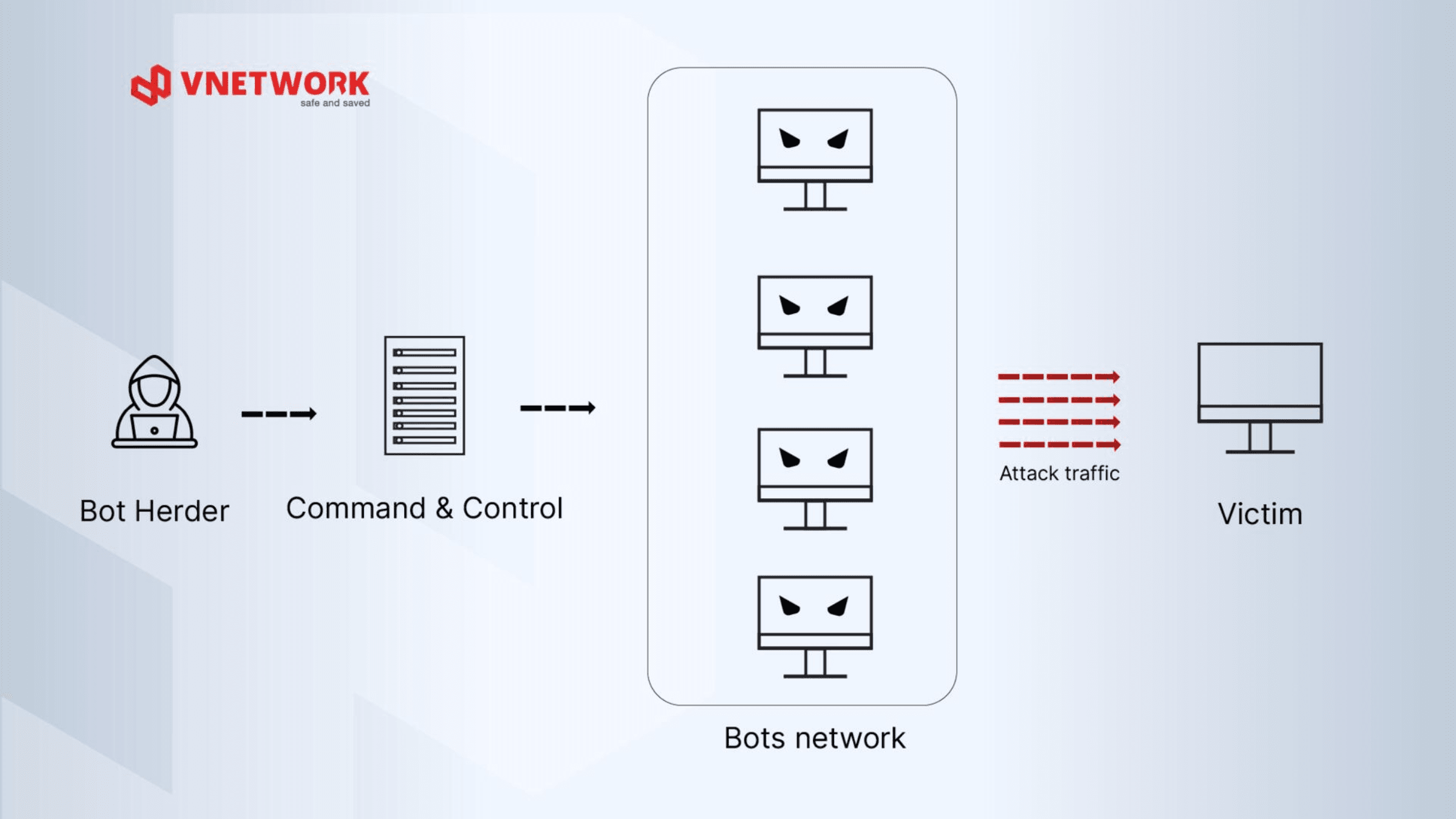
A botnet is a network of internet-connected devices that have been infected with malware and are remotely controlled by hackers, typically without the knowledge of the device owners. Each device in the network is referred to as a "bot" or "zombie," and the entire system can consist of tens of thousands to millions of devices spread across the globe.
To better understand botnet networks, it is important to distinguish between a few core concepts:
Unlike conventional malware that only targets a single device, botnets are distributed and synergistic in nature, meaning attack capability grows exponentially as more bots are added to the network.
The process of building and operating a botnet unfolds across three consecutive stages, from infecting devices to executing attacks.
The first stage is when hackers implant malicious code onto victims' devices. Common infection vectors include:
Once infected, each bot automatically connects to the C&C Server to "register" in the botnet and await commands. This connection is typically concealed within normal network traffic, making detection difficult.
Attackers are increasingly using more sophisticated C&C mechanisms, most notably the peer-to-peer botnet model, where bots communicate with each other rather than relying on a single central server, making it far more difficult to neutralize the botnet.
Once the Bot Herder issues commands, the entire botnet acts in unison. Common behaviors include:
DDoS botnet attacks occur with high frequency and at massive scale. Attackers use a large number of bots to send floods of access requests to a target, pushing the system into an overloaded state, consuming all available bandwidth, and rendering network services inoperable.
DDoS botnets also disrupt enterprise online services, including e-commerce stores, online banking, and mobile applications, degrading the user experience and significantly impacting brand reputation and revenue.
DDoS botnets come in many variants targeting different layers of the OSI model. Understanding each attack type helps organizations select the right defensive solution.
This attack exploits the three-way handshake mechanism of the TCP protocol. Bots continuously send SYN packets to the server but never complete the final acknowledgment step, forcing the server to keep thousands of half-open connections in memory until resources are completely exhausted.
Bots send a large volume of UDP packets to random ports on the target server. The server must constantly check whether any application is listening on each port, consuming all bandwidth and processing capacity until the system can no longer respond.
This is the most complex attack method because bots simulate real user behavior, sending valid HTTP Flood GET or POST requests to the web application. The spidering variant automatically crawls and follows internal links, generating an enormous load at Layer 7 that conventional firewalls struggle to filter.
When attacked by a botnet network, businesses face serious consequences across multiple dimensions.
Early botnet detection is a critical factor in minimizing damage. Initial signs are often subtle and easy to overlook without a systematic monitoring process.
Common warning signs to watch for:
The following are technical checks that can be performed directly within an enterprise environment:
Defending against botnets requires a multi-layered strategy that combines technology with rigorous operational processes. Below are four core solution categories.
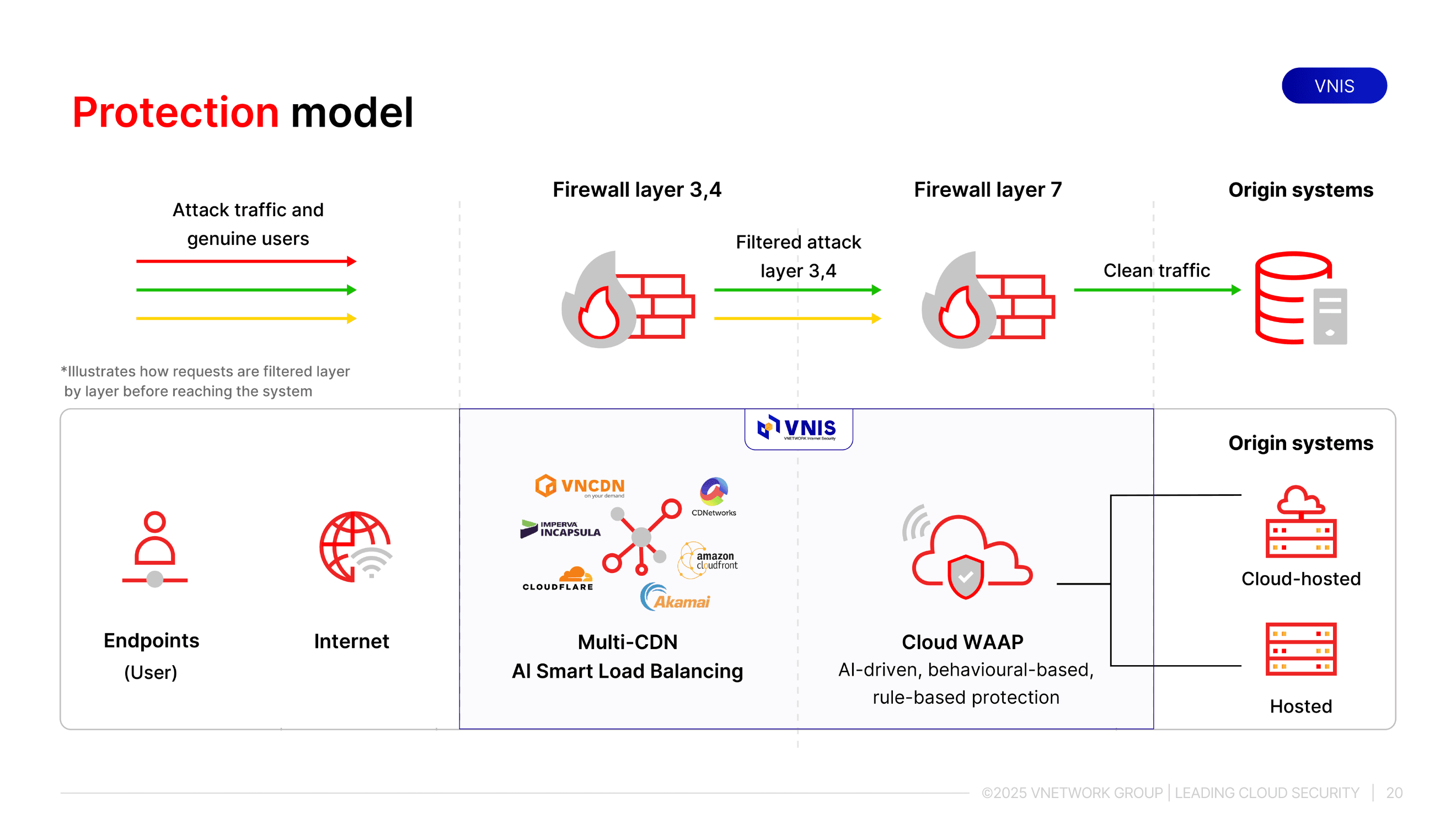
Firewalls serve as the first filtering layer, controlling all incoming and outgoing network traffic based on predefined rules. When integrated with a next-generation WAF, the system can identify and block abnormal traffic patterns characteristic of botnets.
IDS monitors and alerts when intrusion signs are detected, while IPS goes one step further by automatically intervening and blocking attacks immediately without waiting for a manual response from the technical team.
For application-layer botnet attacks such as HTTP Flood, WAAP combines WAF, API protection, bot mitigation, and DDoS defense into a unified platform, enabling precise differentiation between real users and automated bots.
In addition to blocking SQL injection and XSS attacks, WAAP continuously updates its detection of new botnet attack vectors, including variants that use artificial intelligence to evade detection.
Deploying a CDN distributes attack traffic across multiple Points of Presence (PoPs) worldwide instead of concentrating it all on the origin server. When a botnet strikes, the CDN absorbs and handles the bulk of traffic at the PoPs closest to the attack source, protecting the origin server from overload.
Establishing a continuous monitoring system allows the technical team to detect anomalies early before they escalate into serious incidents. Key indicators to monitor include sudden traffic spikes from a specific IP range, abnormal request rates to a particular endpoint, and outbound connections to unidentified addresses.
VNIS (VNETWORK Internet Security) is VNETWORK's website security platform, built to help businesses proactively defend against cybersecurity threats, including multi-layer DDoS botnet attacks from Layer 3/4 to Layer 7.
Beyond its security capabilities, VNIS also maintains website and application speed and stability even under high-traffic conditions. The solution operates on a global infrastructure with 2,300+ PoPs across 146+ countries, capable of handling traffic up to 2,600 Tbps and more than 10 billion requests per day. With 2,400+ active security rule sets, VNIS currently protects 400,000+ websites, applications, and APIs, keeping systems ready to withstand large-scale DDoS attacks.
Botnets are a sophisticated and dangerous threat due to their distributed nature, difficulty of detection, and capacity to cause harm across multiple dimensions simultaneously. Understanding what a botnet is, mastering how to identify signs of infection, and deploying appropriate layers of defense are the foundations for businesses to protect their systems sustainably.
For organizations with critical web infrastructure or online services that require high uptime, an integrated solution like VNIS simplifies the entire defense process and proactively blocks botnets before damage occurs. Contact VNETWORK via Hotline (028) 7306 8789 or email contact@vnetwork.vn for tailored advice based on your organization's scale and infrastructure.
A regular virus typically operates independently on the infected device, while a bot is malware specifically designed to connect to a central server and operate under the coordination of a hacker. This allows bots to receive commands and execute different behaviors over time, without being limited to a single fixed objective like a conventional virus.
Yes. IoT devices such as IP cameras, routers, and smart TVs are common botnet targets because they often run outdated firmware, use default passwords, and receive infrequent security updates. Businesses should change default passwords and regularly update firmware for all IoT devices on their networks.
Yes. Small and medium-sized businesses are often easier targets because their security infrastructure is more limited, while customer data and financial assets remain valuable resources for attackers. Additionally, devices on small business networks can be conscripted as bots to attack larger targets.
Completely dismantling a large botnet network is extremely difficult because bots are distributed across multiple countries and C&C Servers change frequently. For businesses, the more practical goal is building sufficiently strong defenses to avoid becoming a victim or becoming part of a botnet.
VNIS combines Cloud WAF, AI Load Balancing, and a global multi-CDN network to detect and block DDoS botnet attacks in real time. When anomalous botnet traffic is detected, the system automatically distributes traffic across CDNs in the alliance, absorbing the entire attack volume before it reaches the business's origin server.