
Cloud storage is a method of storing and managing data on remote servers that are accessed over the internet. Instead of being limited to local hard drives, personal computers, or on-premises servers, users and enterprises can store, retrieve, and manage data from any location with an internet connection.
Before cloud storage became widespread, data could only be accessed from a fixed physical location much like using a landline phone that only works at home. With cloud storage, data becomes as mobile as a smartphone: available anytime, anywhere, and across multiple devices. It frees users from expensive, space-constrained hardware while providing 24/7 access without carrying physical devices.
At its core, cloud storage operates in a three-stage flow: uploading data, distributed storage, and retrieval when needed. Each stage has its own security layers and optimization mechanisms.
In today’s fast-paced digital transformation, simply having enough storage is no longer sufficient. Flexibility, security, and cost efficiency are equally critical. Cloud storage delivers all of these in one comprehensive solution.

Cloud storage allows businesses to increase or decrease storage capacity based on actual needs without investing in new hardware or interrupting operations. The pay-as-you-go billing model helps businesses control costs effectively, particularly during periods of rapid growth or peak business seasons when storage demand spikes.
With traditional storage infrastructure, expanding capacity means purchasing new equipment, planning installation, and accepting lead times. Cloud storage eliminates this cycle entirely: businesses adjust capacity within minutes from the management console.
Cloud storage automatically backs up data across multiple geographic regions, helping businesses minimize the risk of data loss due to hardware failure, natural disasters, or data center incidents. RPO (Recovery Point Objective) and RTO (Recovery Time Objective) metrics are significantly shorter than traditional backup solutions, enabling business operations to recover quickly after an incident.
Additionally, cloud computing security on modern platforms integrates multi-layer encryption, IAM (Identity and Access Management) access control, and audit logs that help businesses detect and address abnormal access in a timely manner.
Cloud storage enables employees to access their work data from any device and any location, as long as they have an internet connection. With hybrid and remote work models becoming increasingly prevalent, this capability is a critical factor in maintaining organizational productivity and flexibility.
Moreover, cloud storage supports real-time collaboration: multiple team members can simultaneously access, edit, and synchronize documents without version conflicts, eliminating the confusion and version-control issues caused by emailing files back and forth.
Rather than committing large upfront capital expenditure (CapEx) to physical storage equipment, businesses shift to a predictable and controllable operating expenditure (OpEx) model. Operational costs, equipment maintenance, and dedicated IT staffing are significantly reduced when the service provider assumes full responsibility for the infrastructure.
In the cloud storage environment, data is organized and managed according to various models depending on usage requirements. The three most common storage types today are File Storage, Block Storage, and Object Storage, each suited to different needs and data scales.
File storage in the cloud provides a familiar directory-structured storage interface, supporting NFS and SMB protocols for file sharing within internal networks. This type is well-suited for collaborative work environments where multiple users simultaneously access and edit shared documents.
Organizations that need to share internal documents, manage group projects, or maintain data repositories for accounting and HR departments often prioritize file storage for its user-friendly nature and ability to set granular access permissions per folder.
Block storage functions similarly to a virtual disk, allocating data in fixed-size blocks and mounting directly to virtual machines (VMs) or containers as a physical drive. With low latency and high I/O throughput, block storage is the appropriate choice for database systems (MySQL, PostgreSQL, MongoDB), enterprise applications requiring fast processing, and software development environments.
Block storage is typically integrated directly into the overall cloud computing platform, allowing businesses to attach additional storage capacity to existing virtual servers without requiring a system restart.
Object storage is the most prevalent cloud storage type today, particularly well-suited for storing large-scale unstructured data such as images, videos, backup files, system logs, and Big Data. Each data file is stored as an independent "object" accompanied by descriptive metadata (file type, size, creation time, etc.) and a unique key for identification.
Unlike traditional file storage, object storage does not require a rigid directory structure. Data can be distributed across multiple nodes and retrieved quickly through key-based identification. This type is suitable for e-commerce applications that need to store product catalogs, media platforms requiring video and image repositories, or automated data backup systems.
One of the biggest concerns when migrating to cloud storage is data security. Reputable cloud storage providers implement multiple layers of protection to ensure data is never lost, corrupted, or accessed without authorization.
Moreover, providers like VNCDN integrate a Content Delivery Network (CDN) that not only accelerates data delivery and reduces latency but also shields origin servers from direct attacks.
When choosing a trusted provider and following best practices, cloud storage is not only flexible but also one of the safest data storage methods available today.
Cloud storage is not merely a place to store data; it is the core infrastructure that enables businesses to operate smoothly, flexibly, and securely in the digital age. It delivers optimal solutions across all industries through its capabilities for processing large datasets, rapid content delivery, and high-level security.
From e-commerce and online education to IoT solutions, cloud storage is a flexible, secure, and effective solution for any enterprise on the journey of digital transformation and sustainable growth.
To select the right cloud storage solution, businesses need to carefully consider the following criteria:
VNETWORK Cloud Storage is built on internationally certified data center infrastructure, serving organizations across e-commerce, fintech, online entertainment, and government digital services with requirements for continuous operation and high security. With over 500 customers domestically and internationally, hands-on deployment experience across multiple industries enables VNETWORK to understand each specific storage challenge, from optimizing egress costs to ensuring compliance with data storage regulations within Vietnamese territory
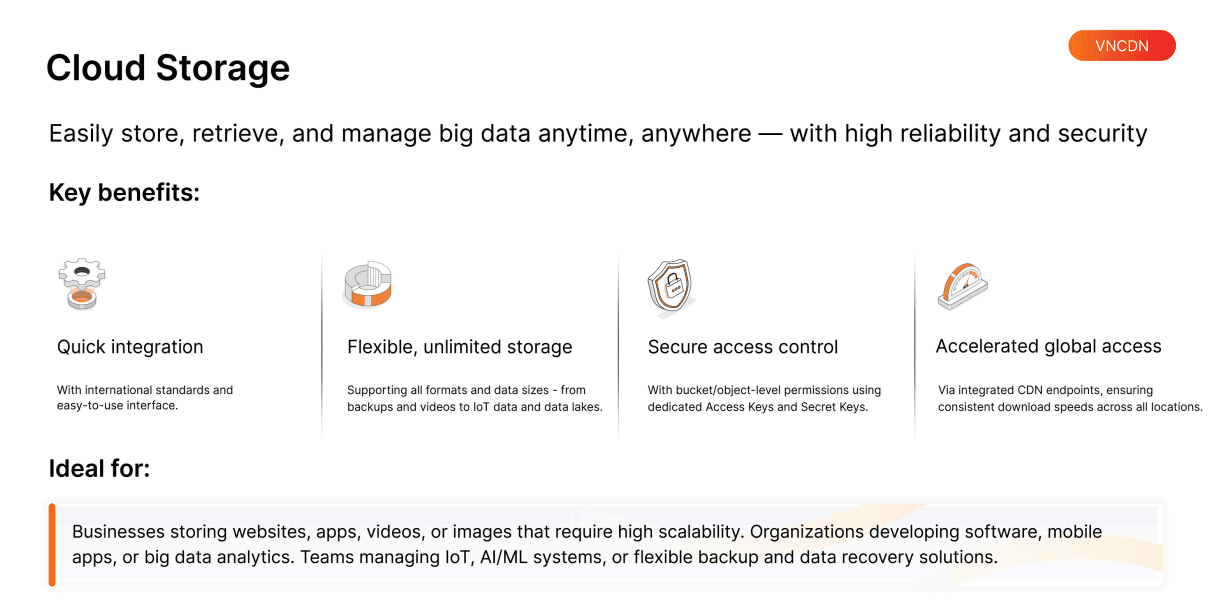
VNETWORK's S3 Cloud Storage solution is designed for immediate deployment, with international standard compatibility and full support for familiar protocols. Businesses can connect, manage, and operate within just a few steps without requiring significant technical resources.
The system supports all data types including backups, video, images, system logs, IoT device data, and data lakes. Capacity can be expanded without limitation based on actual needs, enabling businesses to operate continuously without worrying about overload or costly hardware upgrades.
Each storage bucket and data object is protected by granular permission mechanisms, combined with distinct Access Key and Secret Key credentials. This enables businesses to maintain strict control over who is authorized to view, download, or modify data, minimizing the risk of unauthorized access.
Beyond data storage, VNETWORK's S3 Cloud Storage is natively integrated with a CDN (Content Delivery Network) directly at the retrieval endpoint. As a result, data is distributed rapidly to all geographic regions, maintaining consistent speeds even during traffic spikes.
Furthermore, VNCDN provides global distribution infrastructure with over 2,300 PoPs (Points of Presence) across 146 countries and international bandwidth exceeding 200+ Tbps. The system supports low-latency streaming, cost optimization, effective access control, and full API integration with HTTP/3 & QUIC, Origin Shield, and a multi-CDN model. The entire system is monitored 24/7 by a dedicated SOC expert team, ensuring stable and fully secure operations.
Leveraging this robust platform, businesses can publish online content effortlessly, grow e-commerce operations, deploy smooth OTT services, run secure fintech solutions, and advance online education. VNCDN also helps accelerate websites and improve user experiences.
Cloud storage is the modern solution that helps enterprises manage large-scale data securely, quickly, and flexibly. With powerful features and full support from VNETWORK’s VNCDN platform, businesses can enhance operational efficiency, reduce costs, and deliver superior user experiences worldwide.
Investing in cloud storage today is a strategic move that positions enterprises for success in digital transformation and global integration.
Cloud storage is a method of storing data on remote servers accessible via the internet, allowing enterprises to store, share, and manage data anytime, anywhere.
Enterprises that need to store websites, videos, applications, IoT data, AI/machine learning workloads, e-commerce platforms, or require flexible backup and disaster recovery.
Access from anywhere, instant scalability, high security, rapid disaster recovery, and significant operational cost savings.
Yes, absolutely, when used correctly. Data is protected by multiple layers including encryption, granular access controls, and redundant storage across geographically distributed servers. This ensures data remains safe even if one server fails and minimizes risks of unauthorized access.
VNCDN offers S3-compatible cloud storage with integrated global CDN, multi-CDN, Origin Shield, HTTP/3 & QUIC, full API support, VNIS security, website acceleration, and low-latency worldwide content delivery.