Kubernetes, also known as K8s, is an open-source platform that automates the deployment, scaling, and management of containerized applications. Originally developed by Google based on its internal large-scale infrastructure experience, the project was later donated to the Cloud Native Computing Foundation (CNCF) for ongoing maintenance.
If cloud computing is the environment where infrastructure runs, Kubernetes is the orchestration layer on top, automatically deciding where each container runs, when additional resources are needed, and how to handle failures, all without manual intervention.
Kubernetes is organized as a cluster model with two main layers: the Control Plane, which handles orchestration, and Worker Nodes, which run the actual applications.
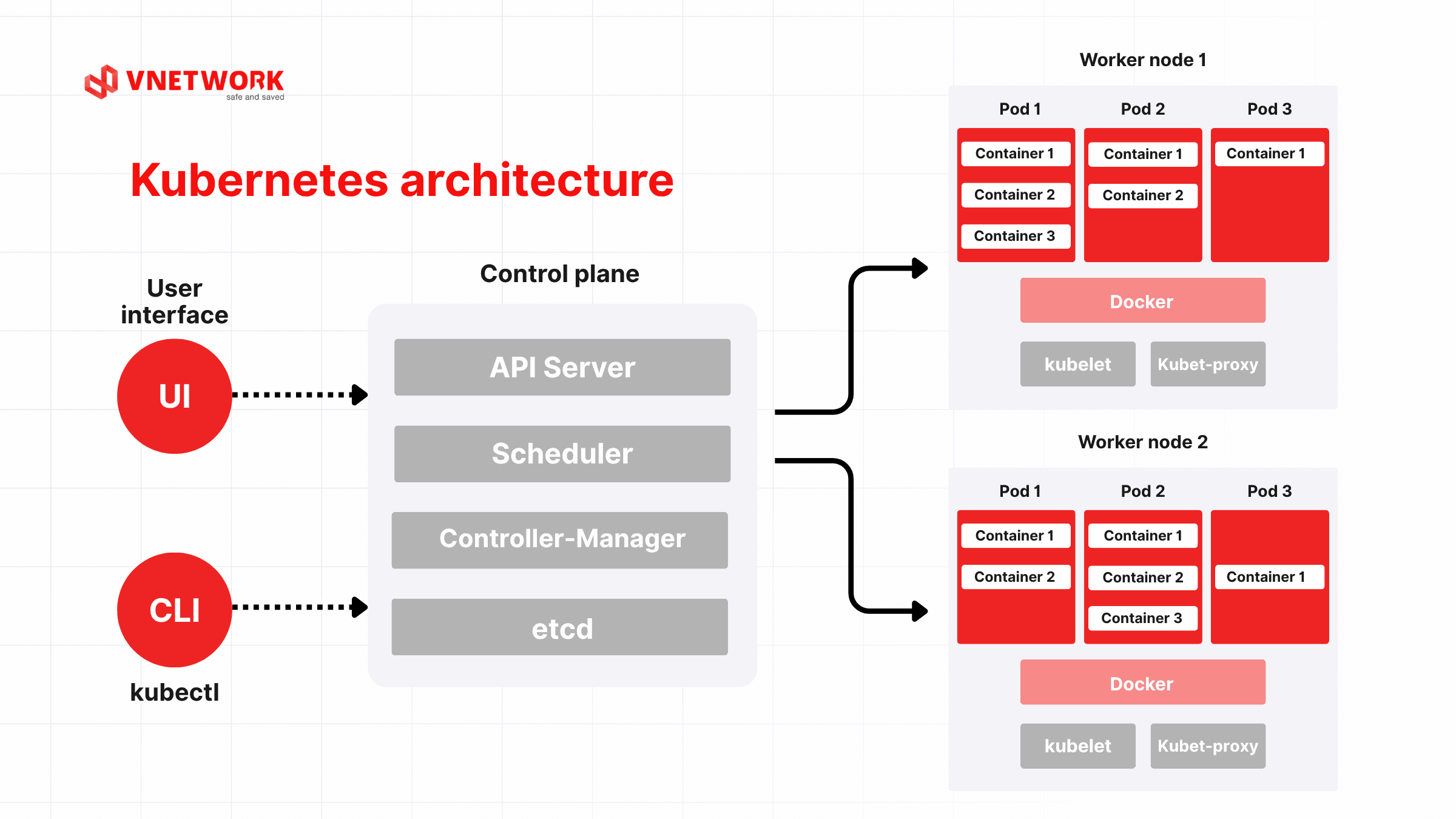
The Control Plane is the management core of a K8s cluster. It is responsible for resource allocation decisions, container deployment scheduling, and incident handling across the entire cluster.
The Control Plane consists of four main components:
Worker Nodes are the servers (physical or virtual) where applications actually run. Each Node contains multiple Pods, the smallest deployable unit in Kubernetes. A Pod typically holds one container, and containers within the same Pod share a network address and storage resources.
Kubernetes continuously monitors the state of each Pod. When it detects a Pod is not functioning normally, the system automatically creates a replacement Pod without any manual intervention. This self-healing mechanism significantly reduces downtime in continuously operating systems.
| Component | Layer | Primary role |
| API Server | Control Plane | Communication gateway, receives all control commands |
| Scheduler | Control Plane | Assigns containers to Worker Nodes |
| Controller Manager | Control Plane | Continuous monitoring, auto-corrects deviations |
| etcd | Control Plane | Distributed database storing full cluster state |
| Worker Node | Data Plane | Physical/virtual servers where applications run |
| Pod | Data Plane | Smallest unit, holds one or a few containers |
Kubernetes handles repetitive operational tasks automatically: restarting containers on failure, redistributing load when a Node is overwhelmed, and adjusting load balancing in real time. IT teams can focus on product development instead of responding to manual infrastructure incidents.
Kubernetes supports horizontal scaling and auto-scaling based on CPU load, memory usage, or custom metrics. When traffic spikes, the system automatically scales up the number of Pods. When load decreases, resources are automatically reclaimed, allowing enterprises to optimize infrastructure costs rather than maintaining fixed capacity for peak scenarios.
Kubernetes monitors the state of each Pod continuously. When a container becomes unresponsive, it restarts it or shifts workloads to another Node within seconds. Rolling updates allow a new version to be deployed alongside the old one, gradually shifting traffic only after stability is confirmed. End users experience no interruption throughout the process.
Kubernetes not only runs applications but also helps control who can do what within the system. RBAC (Role-Based Access Control) restricts access at the component level, Network Policy governs traffic flows between namespaces, and each container is isolated by default. Combined with specialized security solutions, enterprises can protect container workloads against DDoS attacks, ransomware, and advanced threats through a layered defense approach.
Docker and Kubernetes are often mistaken for competing technologies, but they serve two distinct purposes within the same ecosystem.
Docker is a tool for packaging applications into container images and running them on a single machine. Kubernetes is an orchestration system that manages hundreds or thousands of containers across multiple servers simultaneously, with built-in self-healing, auto-scaling, and rolling update capabilities. In practice, Docker is typically used to build container images while Kubernetes handles running them at production scale.
| Criteria | Docker | Kubernetes |
| Core function | Package and run containers | Orchestrate and manage multiple containers |
| Suitable scale | A few containers on one machine | Hundreds to thousands of containers across multiple machines |
| Self-healing | Not built-in | Auto-recreates containers on failure |
| Load balancing | Manual configuration required | Built-in, automatic |
| Scaling | Manual | Auto-scaling based on real-time load |
| When to use | Individual dev, test environments | Production, enterprise systems |
Most enterprises use both in parallel within a modern IaaS, PaaS, and SaaS ecosystem: Docker handles packaging, Kubernetes handles operations.
Kubernetes delivers the most value when deployed at the right time. However, adopting K8s before the scale truly demands it adds unnecessary complexity and operational overhead.
In the early stages, starting with a VPS or bare metal server is the more appropriate choice in terms of cost and complexity. Kubernetes is the logical next step when the scale genuinely demands it.
During major sales events or peak transaction hours, traffic can surge well above normal levels. With fixed infrastructure, servers risk overloading at precisely the moment demand is highest. Kubernetes detects the load increase and automatically scales up the number of processing Pods within minutes, with no manual intervention. Once the peak subsides, resources are reclaimed automatically, avoiding unnecessary operational costs.
Software development teams need to ship new features continuously without causing service disruptions. Kubernetes supports rolling updates: the new version is deployed gradually, running alongside the existing version. If the new version contains a bug, the system automatically rolls back to the last stable state without affecting end users.
Kubernetes allows organizations to start with a small K8s cluster on a data center or cloud, then expand to tens of Nodes without redesigning the architecture. Applications run consistently whether the cluster has 3 or 300 Nodes, enabling enterprises to build the right technical foundation from the start rather than rebuilding it when they hit the next growth threshold.
Before deployment, clearly define which applications will run on the K8s cluster, whether the current infrastructure is suitable, and how many Nodes the cluster needs to handle actual workloads. Getting the architecture right from the start avoids having to overhaul everything after deployment is already underway.
Install the Control Plane and Worker Node components, configure networking so Pods can communicate with each other, set up persistent storage for applications that require data retention, and package applications into properly structured container images. This step demands the highest level of technical expertise and is the most common source of configuration errors for teams unfamiliar with K8s environments.
A production K8s cluster without proper security is a serious risk. Configure RBAC to control access rights, integrate a firewall and intrusion detection systems at the network layer, encrypt internal communication between components, and enforce Network Policies to restrict traffic flows between namespaces. Security must be embedded from the beginning, not patched in after an incident occurs.
Once the cluster is live, establish a monitoring system to track Pod performance, Node resource utilization, and application health in real time. Monitoring data provides the basis for fine-tuning auto-scaling configurations, detecting bottlenecks early, and scheduling Kubernetes version upgrades at the right time.
VCLOUD is the cloud computing platform of VNETWORK, built to meet the flexible, secure, and high-performance digital infrastructure needs of enterprises. With VCLOUD, organizations can easily deploy, operate, and scale K8s clusters without worrying about the underlying infrastructure.
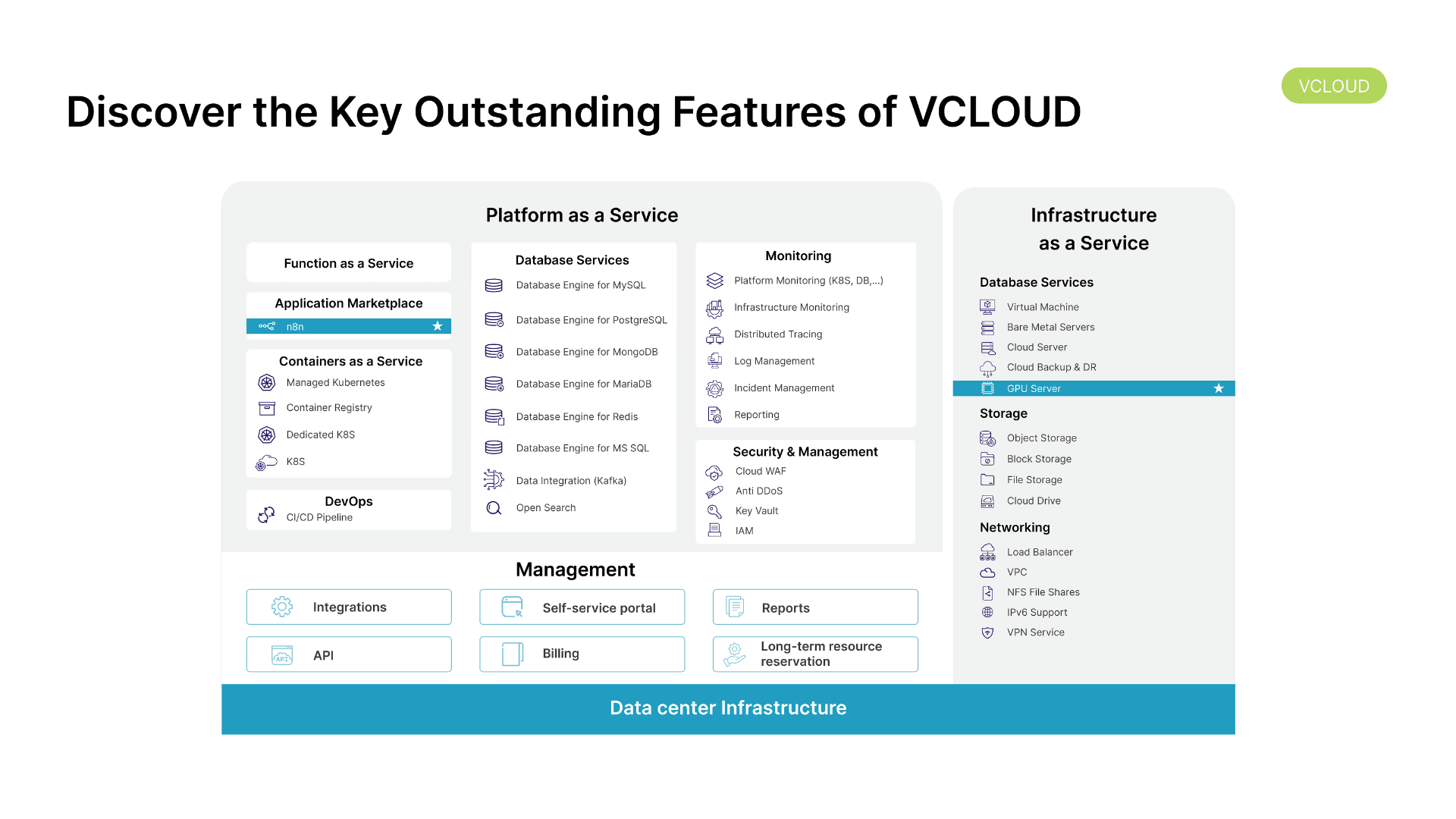
VCLOUD provides a full suite of Containers as a Service, including Managed Kubernetes, Container Registry, Dedicated K8s, and K8s, giving enterprises the flexibility to choose the deployment model that best fits their scale and technical requirements.
Kubernetes is open-source technology and any enterprise can self-deploy it. What makes the real difference is not whether K8s is used, but whether the underlying infrastructure is reliable enough to let Kubernetes perform to its full potential. A K8s cluster running on an unstable platform can still fail, lack security, and struggle to scale at the right moment. For enterprises investing seriously in infrastructure, VCLOUD provides a production-ready environment with Kubernetes built in, so K8s operates as it was designed to: stable, automated, and ready to scale on demand. That is the foundation for the digital transformation journey of Vietnamese enterprises to go further and last longer.
Kubernetes (K8s) is an open-source platform that automates the deployment, scaling, and management of containerized applications. Originally developed by Google and now maintained by the CNCF, Kubernetes solves the challenge of running hundreds or thousands of containers simultaneously, handling it automatically without requiring manual intervention from IT teams.
Docker is a tool for packaging applications into containers and running them on a single machine. Kubernetes is an orchestration system that manages multiple containers across multiple servers, with built-in self-healing, auto-scaling, and rolling update capabilities. The two technologies are complementary: Docker creates containers, Kubernetes runs them at scale.
A K8s cluster is a collection of servers that work together under the coordination of the Control Plane. A cluster consists of one or more Control Planes responsible for management and multiple Worker Nodes responsible for running actual applications. Scale can range from 3 Nodes for a startup to thousands of Nodes for large enterprise systems.
Not necessarily. Kubernetes delivers the most value when an enterprise is managing many containers, requires auto-scaling, or is doing continuous deployment. If the application is still straightforward and the engineering team is not yet familiar with containers, starting with a standard VPS or cloud setup is more practical. Kubernetes is the next step when scale and complexity genuinely call for it.
Kubernetes includes several built-in security mechanisms such as RBAC, namespace isolation, and Network Policy, which provide better access control and application isolation compared to traditional infrastructure. That said, how secure a deployment actually is depends heavily on configuration and operations. To fully protect a K8s cluster, enterprises should also integrate specialized security solutions at the network and application layers.