A website security vulnerability is a weakness in the source code, server configuration, third-party libraries, or operational processes of a website that allows an attacker to gain unauthorized access, steal data, or damage the system. A vulnerability differs from an attack in that a vulnerability is a latent weakness, while an attack is the actual act of exploiting that weakness.
A website can carry a security vulnerability for months, even years, without being discovered if there is no periodic review process in place. What makes this even more concerning is that the concept of a website security vulnerability is not fixed. Every time new technology, a new framework, or a new library comes into use, the risk of new vulnerabilities emerging increases accordingly.
Because of this constantly shifting nature, businesses cannot treat security as a one-time task. This is why international security organizations such as OWASP continuously update their list of the most common web security flaws for each period, so the technology community can stay ahead of the risk.
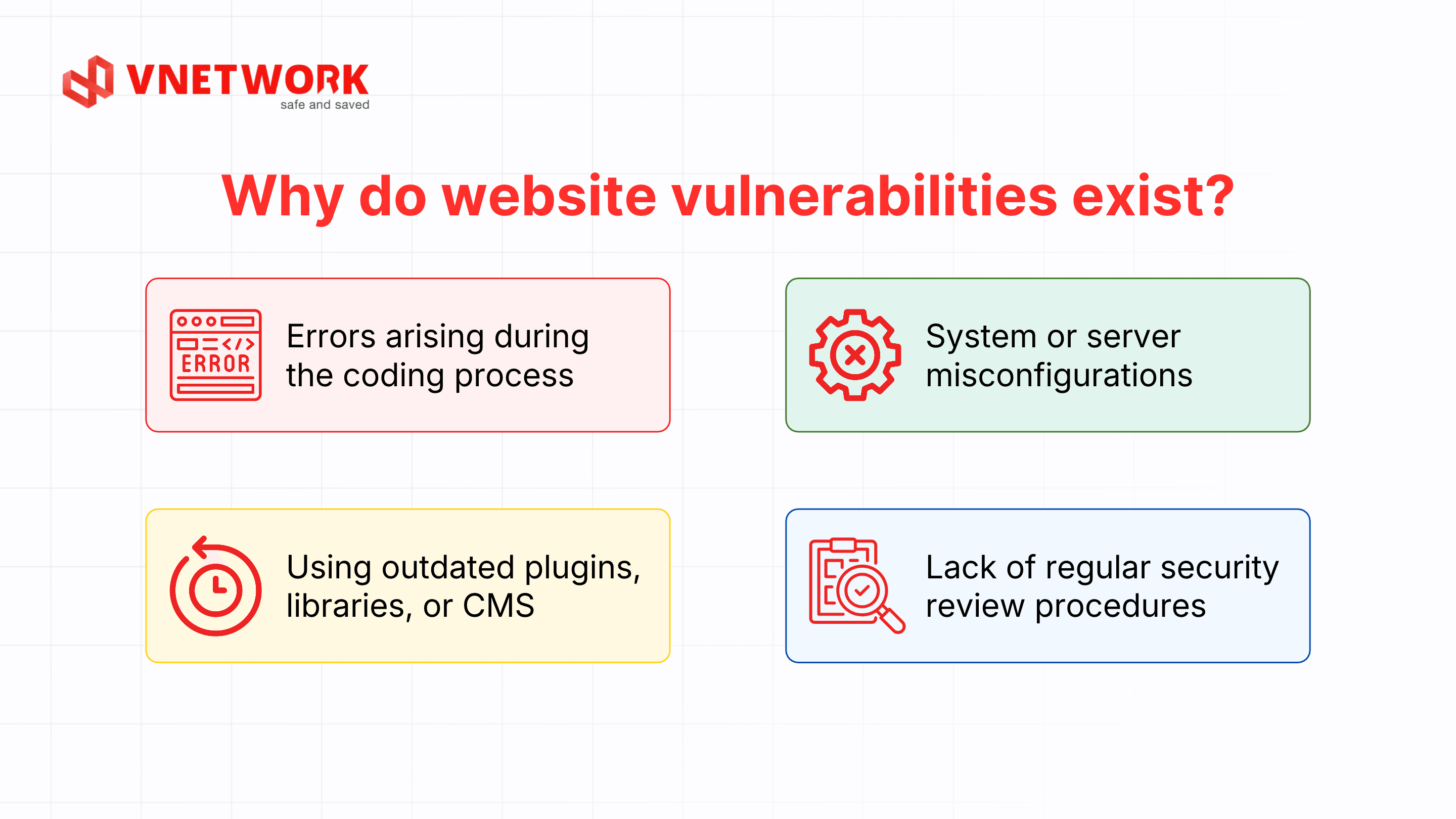
No system is completely safe. Even major technology platforms with dedicated security teams regularly release patches for serious flaws. Below are the four most common reasons websites end up with security vulnerabilities.
Developers handle thousands of lines of code while building a website, and user input is not always checked, filtered, and validated thoroughly before it is processed. When an input field accepts any character without restricting its format, an attacker can exploit it to inject malicious code into the system. Pressure to launch a product on time also leads many development teams to skip security testing before deployment.
Web servers, databases, and related services typically have a large number of configuration options, and just one incorrect setting can open the door to an attacker. Common misconfigurations include leaving debug mode enabled in production, exposing directory listings, failing to change default admin passwords, or running unnecessary services. These flaws usually don't require sophisticated attack techniques; an attacker only needs an automated scan to find them.
Many websites today are built on popular content management systems (CMS), along with a wide range of third-party plugins and open-source libraries. When a component in this ecosystem isn't updated to its latest version, previously disclosed vulnerabilities become the easiest targets to exploit. Attackers often scan large numbers of websites to find systems still running outdated versions, then apply readily available exploitation tools to break in.
Many businesses, especially small and medium ones, implement security only once when the website launches and never revisit it throughout operation. Meanwhile, the system keeps changing through feature updates, new modules, or shifts in data structure, and every change can unintentionally introduce a new vulnerability. Without a regular review process, a business has no way of knowing how secure its website really is.
OWASP has compiled a list of the most common and dangerous vulnerability types that websites typically face. If you want a full rundown of all 10 vulnerability types under this international standard, you can check the article Top 10 OWASP. In this article, we'll cover the three most common groups of vulnerabilities that any website is at risk of encountering.
SQL Injection occurs when an attacker inserts malicious SQL query statements into a website's input fields, taking advantage of input data that isn't properly filtered before being passed to the database. If successfully exploited, an attacker can read, modify, or delete all data in the system, and even take control of the server. This is one of the most damaging types of web security flaws because it directly affects all operational data.
To get a clearer picture of how dangerous SQL injection can be and how effective a web application firewall is at blocking it, you can watch the demo video below, showing an attack before and after WAF Free is deployed.
<iframe width="853" height="480" src="https://www.youtube.com/embed/owT683hGQ1E" title="What Is SQL Injection? Live Attack Demo & How to Prevent It | VNETWORK" frameborder="0" allow="accelerometer; autoplay; clipboard-write; encrypted-media; gyroscope; picture-in-picture; web-share" referrerpolicy="strict-origin-when-cross-origin" allowfullscreen></iframe>
Within just a few minutes of setup, WAF Free was able to stop this type of attack right at the application layer, before the malicious query ever reached the database. Businesses don't need a dedicated security team or complex infrastructure to start protecting their website today.
Button;Try it now;https://partner.vnetwork.vn/?utm_source=google&utm_medium=blog&utm_campaign=waf_free&utm_term=lohongbaomatwebsitelagi;_blank
XSS is a type of attack in which an attacker injects malicious JavaScript code into a website, causing it to execute directly in the browser of other users when they visit the page. Common consequences of XSS include stealing session cookies, hijacking account access, or redirecting users to other malicious websites. Because this vulnerability directly affects the end-user experience, it's often detected later than attacks that target the server.
CSRF is a technique that tricks the browser of a logged-in user into performing an unintended action on a website they trust, such as transferring money or changing account information. The attacker doesn't need to know the victim's password; they just take advantage of the victim's active login session to forge a request. This type of vulnerability is especially dangerous for websites with financial transaction or administrative functions.
Besides the three types above, the OWASP list also records many other dangerous types, such as broken access control, security misconfiguration, use of components with known vulnerabilities, or authentication failures. Each of these vulnerability types has its own exploitation mechanism and countermeasures, covered in detail in the Top 10 OWASP article mentioned above. Understanding these vulnerability groups fully helps a business build a comprehensive security strategy instead of focusing on just a few isolated weaknesses.
When a website security vulnerability is successfully exploited, the consequences go far beyond temporary data loss. Customer data, payment information, or internal documents can be stolen and sold on underground forums, leading to widespread data breach risk. In many serious cases, hackers also install ransomware to encrypt all the data and demand a ransom.
A hacked website often also has to go offline while the incident is being resolved, disrupting business and directly affecting revenue. For e-commerce businesses or online service providers, every hour a website is down means losing a significant number of potential customers.
Beyond the direct financial damage, brand reputation also suffers heavily once news of the security incident spreads. Customers tend to lose trust and switch to a competitor's service if they feel their personal data isn't being protected safely. In addition, businesses face legal risk if a customer's personal data is leaked, especially as regulations such as the Personal Data Protection Law are increasingly tightened in Vietnam.
In many cases, a website that's been exploited through a security vulnerability shows no clear signs right away; instead, it only reveals itself through small anomalies during operation. Recognizing these signs early helps businesses intervene before the damage spreads.
If a website shows one or more of the signs above, the business needs to run a security check immediately rather than wait for a more serious incident to occur. Reacting slowly in these situations usually multiplies the cost of remediation compared with detecting and handling the issue early.

To proactively detect vulnerabilities before attackers exploit them, a business needs to run a structured security review process that combines automated tools with human experts.
Automated vulnerability scanning tools review an entire website against a list of known security flaws, from server misconfigurations to outdated software versions. The advantage of this method is speed, low cost, and the ability to run on a fixed schedule. However, automated tools often miss complex business logic vulnerabilities that only a human can detect.
Penetration testing is the process where a security expert plays the role of a real attacker, trying to exploit the system through various scenarios. Unlike automated scanning, pentesting can uncover complex vulnerabilities tied to business logic, authorization flows, or attack chains that combine several smaller flaws. Businesses should run pentests regularly, especially before launching an important feature or after noticing unusual signs.
Alongside periodic reviews, a business needs a continuous monitoring mechanism to detect abnormal behavior as soon as it happens, rather than only checking on a fixed cycle. Continuous monitoring lets the technical team receive instant alerts when there are signs of a brute force attack, unauthorized access, or unusual traffic. Combining continuous monitoring with active defense layers significantly shortens the time it takes to detect and respond to an incident.
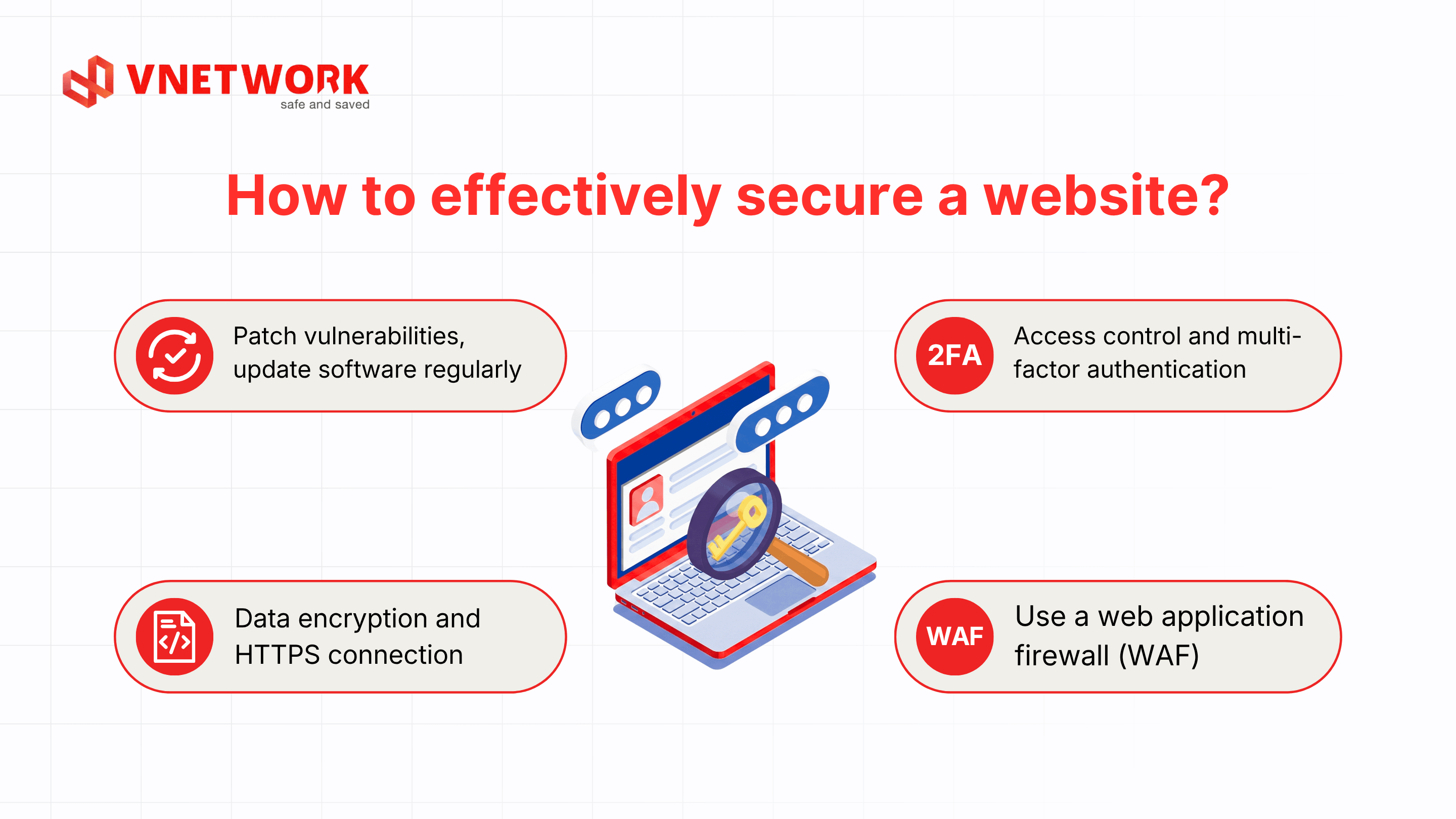
Detecting a vulnerability is only the first step. To truly protect against website hacking, a business needs to build multiple defense layers working in parallel.
Updating the CMS, plugins, libraries, and server operating system to their latest versions is the simplest yet most effective way to eliminate publicly disclosed vulnerabilities. Businesses should set a schedule for checking and applying patches regularly, while also following security advisories related to the technologies they use.
Applying the principle of least privilege, where each account is granted just enough access to perform its job, helps minimize damage if an account is compromised. Combined with multi-factor authentication for admin accounts, a business can block most attacks that rely solely on stolen passwords.
All sensitive data needs to be encrypted both in transit and at rest, ensuring that even if the data is stolen, an attacker can't read its content. Using HTTPS across the entire website, combined with secure cookie flags, helps prevent data from being intercepted while it travels between the server and the user's browser.
WAF is a defense layer placed in front of a website, responsible for monitoring and filtering all traffic in real time before it reaches the origin server. Unlike a traditional firewall, which operates at the network layer, a WAF specifically analyzes request content at the application layer, helping detect and block attacks such as SQL Injection, XSS, or other malicious payloads. This is a solution that any website, from a personal blog to a large-scale e-commerce system, should deploy as a foundational protection layer.
With WAF Free, a business can set up this protection layer in just a few minutes, without needing deep technical knowledge or a complex infrastructure investment.
Button;Try it now;https://partner.vnetwork.vn/?utm_source=google&utm_medium=blog&utm_campaign=waf_free&utm_term=lohongbaomatwebsitelagi;_blank
Website security isn't the responsibility of the technical department alone; it needs to be built as a process spanning the entire organization.
A business needs a written policy that clearly defines each department's responsibility for protecting the system, from password rules and access-granting and revocation procedures to incident response processes. A clear policy helps every employee understand their role in the overall security picture, rather than leaving it entirely to the IT team.
Most successful cyberattacks don't stem from complex technical vulnerabilities but from human error, such as clicking a phishing link or using a weak password. Regular training helps staff recognize the signs of phishing emails, malware, or other social engineering techniques, significantly reducing the risk of becoming an entry point for attackers.
No single security measure can fully protect a website against every form of attack. Businesses should adopt a multi-layered security model based on the Zero Trust principle, where every access request is verified rather than trusted by default, combined with a WAF to block real-time attacks, continuous monitoring to detect anomalies, and regular pentesting to verify the effectiveness of the entire defense system.
As a website grows with higher traffic, handles sensitive data, or faces multiple complex attack forms at once, a business needs a more comprehensive security solution rather than stopping at the application layer. VNIS is built by VNETWORK on a two-layer protection model, helping businesses proactively counter increasingly sophisticated cybersecurity threats.
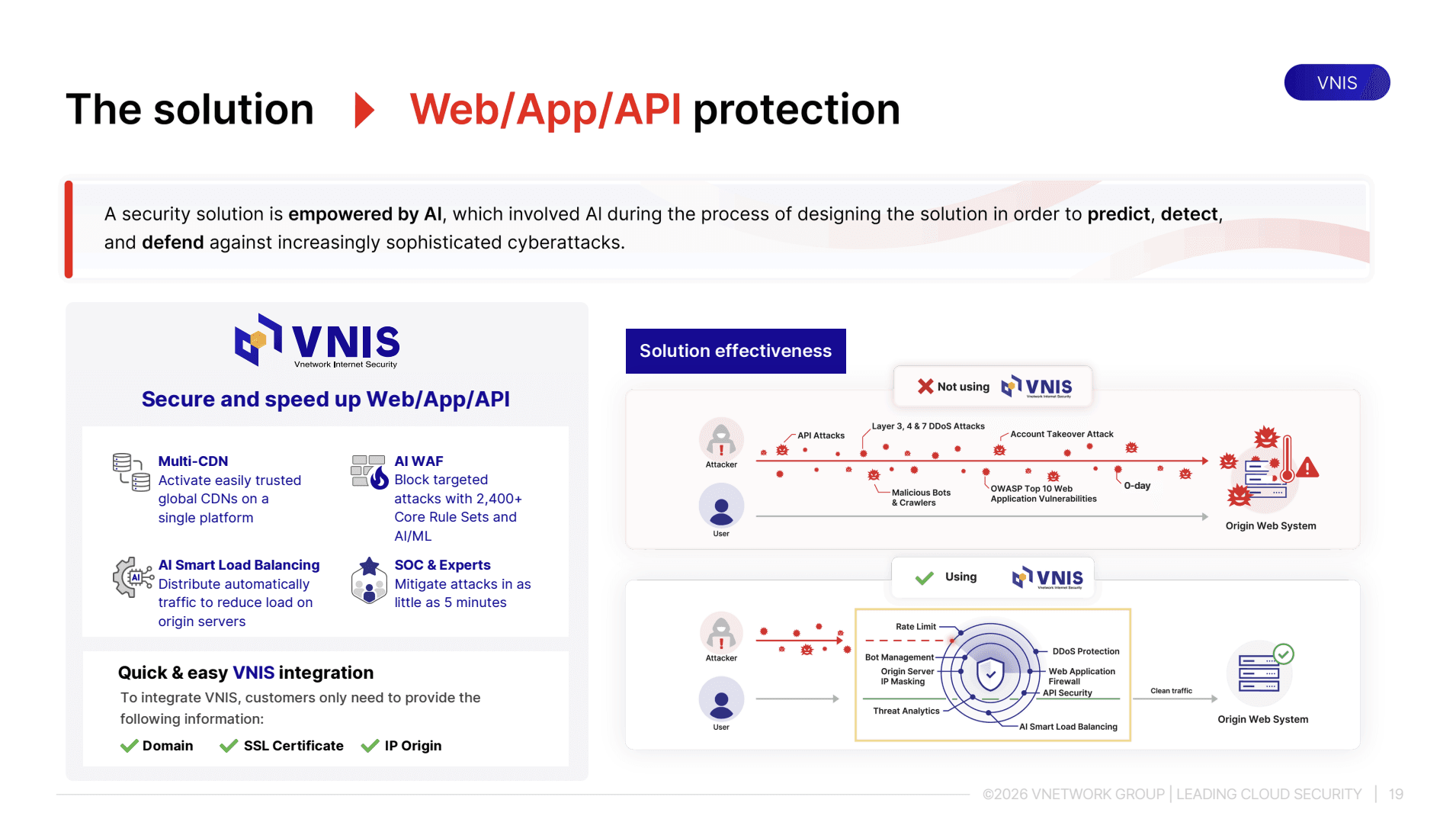
With the capacity to protect hundreds of thousands of websites, applications, and APIs worldwide, backed by a SOC team monitoring 24/7, VNIS is a solution well suited for businesses that want long-term system security. WAF Free, part of the VNIS ecosystem, serves as the initial free stepping stone, letting businesses experience application-layer protection before considering an upgrade to more comprehensive security packages.
Button;Try it now;https://partner.vnetwork.vn/?utm_source=google&utm_medium=blog&utm_campaign=waf_free&utm_term=lohongbaomatwebsitelagi;_blank
A website security vulnerability isn't a problem you can solve once and move on from; it requires a business to maintain an ongoing process of review, defense, and improvement. From understanding the causes and recognizing unusual signs, to building multiple protection layers, every step helps reduce the risk of attack. Starting with WAF Free is the simplest and fastest way to give your website its first line of defense against today's most common attacks.
A website security vulnerability, in general, is any weakness that exists in a system, which may already be known and have a patch, while a zero-day vulnerability is a type of vulnerability that has never been disclosed or doesn't yet have an official patch at the time it's discovered and exploited. Zero-days are usually more dangerous because a business has no time to prepare before being attacked.
A business can use an automated vulnerability scanning tool for periodic reviews, combined with hiring experts to run penetration tests every six months to a year. In addition, watching for unusual signs, such as a sudden drop in page load speed or unfamiliar traffic, also helps detect the risk of a vulnerability early.
Yes. WAF Free runs on OWASP-standard rule sets and can identify and block the malicious payloads characteristic of SQL Injection and XSS right at the application layer, before they reach the website's origin server.
Yes. Attackers commonly use automated scanning tools that target large numbers of websites regardless of size, as long as the system has an exploitable vulnerability. Small businesses are often easier targets because they tend to invest less in security than larger businesses.
A business should start with automated vulnerability scanning since it's low cost and can be deployed quickly to detect basic configuration errors. After addressing the basic issues, pentesting should be performed regularly to dig deeper into business logic vulnerabilities that automated tools can't detect.