
1. What is malware?
Malware (malicious software) refers to programs or code designed to infiltrate, damage, or take control of computer systems without user consent. Malware can cause severe damage, including data theft, business disruption, remote device control, or data encryption for extortion purposes.
As technology continues to evolve, malware has become more diverse in form and increasingly sophisticated in attack techniques, especially when combined with Artificial Intelligence (AI).
2. Malware and Virus: Key differences you need to understand
In cybersecurity, malware and virus are often used interchangeably. Understanding their similarities and differences helps users and organizations apply more effective defense strategies.
A virus is a type of malware, but not all malware is a virus.
- A virus is a specific form of malicious software known for its ability to self replicate and spread by attaching itself to legitimate programs.
- Malware is a broader term that includes many types of malicious software such as worms, trojans, ransomware, spyware, adware, and others. Each type has distinct behaviors and objectives, ranging from data theft and system damage to full device takeover.
Similarities
- Both are malicious software.
- Both aim to harm computers, networks, or user data.
- Both can degrade system performance, steal data, or damage devices.
Differences
| Ordinal number | Criteria | Malware | Virus |
| 1 | Scope | A broad term that includes multiple types of malicious software. | A specific type of malware representing a single category. |
| 2 | Propagation capability | Not all types can self propagate, such as trojans or spyware. | Always capable of self replication and spreading once activated. |
| 3 | Operational behavior | Varies by type, with objectives such as extortion, espionage, system takeover, or cryptocurrency mining. | Primarily focused on spreading, destroying, or corrupting data, sometimes combined with other goals. |
| 4 | Typical examples | Trojan, ransomware, spyware, adware, worms, rootkit, fileless malware. | ILOVEYOU virus, Melissa, CIH (Chernobyl). |
3. Why is malware dangerous?
In the context of digital transformation, malware has evolved far beyond simple malicious code. Modern malware is intelligent, stealthy, and capable of causing severe consequences for both individuals and organizations.
3.1. Stealth and evasion of traditional security software
Modern malware is designed to evade detection by encrypting itself or constantly changing its structure, making legacy antivirus solutions ineffective. It can remain dormant within systems for months without leaving obvious traces.
3.2. Automated propagation across internal networks or the Internet
Without user interaction, many types of malware such as worms can automatically spread from one system to another through network connections, leading to large scale outbreaks.
3.3. Exploitation of unpatched software vulnerabilities
Malware frequently exploits security vulnerabilities, including zero-day flaws, in operating systems, browsers, or applications. This is particularly dangerous when organizations fail to apply updates promptly.
3.4. Data encryption and ransom extortion
Ransomware variants encrypt critical business data and demand ransom payments for decryption. This can severely disrupt operations and result in significant financial losses.
3.5. System takeover through botnets
Certain malware strains transform infected devices into zombie machines that are remotely controlled to launch DDoS attacks, spam mail, or propagate additional malware under attacker commands.
Notably, with the support of Artificial Intelligence (AI), many malware variants can learn how to evade security tools and dynamically adjust their behavior to avoid detection. Large scale attacks such as WannaCry and NotPetya clearly demonstrate this threat, causing billions of dollars in global damage.
In summary, malware is not only a technical threat but also a direct risk to enterprise data, financial stability, and reputation. Understanding the true severity of malware is the first step toward building an effective and resilient security defense.
4. Common types of malware today
Malware is an umbrella term that refers to all malicious software affecting computer systems, data, or users. Each type of malware operates differently and serves distinct attack objectives, ranging from information theft and system takeover to data encryption for extortion. Understanding each category helps organizations and individuals apply more effective prevention strategies.
Below are 14 of the most common malware types today:
- Virus: Virus is one of the earliest forms of malware. It attaches itself to legitimate files or programs and spreads when users execute them. Although less common today, viruses can still cause significant damage by corrupting files, slowing down systems, and disrupting operations.
- Worm (computer worm): Worms can self propagate without user interaction. They typically exploit network vulnerabilities to spread across the Internet or internal networks. Worms often lead to network congestion and rapid resource exhaustion.
- Trojan (Trojan Horse): Trojans disguise themselves as legitimate software to trick users into downloading them. Unlike viruses or worms, trojans do not self replicate. Instead, they open a backdoor that allows attackers to steal data or remotely control the system.
- Ransomware: Ransomware encrypts data and demands ransom payments, usually in cryptocurrency. It is one of the most destructive malware categories, responsible for billions of dollars in damage through incidents such as WannaCry and NotPetya.
- Spyware: Spyware secretly monitors and collects sensitive information such as login credentials and financial data. A common variant is the keylogger, which records keystrokes to steal passwords.
- Adware: Adware continuously displays unwanted advertisements and may track browsing behavior. While not directly destructive, adware is disruptive and can increase the risk of additional malware infections.
- Rootkit: Rootkits allow attackers to hide deeply within a system and maintain control at the lowest levels, making detection extremely difficult. They are often used to conceal long term malicious activities.
- Fileless Malware: Unlike traditional malware, fileless malware leaves no obvious files on disk and operates directly in memory or the registry. This makes it particularly difficult to detect using conventional file based scanning.
- Malvertising: Malvertising leverages online advertisements to distribute malware. Users can become infected simply by visiting a compromised website, even without clicking on an ad.
- Phishing: Phishing attacks impersonate trusted organizations through emails or fake websites to trick users into revealing sensitive information. While not malware itself, phishing is often used to deliver malicious payloads.
- Bots và Botnet: A bot turns an infected device into a remotely controlled system. When connected into a botnet, hundreds of thousands of devices can be orchestrated to launch DDoS attacks, send spam, or abuse computing resources.
- Fake Antivirus (Scareware): Scareware pretends to be antivirus software and displays fake alerts to pressure users into purchasing a fraudulent upgrade, which actually installs malware. It is a common form of trojan.
- Cryptojacking: Cryptojacking secretly hijacks system resources to mine cryptocurrencies such as Monero. It can run inside browsers or as background processes, causing overheating, battery drain, and degraded performance.
- Hybrid Malware: Hybrid malware combines multiple malware techniques into a single threat. For example, a trojan that spreads like a worm while deploying ransomware via a backdoor. This is the most complex and hardest to detect malware category today.
The table below compares infection methods, objectives, impact, and detection difficulty across different malware types:
| Ordinal number | Malware type | Infection method | Primary target | Impact | Detection and remediation difficulty |
| 1 | Virus | Attached to files or programs and requires user execution | System files and applications | Data corruption, performance degradation, wide spread infection | Medium |
| 2 | Worm | Automatic propagation via networks, email attachments, Internet | Internal networks and systems | Resource exhaustion, rapid spread, system outages | Difficult |
| 3 | Trojan | Disguised as legitimate software via email or websites | System access privileges | Backdoor installation, data theft, remote control | Difficult |
| 4 | Ransomware | Email, attachments, exploit of vulnerabilities | Sensitive data | Data encryption and ransom demands | Very difficult |
| 5 | Spyware | Bundled with applications, freeware, or exploited vulnerabilities | Personal data and credentials | Silent monitoring, data theft, keystroke logging | Difficult |
| 6 | Adware | Bundled with free software or deceptive ads | Browsers and user behavior | Intrusive ads, tracking, potential malware exposure | Easy to medium |
| 7 | Rootkit | Exploited vulnerabilities or manual installation with admin rights | Kernel and deep system layers | Full system control, concealment of other malware | Very difficult |
| 8 | Fileless Malware | PowerShell, WMI, registry, in memory scripts | System memory and background services | No files to scan, highly evasive | Very difficult |
| 9 | Malvertising | Malicious ads on websites or ad networks | Internet users | Malware distribution, cryptojacking, ransomware delivery | Difficult |
| 10 | Phishing | Email, SMS, fake websites | Accounts and personal information | Credential theft, financial loss, access compromise | Easy if users are careless |
| 11 | Bot/Botnet | Trojans, malicious files, system vulnerabilities | CPU and network resources | Remote control, DDoS attacks, spam, malware propagation | Medium |
| 12 | Fake Antivirus | Fake popups, malicious links, pirated software | Inexperienced users | Malware installation or fraudulent payments | Medium |
| 13 | Cryptojacking | Web scripts, pirated software, injected exploits | User CPU or GPU | Covert crypto mining, system slowdown | Medium to difficult |
| 14 | Hybrid Malware | Combined techniques (Trojan + Worm + Ransomware) | Entire system | Unpredictable behavior, severe damage, complex recovery | Very difficult |
5. How does malware spread?
In today’s digital environment, malware can infiltrate systems in highly sophisticated ways, sometimes triggered by just a single user action. Understanding common infection vectors enables both individuals and enterprises to take proactive measures to prevent cyber threats.
- Phishing emails: Attackers impersonate trusted organizations and send emails containing malicious links. When users click these links, malware is silently downloaded and installed on the system.
- Untrusted email attachments: Word, Excel, PDF, or ZIP files sent via email may carry malicious code. Simply opening the attachment can activate malware and allow it to spread across the system.
- Applications or software from unsafe websites: Downloading cracked software, free tools, or applications from unverified sources significantly increases the risk of malware infection. Some software packages automatically install malware once users grant requested permissions.
- Unpatched vulnerabilities in operating systems or applications: Malware often exploits security vulnerabilities that have not yet been updated or patched. These attacks can occur without any user interaction.
- Infected USB drives or external devices: Malware can spread through USB drives, memory cards, or other external devices. Once connected to a computer, the malware may automatically replicate and infect the system.
Understanding these infection paths is a critical first step toward building effective defenses, from system upgrades and security software deployment to exercising caution with external files and links.
6. Signs that a system is infected with malware
Malware typically operates silently, but affected systems often begin to exhibit unusual behavior. Early detection allows individuals and organizations to minimize damage.
- Significant performance degradation or frequent system freezes: Unusually slow performance, long application load times, or recurring system crashes may indicate that malware is consuming system resources.
- Files are encrypted and inaccessible: Ransomware and certain types of malware can encrypt data, preventing access and displaying ransom demands.
- Browser redirection to unfamiliar websites: Unexpected redirects or excessive pop ups while browsing often signal adware or browser hijacking malware.
- Unknown applications installed without user consent: Malware may secretly install hidden software, backdoors, or spyware without the user’s awareness.
- Sudden spikes in network traffic without active internet usage: Malware may transmit data externally, connect to botnets, or download additional payloads, resulting in abnormal bandwidth usage.
Timely identification of malware symptoms enables users to act quickly, safeguarding systems and data from serious damage.
7. How to protect against malware
As cyber threats become increasingly sophisticated, proactive malware prevention is essential to protecting systems and data. Below are key measures that individuals and organizations should implement.
7.1. Use reputable security software
Always install antivirus software, firewalls, and email filtering tools from trusted vendors. Ensure that these solutions are continuously updated so they can detect and respond to emerging threats.
7.2. Stay vigilant with emails and attachments
Avoid opening attachments or clicking links in emails from unknown or unverified senders. Carefully examine the sender address, subject line, and content before taking action. Phishing emails remain one of the most common malware delivery methods.
7.3. Keep operating systems and applications up to date
Vulnerabilities in operating systems and software provide entry points for malware. Regular updates and timely patching significantly reduce attack surfaces.
7.4. Train employees and raise security awareness
Human error remains the weakest link in cybersecurity. Organizations should provide regular training to help employees recognize phishing attempts, social engineering tactics, and risky behaviors that could enable malware infections.
7.5. Deploy advanced AI powered security solutions
Traditional security approaches are often insufficient against modern threats. Organizations should adopt intelligent security solutions powered by AI to analyze abnormal behavior, provide early warnings, and block malware before damage occurs. EG Platform by VNETWORK is a prime example, combining artificial intelligence with multi layer defense mechanisms to rapidly detect, analyze, and respond to all types of malware.
Implementing these preventive measures helps protect data, maintain system performance, and minimize cyber risks. Advanced solutions such as EG Platform serve as a critical last line of defense, strengthening security posture against complex threats.
EG-Platform - A comprehensive AI driven malware protection solution
As an advanced defensive layer within VNETWORK’s security ecosystem, EG-Platform is built on AI and Machine Learning technologies to identify and neutralize malware attacks at an early stage, before they can compromise systems.
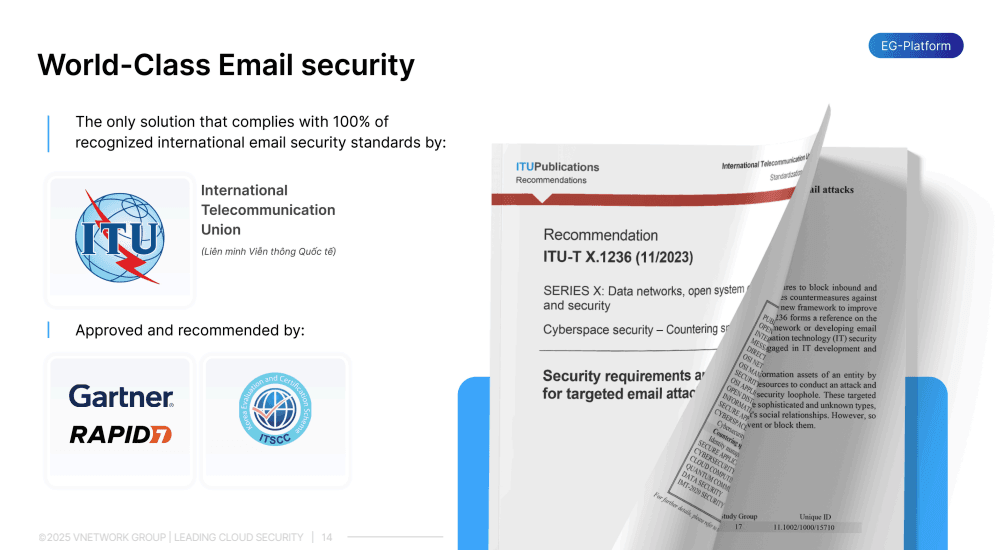
EG Platform is the only email security solution worldwide that fully complies with 100 percent of the ITU T X.1236 standards issued by the International Telecommunication Union. It is recommended by trusted organizations such as ITSCC, Gartner, and Rapid7. EG Platform provides comprehensive two way email protection for both inbound and outbound traffic, covering the full scope of international email security standards.
Key features of EG-Platform:
- Spam Guard: Leverages Machine Learning and Bayesian filtering to analyze and score emails based on spam likelihood. It validates email authenticity using international standards such as SPF, DKIM, and DMARC, effectively blocking spam, phishing emails, and ransomware before they reach users. This allows organizations to focus solely on legitimate business communications.
- Receive Guard: Protects inbound email by inspecting content, attachments, and URLs in a virtual environment (Sandboxing/Virtual Area). The system validates headers and sender IPs, analyzes malicious code in files, and performs static malware detection. If threats are identified, emails are blocked or suspicious URLs are converted into images to prevent access. Receive Guard also compares emails against historical data to detect and prevent spoofing attacks.
- Send Guard: Controls outbound emails to prevent data leakage. The system blocks suspicious connections based on IP addresses and geographic locations, applies keyword filtering, enforces approval workflows before sending, and can require password protection for sensitive emails.
With EG Platform, organizations gain a proactive, intelligent, and adaptive security layer capable of defending against all malware variants, from viruses and trojans to ransomware and advanced persistent threats.
FAQ - Frequently asked questions about Malware
1. What is malware and is it the same as a virus?
Malware is a broad term that refers to malicious software, including viruses, trojans, ransomware, spyware, and more. A virus is only one type of malware that can self replicate and spread.
2. How does malware typically infect systems?
Malware commonly spreads through phishing emails, untrusted attachments, malicious websites, system vulnerabilities, or downloads from unreliable sources.
3. How can I tell if my system is infected with malware?
Infected systems often run slowly, experience unexpected errors, suffer data encryption, or redirect users to unfamiliar websites. Any abnormal behavior warrants a system scan.
4. What is the most effective way to prevent malware?
A multi layer security approach is essential. This includes regular updates, antivirus software, employee awareness training, and AI powered security solutions such as EG-Platform.
5. Can EG-Platform protect against malware?
Yes. EG-Platform uses AI to analyze emails, scan links, sandbox attachments, and authenticate senders. It is a comprehensive solution designed to prevent malware in enterprise environments.