---
title: What is a Server? How it Works & Real-world Applications
description:  What is a server? This article helps you understand clearly how servers work, common types of servers, and their real-world applications.
slug: server-la-gi
type: news
locale: en-US
author: Tony Dang
date: "2025-10-14T11:09:39.570Z"
lastmod: "2025-10-14T11:09:39.489Z"
thumbnail: "https://static.vncdn.vn/vnetwork.vn/pub/websites/uploads/1/57/未命名 (4).jpg"
sabo: "\"What is a server?\" - not everyone can answer this question accurately. Many people are still confused about the concept of servers, how they work, and their role in information technology systems. In this article, you will clearly understand the definition, operating mechanisms, and real-world applications of servers in the most understandable way, even if you don't have much technical knowledge. Let's explore the world of servers right now!"
---

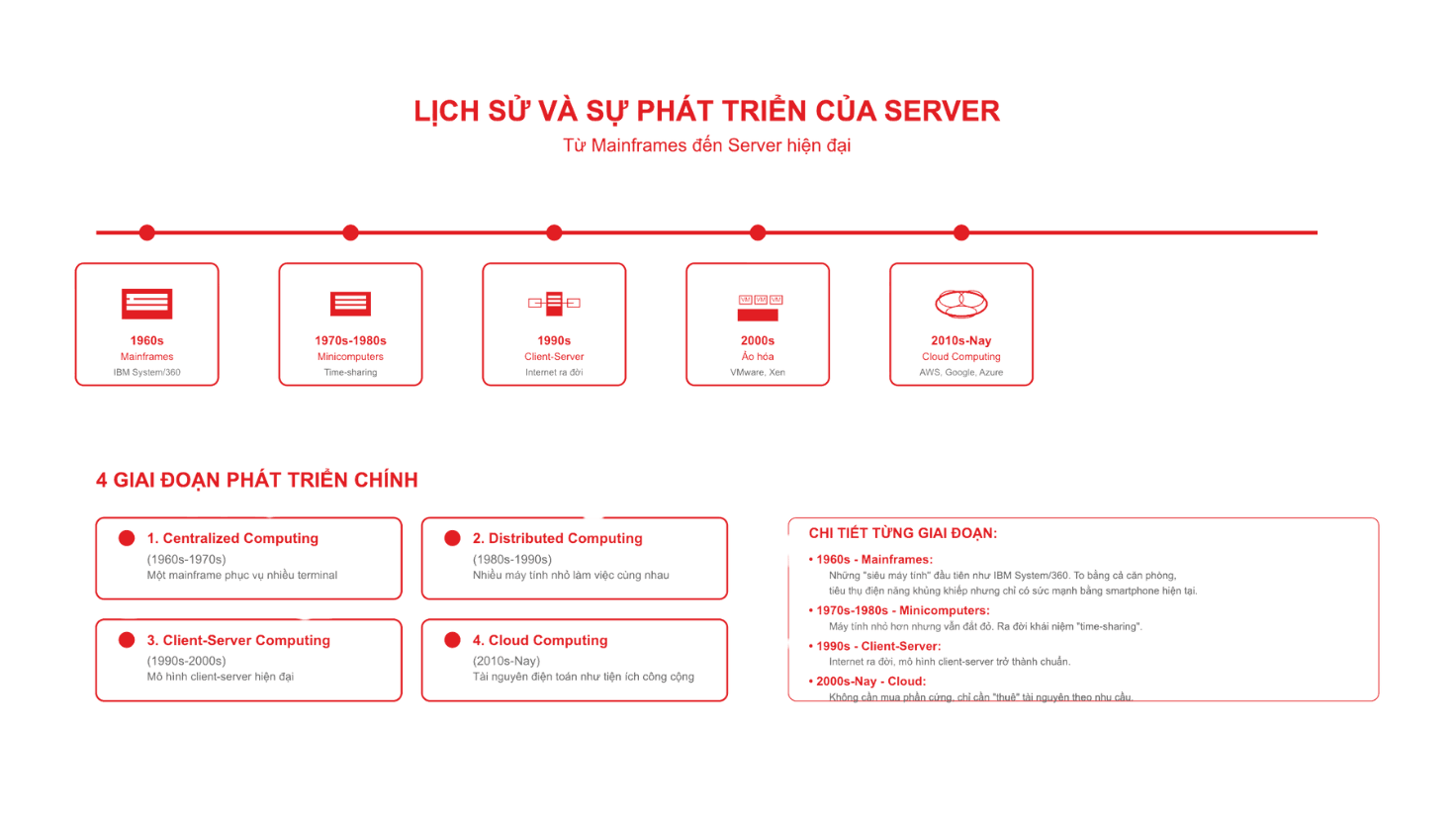
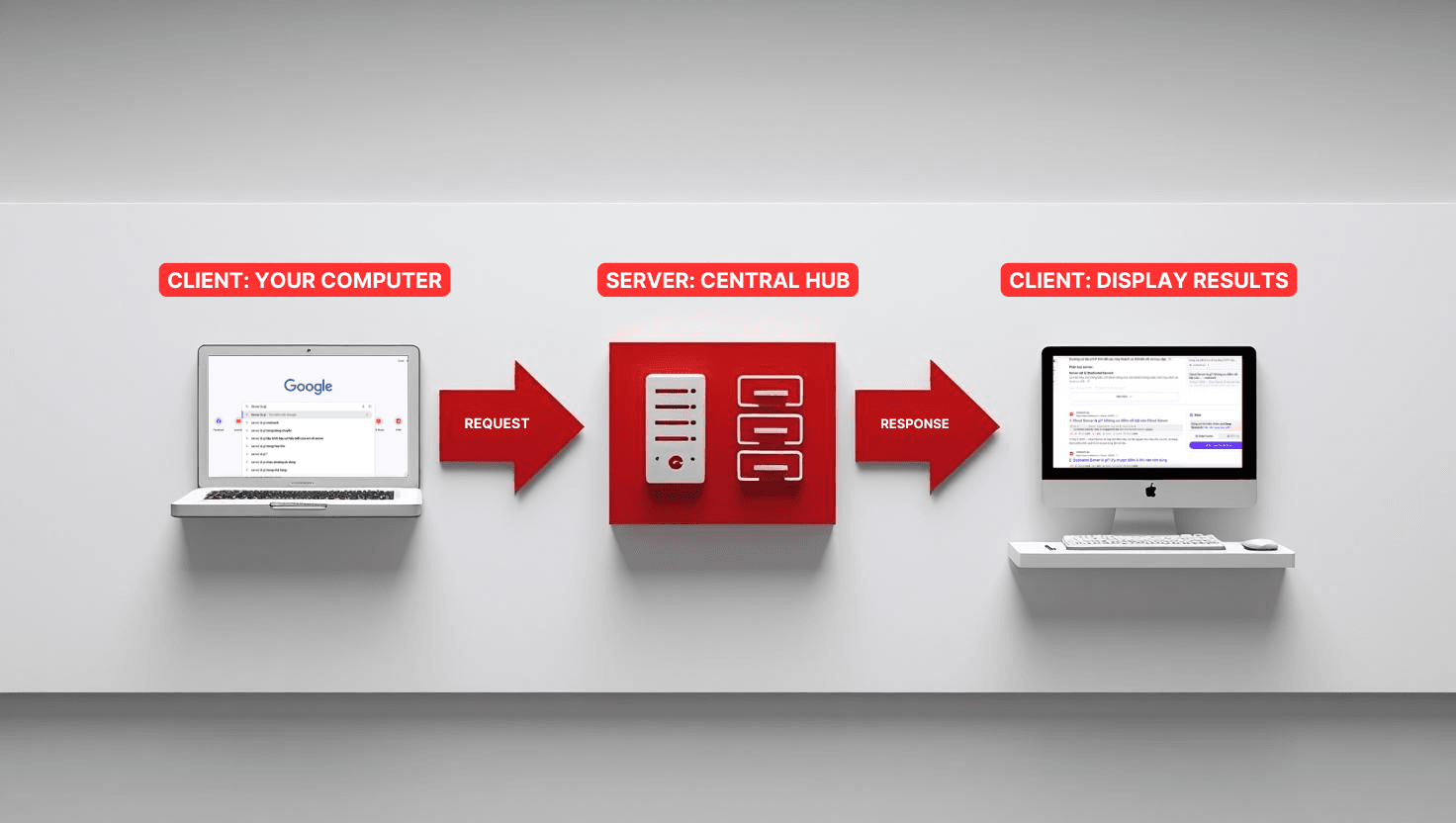
<h2><strong>What is a server?</strong></h2><p>A server is a computer system connected to the Internet or an internal network, responsible for providing services, resources, and data to other computers (called clients).</p><p>Simply put, a server is like a "waiter" in a restaurant. When you (client) order food, the waiter (server) receives the request, processes it, and brings the food to you. Similarly, when you access a website, your computer sends a request to the server, the server processes it and returns the website content for you to view.</p><h2><strong>The role of servers in IT systems</strong></h2><p>Servers play the role of operational centers for all modern digital systems:</p><p><strong>Data storage:</strong> All information from images, videos, text to databases are safely stored on servers</p><p><strong>Request processing:</strong> Receiving and processing millions of user requests every day</p><p><strong>Service provision:</strong> Email, websites, mobile applications all operate thanks to servers</p><p><strong>Access management:</strong> Controlling who can access which data</p><h2><strong>Easy-to-understand examples of servers</strong></h2><p><strong>Website:</strong> When you type "google.com", Google's server receives the request and displays the homepage for you</p><p><strong>Email:</strong> Gmail uses servers to store and send your emails to recipients</p><p><strong>Online games:</strong> When playing PUBG Mobile, game servers process all player actions and synchronize with other gamers</p><p><strong>Cloud storage:</strong> Google Drive, Dropbox use servers to store your files in the "cloud"</p><h2><strong>How servers process user requests in 3 steps</strong></h2><p>Servers operate based on the Client-Server model - the main foundation of all modern network systems. Below is a step-by-step guide to help you understand clearly how servers respond when you access a website or use online applications.</p><figure class="image"><img style="aspect-ratio:1472/832;" src="https://static.vncdn.vn/vnetwork.vn/pub/websites/uploads/1/36/quy-trinh.png" alt="How servers process user requests in 3 steps" width="1472" height="832"><figcaption>How servers process user requests in 3 steps</figcaption></figure><h3><strong>Step 1: Send request from client (user's machine)</strong></h3><p>When you access a website (for example: typing "facebook.com" in your browser), your computer or phone - called the client - will send a request to the server through the Internet.</p><h3><strong>Step 2: Server receives and processes the request</strong></h3><p>Immediately after receiving the request, the server will check the information, authenticate the user if necessary, then retrieve appropriate data from the storage system (for example: posts, images, messages...).</p><h3><strong>Step 3: Server responds and returns results to client</strong></h3><p>After processing, the server will send a response back to your device - including the website content or data you requested. This entire process usually takes place in just a few milliseconds.</p><h3><strong>Real example: When you access Facebook</strong></h3><p><strong>Request:</strong> You type "facebook.com" in your browser&nbsp;<strong>Processing:</strong> Facebook server receives the request, checks login, searches for your newsfeed&nbsp;<strong>Response:</strong> Server sends back Facebook page with the latest posts</p><h2><strong>Important concepts</strong></h2><p><strong>Traffic:</strong> The number of requests a server processes in a time period</p><p><strong>Uptime:</strong> The time a server operates continuously without interruption (calculated as %)</p><p><strong>IP Address:</strong> The unique address of a server on the Internet (example: 192.168.1.1)</p><p><strong>DNS:</strong> System that converts domain names (facebook.com) to IP addresses</p><h2><strong>Server components and structure</strong></h2><p>A server is basically a computer, but designed with more powerful and durable components to operate 24/7.</p><h3><strong>Motherboard</strong></h3><p>The motherboard is the "backbone" of the server, connecting all components together. Unlike regular computers, server motherboards are designed to:</p><ul><li>Support multiple CPUs simultaneously</li><li>Contain more RAM slots (usually 8-16 slots)</li><li>Have more network ports and expansion slots</li></ul><h3><strong>CPU - the brain of the server</strong></h3><p>Server CPUs are much more powerful than regular CPUs:</p><p><strong>Multiple processing cores:</strong> From 8-64 cores (regular CPUs only have 4-8 cores)&nbsp;<strong>Multi-threading processing:</strong> Can process hundreds of tasks simultaneously&nbsp;<strong>Server optimized:</strong> Intel Xeon, AMD EPYC designed specifically for servers</p><h3><strong>RAM - temporary memory</strong></h3><p>Servers need extremely large RAM to process many simultaneous requests:</p><p><strong>Capacity:</strong> From 32GB to 1TB RAM&nbsp;<strong>RAM type:</strong> ECC RAM with self-error correction capability&nbsp;<strong>High speed:</strong> Ensures fast data access</p><h3><strong>Storage - HDD/SSD/NVMe</strong></h3><p>Server storage prioritizes durability and speed:</p><p><strong>Enterprise HDD:</strong> Durable, large capacity, cheap&nbsp;<strong>SSD:</strong> 10-100 times faster than HDD&nbsp;<strong>NVMe:</strong> Latest technology, super fast speed&nbsp;<strong>RAID:</strong> Combining multiple hard drives to increase performance and security</p><h3><strong>Other components</strong></h3><p><strong>Power supply (PSU):</strong> Usually dual power supplies to ensure the server never loses power&nbsp;<strong>Network card:</strong> High-speed connections (1Gbps - 100Gbps) to handle large traffic&nbsp;<strong>Cooling system:</strong> Powerful fans and cooling because servers run 24/7</p><h2><strong>Common types of servers today</strong></h2><p>Depending on needs and budget, you can choose different types of servers. Each type has its own advantages and disadvantages.</p><h3><strong>Physical server (Dedicated server)</strong></h3><p><a href="https://www.vnetwork.vn/en-US/news/the-difference-between-bare-metal-servers-vs-dedicated-servers/">Dedicated Server</a> is a physical server completely dedicated to one customer.</p><p><strong>Advantages:</strong></p><ul><li>Highest performance</li><li>Full control</li><li>Maximum security</li><li>No shared resources</li></ul><p><strong>Disadvantages:</strong></p><ul><li>Highest cost</li><li>Requires technical knowledge</li><li>Difficult to scale quickly</li></ul><p><strong>Suitable for:</strong> Large enterprises, websites with high traffic</p><h3><strong>Cloud server</strong></h3><figure class="image"><img style="aspect-ratio:1472/832;" src="https://static.vncdn.vn/vnetwork.vn/pub/websites/uploads/1/36/cloud server.png" alt="Cloud server" width="1472" height="832"><figcaption>Cloud server</figcaption></figure><p><a href="https://www.vnetwork.vn/en-US/news/what-is-a-cloud-server-key-advantages-and-features-of-cloud-servers/">Cloud Server is</a> built on cloud computing platform, combined from multiple physical servers.</p><p><strong>Advantages:</strong></p><ul><li>Flexible scaling</li><li>Pay-as-you-use</li><li>High reliability</li><li>Easy management</li></ul><p><strong>Disadvantages:</strong></p><ul><li>Performance may be unstable</li><li>Dependent on provider</li><li>Long-term costs may be high</li></ul><p><strong>Suitable for:</strong> Startups, small and medium enterprises, scalable projects</p><h3><strong>VPS (Virtual Private Server)</strong></h3><p>VPS is a virtual server created by dividing a physical server into multiple parts.</p><p><strong>Advantages:</strong></p><ul><li>Balance price and performance</li><li>Full root access</li><li>Separate resources</li><li>Easy to upgrade</li></ul><p><strong>Disadvantages:</strong></p><ul><li>Shares hardware with other VPS</li><li>Performance depends on "neighbors"</li></ul><p><strong>Suitable for:</strong> Small and medium websites, developers, personal projects</p><h3><strong>Shared hosting</strong></h3><p>Shared Hosting is multiple websites sharing resources of one server.</p><p><strong>Advantages:</strong></p><ul><li>Cheapest price</li><li>Easy to use</li><li>Provider manages everything</li></ul><p><strong>Disadvantages:</strong></p><ul><li>Low performance</li><li>Limited customization</li><li>Poor security</li></ul><p><strong>Suitable for:</strong> Personal websites, blogs, small businesses</p><h3><strong>Quick comparison of server types</strong></h3><figure class="table"><table class="ck-table-resized"><colgroup><col style="width:20%;"><col style="width:20%;"><col style="width:20%;"><col style="width:20%;"><col style="width:20%;"></colgroup><tbody><tr><td><strong>Criteria</strong></td><td><strong>Shared Hosting</strong></td><td><strong>VPS</strong></td><td><strong>Cloud Server</strong></td><td><strong>Dedicated Server</strong></td></tr><tr><td>Price</td><td>Cheapest</td><td>Medium</td><td>Flexible</td><td>Most expensive</td></tr><tr><td>Performance</td><td>Low</td><td>Medium</td><td>High</td><td>Highest</td></tr><tr><td>Security</td><td>Basic</td><td>Good</td><td>Very good</td><td>Excellent</td></tr><tr><td>Scaling</td><td>Difficult</td><td>Easy</td><td>Very easy</td><td>Difficult</td></tr><tr><td>Management</td><td>Automatic</td><td>Self-managed</td><td>Flexible</td><td>Self-managed</td></tr></tbody></table></figure><h2><strong>What are servers used for? Real-world applications</strong></h2><p>Servers are present in almost all our digital activities. Below are the most common applications.</p><h3><strong>Enterprise data storage and processing</strong></h3><p><strong>Internal information management:</strong></p><ul><li>Store documents, contracts, reports</li><li>Manage employee and customer information</li><li>Automatic daily data backup</li><li>File sharing between departments</li></ul><p><strong>Data analysis:</strong></p><ul><li>Process Big Data for business decisions</li><li>Create revenue and sales reports</li><li>Analyze customer behavior</li></ul><h3><strong>Website and application operation</strong></h3><p><strong>Company website:</strong></p><ul><li>Display business information</li><li>Online sales (e-commerce)</li><li>Customer interaction</li><li>SEO and digital marketing</li></ul><p><strong>Mobile applications:</strong></p><ul><li>Backend for iOS/Android apps</li><li>Data synchronization between devices</li><li>Payment and order processing</li><li>Push notifications</li></ul><h3><strong>Create dev/test environments</strong></h3><p><strong>Software development:</strong></p><ul><li>Code and test application environments</li><li>Automated CI/CD pipeline</li><li>Version control (Git)</li><li>Staging environment</li></ul><p><strong>Testing:</strong></p><ul><li>Performance and security testing</li><li>Load testing with high traffic</li><li>A/B testing new features</li></ul><h3><strong>Email and internal data management</strong></h3><p><strong>Email server:</strong></p><ul><li>Business email (@companyname.com)</li><li>High email security</li><li>Unlimited email storage</li><li>CRM integration</li></ul><p><strong>File server:</strong></p><ul><li>Company's shared file storage</li><li>Access permissions by group</li><li>Automatic file sync</li><li>Multi-tier backup</li></ul><h2><strong>History and development of servers</strong></h2><figure class="image"><img style="aspect-ratio:1472/832;" src="https://static.vncdn.vn/vnetwork.vn/pub/websites/uploads/1/36/lich-su-hinh-thanh.png" alt="History and development of servers" width="1472" height="832"><figcaption>History and development of servers</figcaption></figure><h3><strong>From mainframes to modern servers</strong></h3><p><strong>1960s - Mainframes:</strong> The first "supercomputers" like IBM System/360 were born. They were as big as a room, consumed enormous power but only had the power of a current smartphone.</p><p><strong>1970s-1980s - Minicomputers:</strong> Smaller computers but still expensive. This period saw the birth of "time-sharing" concept - multiple users sharing one computer.</p><p><strong>1990s - Client-Server:</strong> The Internet was born, the client-server model became standard. Specialized servers for web, email, database were developed.</p><p><strong>2000s - Virtualization:</strong> Virtualization technology allowed running multiple virtual servers on one physical machine. VMware, Xen led this revolution.</p><p><strong>2010s to present - Cloud Computing:</strong> Amazon AWS, Google Cloud, Microsoft Azure completely changed how we use servers. No need to buy hardware, just "rent" resources as needed.</p><h3><strong>4 main development stages</strong></h3><p><strong>Centralized Computing (1960s-1970s):</strong> One mainframe serving multiple terminals&nbsp;<strong>Distributed Computing (1980s-1990s):</strong> Many small computers working together&nbsp;<strong>Client-Server Computing (1990s-2000s):</strong> Modern client-server model&nbsp;<strong>Cloud Computing (2010s-present):</strong> Computing resources as public utilities</p><h2><strong>Physical server vs Cloud server - Which to choose?</strong></h2><p>This is a question that most businesses face when deploying IT systems.</p><h3><strong>Detailed comparison</strong></h3><p><strong>Cost:</strong></p><ul><li>Physical server: High initial cost (50-200 million VND), but no monthly costs</li><li>Cloud server: Low initial cost, but continuous monthly costs</li></ul><p><strong>Security:</strong></p><ul><li>Physical server: Complete control, high physical security</li><li>Cloud server: Dependent on provider, but has large security investments</li></ul><p><strong>Scalability:</strong></p><ul><li>Physical server: Difficult to scale, need to buy additional hardware</li><li>Cloud server: Scale instantly with just a few clicks</li></ul><p><strong>Performance:</strong></p><ul><li>Physical server: Stable performance, no shared resources</li><li>Cloud server: Performance may fluctuate, but improving</li></ul><h3><strong>Situation suggestions</strong></h3><p><strong>Choose Physical server when:</strong></p><ul><li>Large enterprise with high investment budget</li><li>Need maximum security (banks, government)</li><li>Stable, predictable traffic</li><li>Have professional IT team</li></ul><p><strong>Choose Cloud server when:</strong></p><ul><li>Startup or small and medium enterprise</li><li>Uneven traffic, may increase suddenly</li><li>Need quick deployment</li><li>Want to focus on business instead of IT management</li></ul><p><strong>Advice:</strong> Many businesses currently use Hybrid Cloud - combining both physical servers for important data and cloud servers for applications and websites.</p><h2><strong>Why do businesses need to use servers?</strong></h2><p>In the digital age, servers are not just "good choices" but have become "mandatory" for any business wanting to develop.</p><h3><strong>Centralized data management</strong></h3><p><strong>Safe storage:</strong></p><ul><li>All data stored in one safe place</li><li>Automatic daily backup</li><li>Data recovery when incidents occur</li><li>Access permissions by position</li></ul><p><strong>Easy access:</strong></p><ul><li>Employees access data from anywhere</li><li>Quick information search</li><li>File sharing between departments</li><li>Real-time data synchronization</li></ul><h3><strong>Reduce operating costs</strong></h3><p><strong>Reduce hardware costs:</strong></p><ul><li>No need to buy high-configuration computers for each employee</li><li>Maximize server resource utilization</li><li>Reduce maintenance and upgrade costs</li></ul><p><strong>Save energy:</strong></p><ul><li>One powerful server replaces many weak computers</li><li>Modern energy-saving technology</li><li>Optimize operations by time</li></ul><h3><strong>Enhanced security</strong></h3><p><strong>Multi-layer security:</strong></p><ul><li>Professional firewall</li><li>Data encryption</li><li>Two-factor authentication (2FA)</li><li>24/7 monitoring</li></ul><p><strong>Access control:</strong></p><ul><li>Detailed permissions for each employee</li><li>Log all access activities</li><li>Automatically lock suspicious accounts</li></ul><h3><strong>Easy system expansion</strong></h3><p><strong>Scale according to needs:</strong></p><ul><li>Add resources when company grows</li><li>Reduce resources when not needed</li><li>No worry about "running out of" storage</li></ul><p><strong>Easy integration:</strong></p><ul><li>Connect with other systems</li><li>Open API for developing new features</li><li>Automate workflows</li></ul><h2><strong>Things to know before renting/buying servers</strong></h2><p>Choosing the right server is an important decision that affects your business operations.</p><h3><strong>Features to consider</strong></h3><p><strong>CPU:</strong></p><ul><li>Number of cores</li><li>Clock speed (GHz)</li><li>CPU type (Intel Xeon, AMD EPYC)</li></ul><p><strong>RAM:</strong></p><ul><li>Capacity (32GB, 64GB, 128GB...)</li><li>RAM type (DDR4, DDR5)</li><li>ECC or non-ECC</li></ul><p><strong>Storage:</strong></p><ul><li>Hard drive type (HDD, SSD, NVMe)</li><li>Capacity (1TB, 2TB, 10TB...)</li><li>RAID configuration</li></ul><p><strong>Uptime:</strong></p><ul><li>Provider's SLA (Service Level Agreement)</li><li>Usually require 99.9% or higher</li><li>Compensation when downtime occurs</li></ul><h3><strong>Questions to ask yourself</strong></h3><p><strong>Purpose of use:</strong></p><ul><li>Website, email or database?</li><li>Number of concurrent users?</li><li>Which applications will run on server?</li></ul><p><strong>Budget:</strong></p><ul><li>One-time or monthly cost?</li><li>Budget for expansion?</li><li>Calculate ROI (Return on Investment)</li></ul><p><strong>Growth level:</strong></p><ul><li>Expected growth in the next 1-2 years?</li><li>Plans for geographical expansion?</li><li>Will new products/services affect?</li></ul><h3><strong>Reputable rental suggestions</strong></h3><p>When choosing a server provider, prioritize companies that have:</p><ul><li>Long experience in hosting industry</li><li>International standard data center (Tier 3, Tier 4)</li><li>24/7 support in Vietnamese</li><li>High uptime SLA commitment</li><li>Complete backup and disaster recovery</li></ul><h2><strong>Frequently asked questions (FAQ)</strong></h2><h3><strong>Is a server a computer?</strong></h3><p>Yes, a server is essentially a computer but designed specifically to handle requests from multiple clients simultaneously. Servers have stronger configurations, higher durability and are optimized to run 24/7.</p><h3><strong>Is using cloud servers safe?</strong></h3><p>Cloud servers can be very safe if you choose reputable providers with multi-layer security features like firewall, encryption, monitoring. Sometimes cloud servers are even safer than self-managed servers because of professional security investments.</p><h3><strong>Can I build a server at home?</strong></h3><p>Absolutely possible, but only suitable for learning or testing purposes. For production environments, it's not recommended to build yourself because of lack of professional infrastructure like UPS, cooling, security, backup.</p><h3><strong>Do servers need regular maintenance?</strong></h3><p>Yes, servers need regular maintenance including software updates, security patches, resource monitoring, hardware cleaning. If you rent managed servers, the provider will handle this.</p><h3><strong>What is the average server rental price?</strong></h3><p>Server rental prices vary greatly depending on configuration and server type:</p><ul><li>Shared Hosting: 50,000 - 200,000 VND/month</li><li>VPS: 200,000 - 2,000,000 VND/month</li><li>Cloud Server: 500,000 - 10,000,000 VND/month</li><li>Dedicated Server: 5,000,000 - 50,000,000 VND/month</li></ul><h2><strong>Conclusion</strong></h2><p>Servers are the central processing brain for all modern digital systems. From the smallest website to the most complex application, nothing can operate without servers.</p><p>Understanding servers clearly helps you make the right decisions for your business, optimize costs and improve operational efficiency. Whether you choose physical servers, cloud servers or VPS, the most important thing is that it must fit your needs and budget.</p><p>If you are considering using servers, please consult optimal server solutions at VNETWORK immediately. With over 15 years of experience, VNETWORK's expert team will advise the most suitable solution for your business.<br>&nbsp;</p><figure class="media"><oembed url="https://www.youtube.com/watch?v=QkFnw1chb-c"></oembed></figure>