
A File Inclusion vulnerability is a web application security flaw that occurs when a system allows users to inject arbitrary files or malicious paths into a file-loading function without proper validation. When successfully exploited, an attacker can read sensitive configuration files, steal secret keys, or remotely execute malicious code directly on the server. File Inclusion vulnerabilities typically arise when developers skip input filtering, letting user-controlled parameters dictate which file the application loads.
At its core, security vulnerabilities are flaws in software design, and File Inclusion is a branch that emerges when an application dynamically loads files based on user-controlled parameters. MITRE officially classifies this flaw under CWE-98: Improper Control of Filename for Include/Require Statement in PHP Program, grouping it alongside familiar injection-style attacks such as SQL injection and XSS, all of which stem from trusting unvalidated input. In popular web languages, particularly PHP, developers commonly use dynamic file-loading functions to reuse code or flexibly load UI components.
The problem arises when an application accepts parameter values directly without matching them against a whitelist. The server will then load any path the attacker specifies, paving the way for full internal data structure disclosure or turning the server into a malware distribution point. If the account running the application has excessive operating system privileges, the damage can cascade across the entire IT infrastructure.
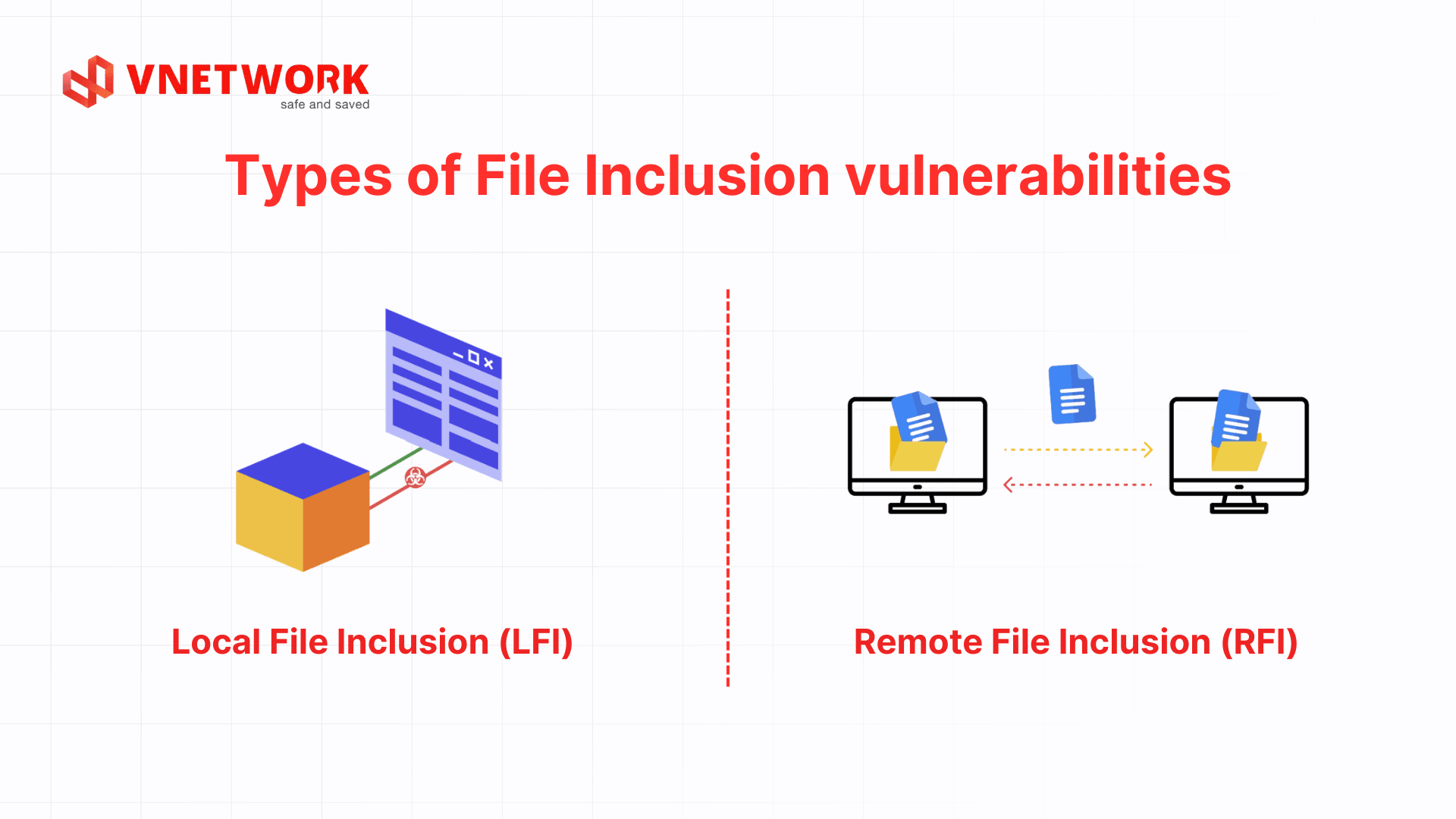
Based on the origin of the improperly loaded file, the security community divides File Inclusion vulnerabilities into two main variants: Local File Inclusion and Remote File Inclusion. Both attack at the application layer but differ in file location, exploitation conditions, and damage potential.
Local File Inclusion is the variant that occurs when an application is tricked into loading and processing files that already reside on the server. Attackers exploit input parameters to point to sensitive configuration files such as database connection credentials, system accounts, or operational logs. The goal is to gather intelligence and prepare for a subsequent privilege escalation step.
What makes Local File Inclusion particularly dangerous is that the attacker does not need to upload new malicious code; instead, they turn legitimate existing files into information leakage sources. For example, a PHP application that accepts a page parameter directly from the URL without normalizing the path allows an attacker to replace that parameter with a local directory traversal string. On both Linux and Windows servers, this is sufficient to read system account files and expand the attack surface.
Remote File Inclusion is more dangerous because the application accepts and executes malicious code files hosted on a remote server controlled by the attacker. The Remote File Inclusion mechanism is triggered when a parameter receives a full URL via the HTTP or FTP protocol. The target server fetches the external code and executes it directly within its processing stream, allowing the hacker to control the system without placing any malicious file on the local disk in advance.
A Remote File Inclusion attack only succeeds when server configuration is lax, typically when the application is permitted to open external URLs without a monitoring firewall. When this barrier is left open, a corporate server becomes a remote command-execution tool in the hands of cybercriminals.
The table below summarizes the core operational criteria so system engineers can quickly grasp the differences between the two variants:
| Comparison criteria | Local File Inclusion (LFI) | Remote File Inclusion (RFI) |
| Location of malicious file | Resides on the local server running the web application. | Stored on an external server controlled by the attacker. |
| Primary attacker objective | Read system files, collect configuration data, identify accounts. | Execute malicious code, install backdoors, take control of the server. |
| Exploitation condition | Application dynamically calls files without filtering user input. | Server configuration allows loading URLs from remote sources. |
| Severity level | High (exposes sensitive data and configuration information). | Critical (immediate full system compromise). |
| Common protocol | Local filesystem paths. | Network protocols such as HTTP, HTTPS, FTP. |

Attackers rarely stop at a basic path injection. They continuously adapt to bypass simple application-level filters.
Path Traversal is the most common technique paired with Local File Inclusion. By inserting directory back-navigation character sequences, an attacker escapes the application root directory and reaches the core directory structure of the operating system. The traversal string is typically repeated multiple times to ensure the request returns to the highest root directory before pointing precisely to the target system file.
Path Traversal exploits the application's blind trust in path structures. Without a string normalization step, the server interprets the traversal characters according to the operating system's default hierarchy mechanism, rendering every directory boundary meaningless.
When developers block traversal strings with basic keyword filters, hackers turn to PHP Wrappers built into the language. With the right wrapper, an attacker forces the application to process data as a stream rather than reading a file normally.
This query string forces the server to encode the entire file contents as a base64 string and return it to the hacker rather than interpreting it normally. This allows the attacker to read the complete database-handling logic and configuration passwords without triggering any error mechanism on the origin server.
Log Poisoning allows an attacker to escalate a pure Local File Inclusion flaw into a remote code execution attack. First, the hacker sends a request containing malicious code in header fields such as User-Agent. The server records this string in a log file; the hacker then uses the Local File Inclusion vulnerability to call that log file back, forcing the server to interpret and inadvertently execute the embedded malware.
Modern attack trends also target cloud infrastructure. Attackers use Local File Inclusion to point at environment configuration files and extract Machine Keys or Environment Tokens. Once these secret keys are exposed, businesses face the risk of a large-scale data breach, as hackers can forge valid tokens to bypass every privilege check and penetrate core databases.
Isolated attacks are generally easier to stop, but when hackers chain multiple weaknesses together, the consequences multiply. The combination of File Inclusion and file upload flaws is a prime example.
With a File Upload flaw, developers typically only filter at the format level, allowing images and documents while blocking executables. Hackers can easily bypass this by concealing a webshell inside a valid image file. After upload, the image file sits quietly in the assets directory like a harmless static file.
The danger erupts when the system also has a Local File Inclusion vulnerability. The hacker uses this flaw to point directly at the image file containing malicious code, forcing the server to interpret its contents as source code rather than displaying the image. The webshell activates on the origin server, turning a legitimate static file into a remote command-execution tool.
This combination nullifies single-layer storage protections. A file that has passed format filters and malware scanning can still become a weapon when called by a loosely written dynamic processing function. This is precisely why modern defense must view the system as a tightly interconnected whole.
Any system with loose source code can become a victim, but hackers tend to prioritize scanning three groups of businesses with a wide attack surface and valuable data assets:

Overlooking a File Inclusion vulnerability can push a business into a full-scale crisis, simultaneously impacting data, operations, finances, and market reputation.
The most direct consequence of Local File Inclusion is the exposure of the entire confidential directory structure and user data. When broken access control occurs, file permission mechanisms collapse, causing internal administrative information and customer data to leak. This makes businesses easy targets for ransomware extortion attacks.
Leaking system architecture documents also opens the door to corporate espionage. Attackers may even plant spyware to maintain long-term access without the business being aware. Competitors or cybercriminals use disclosed software information to craft highly precise sabotage scenarios targeting known weaknesses in the infrastructure.
When a vulnerability escalates into remote code execution, attackers can delete databases, deface websites, or install malware that turns the server into a node in a botnet network. Extended downtime during peak hours causes direct revenue loss and erodes partner trust.
The risk is compounded when there is no timely incident response plan in place. Restoring data from backups is always time-consuming and may result in the loss of recent transactions. Maintaining high availability therefore requires preventive capabilities at the application edge layer.
The cost of handling a File Inclusion incident extends far beyond patching the technical flaw. Businesses must pay for digital forensics, incident response specialists, customer notifications, and remediation measures. For organizations that process personal data, a breach also carries the risk of administrative penalties under Data Law 2024 or personal data protection decrees.
For publicly listed companies or those operating in financial sectors, a data breach can trigger lawsuits from customers, partners, and shareholders. Total financial damages in such cases typically far exceed the initial cost of preventive investment.
The intangible damage from a data breach typically persists far longer than direct financial losses. When news of an incident becomes public, customers lose confidence in the business's ability to protect their data and switch to competitors. Rebuilding brand reputation after a cybersecurity crisis requires significant time and resources, particularly in high-trust industries such as finance, healthcare, and e-commerce.
As customers grow increasingly privacy-conscious, a business that has been exploited through a security vulnerability faces a clear disadvantage when competing for major contracts or expanding into international markets, where standards such as ISO 27001 are rigorously evaluated from the very first vendor assessment round.
Defending against File Inclusion requires combining secure coding practices with strict server configuration under a Defense in Depth model, deploying multiple layers of protection to eliminate web security flaws at their root.
The most effective solution is never passing user-supplied data directly into any file-loading function in the system. If business logic requires loading files by parameter, developers must build a fixed mapping table where each valid value is assigned an index (such as a numeric identifier or short code) rather than using the original filename.
The source code checks whether the incoming parameter value exists in the whitelist mapping table. If the value does not match any entry, the application immediately rejects the request and returns a default error page. The next step is to normalize the path before passing it to the execution function, completely eliminating directory back-traversal strings, dots, slashes, or double-encoded characters that hackers commonly use to bypass basic filters.
Fully disabling dangerous options in the application configuration file is a mandatory step for PHP environments. Specifically, setting the allow_url_include parameter to Off eliminates the ability to trigger Remote File Inclusion, preventing the server from sending outbound requests to fetch malicious code. At the same time, setting open_basedir restricts the directory scope that file-loading functions are permitted to access, even if the hacker successfully injects a Path Traversal string.
Additionally, related settings such as display_errors, expose_php, and session.cookie_httponly should be reviewed to prevent system information from leaking to attackers. Businesses running PHP environments can consult the full list of recommended security settings at the OWASP PHP Configuration Cheat Sheet.
For other languages and frameworks, the general principle remains the same: disable all features that allow loading remote resources by default, and only enable them when there is a specific business need, accompanied by an additional validation layer.
The account running the web application process should only have read and write permissions within the minimal resource directory required for operations, with no access to the operating system's core directories or sensitive configuration files. This way, even if the application is exploited via File Inclusion, the attacker cannot read files outside the permitted scope.
For modern systems, deploying applications within container or sandbox environments adds an additional isolation layer. If the process is compromised, the blast radius is contained within the container rather than spreading to the entire physical server.
Automated vulnerability scanning combined with manual penetration testing should be integrated into the software development lifecycle (SDLC) to detect File Inclusion from the development stage, rather than waiting until the application is in production. Static Application Security Testing (SAST) tools can detect file-loading functions using unfiltered parameters, while Dynamic Application Security Testing (DAST) tools test application behavior when receiving real payloads.
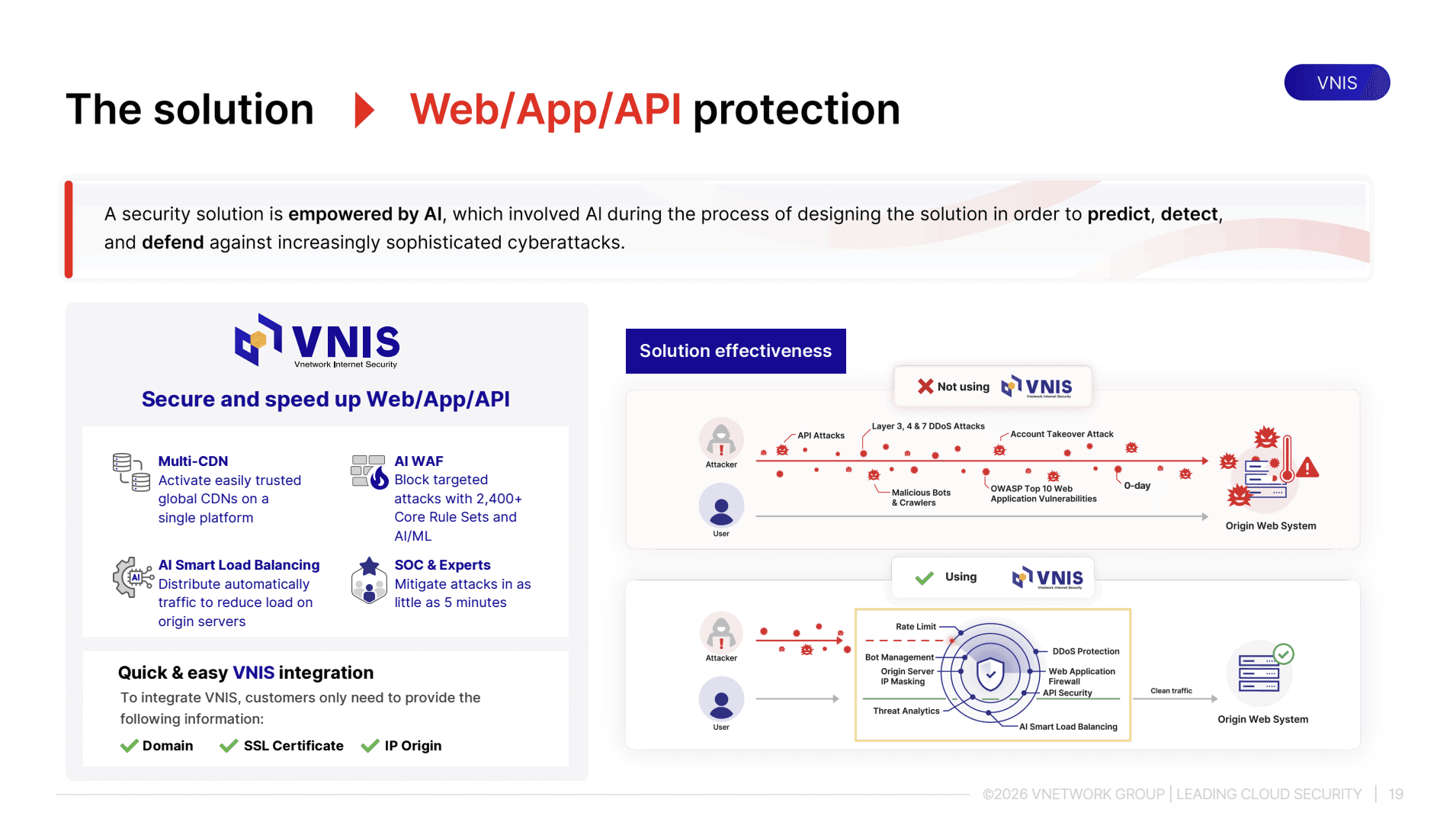
Source code configuration and optimization lay the foundation, but manual management struggles to keep pace with the speed at which attacks evolve and zero-day vulnerabilities continuously emerge. Businesses need an additional proactive defense layer at the application tier. The VNIS (VNETWORK Internet Security) platform from technology company VNETWORK is built precisely for this challenge.
VNIS is a comprehensive Web, App, and API security and acceleration platform that helps businesses stop threats in real time. The VNIS platform operates on a two-layer protection mechanism, combining digital infrastructure processing capabilities with deep security technology. Core features for blocking File Inclusion include:
File Inclusion is a highly dangerous vulnerability that opens the door to destructive source code attacks and sensitive data leakage. A solid defense strategy must combine secure programming thinking at the source code level with modern automated security technology. Proactively protect your digital assets and web application systems before vulnerabilities are exploited.
Businesses looking to strengthen their cybersecurity capabilities should contact VNETWORK specialists for in-depth consultation:
File Inclusion does not appear under its own name but is categorized under Broken Access Control and Security Misconfiguration in the OWASP Top 10. These are among the most common and dangerous web security flaw categories, reflecting deficiencies in file permission management and input data control.
Null Byte Injection uses a special string-termination character to trick file extension validation mechanisms. When a hacker appends this character to the end of a parameter, older language versions will truncate everything after it, allowing the bypass of static format filters to execute system files or webshells at will.
Remote File Inclusion is more dangerous because it allows attackers to directly load and execute malicious code files from an external server, without needing to bypass file upload filters to get malicious code onto the server as with Local File Inclusion. Once the flaw is triggered, the hacker can take control of the server remotely almost instantly.
The core difference lies in how the application processes files. Directory Traversal (or Path Traversal) only uses navigation characters to read or download unauthorized static system files. File Inclusion goes further by injecting the file into the source code interpretation stream, forcing the server to execute its contents as dynamic code.
Web application firewalls based on static signatures are easily bypassed using string encoding techniques or sophisticated PHP Wrapper variants. For comprehensive protection, businesses should use next-generation WAF integrated with AI within the VNIS ecosystem, which analyzes behavioral patterns to detect abnormal requests and block the latest file injection payload variants.