PHP2Shell is the collective name for two critical vulnerabilities, tracked as CVE-2026-109618 and CVE-2026-109619, which the PHP development team disclosed together with patches on October 21, 2026. Both are memory corruption bugs located in the core of the PHP interpreter. They are independent of each other, yet they can complement one another.
Notably, PHP2Shell is not an application layer flaw like common web security vulnerabilities such as SQL injection, XSS or the issues on the OWASP Top 10 list. The vulnerabilities do not live in frameworks or content management systems (CMS) such as WordPress, Laravel or Drupal, but in the PHP software that runs those applications. As a result, every website running on PHP needs to be reviewed, regardless of the platform a business uses.
According to the PHP development team, both vulnerabilities scored 9.2 on the CVSS v4.0 scale, which rates vulnerability severity up to a maximum of 10. The flaws were discovered by researchers with the help of artificial intelligence (AI) tools and were reported to the PHP development team before public disclosure.
| Vulnerability ID | Description | Severity |
|---|---|---|
| CVE-2026-109618 | RCE via memory corruption during OOM handling | Critical, CVSS 9.2 |
| CVE-2026-109619 | RCE via global state persisting across requests | Critical, CVSS 9.2 |
Both PHP2Shell vulnerabilities exploit the way PHP manages memory when request processing is interrupted, but they differ in when the unsafe memory region is accessed.
CVE-2026-109618 stems from how PHP handles out-of-memory conditions. PHP uses the memory_limit directive to cap the memory available to each request. When that limit is exceeded, PHP raises an out-of-memory (OOM) error and halts processing immediately, skipping its normal resource cleanup routine.
An attacker sends a specially crafted multipart/form-data request containing many nested parts to trigger an OOM error at the exact moment PHP is parsing the request and its internal data is only partially initialized. The cleanup process may then treat this incomplete data as valid, corrupting the heap memory of the process. Apache mod_php shares memory space with the Apache process, which makes it easier to exploit, while PHP-FPM is still affected but slightly more complex to exploit.
While CVE-2026-109618 strikes when PHP runs out of memory, CVE-2026-109619 takes advantage of long-lived PHP-FPM workers that handle many consecutive requests. In the first malicious request, the payload triggers a fatal error in the multipart parser, causing PHP to free certain memory regions while still holding pointers to them.
When a second malicious request reaches the same worker, PHP may reuse these stale pointers before its state is reinitialized, resulting in a use-after-free condition. By controlling the memory layout, an attacker can overwrite internal function pointers and execute arbitrary code within the PHP process.
PHP2Shell is rated critical because it allows attackers to remotely execute arbitrary code on a target server without authentication, credentials, session cookies, tokens or any flaw in the web application itself.
Once exploitation succeeds, an attacker can run operating system commands with the privileges of the PHP process and then:
PHP2Shell is exploited while PHP parses the body of multipart/form-data HTTP requests, even before any PHP application code is executed. A website does not need a file upload feature. As long as the PHP SAPI accepts multipart/form-data POST requests, the service is exposed. Conversely, ordinary GET requests cannot trigger either vulnerability.
According to the PHP Foundation, remote code execution has been demonstrated on Apache mod_php with its default configuration, and proof-of-concept exploit code appeared publicly on the day of disclosure. The severity led many government agencies around the world to temporarily take their websites offline as a precaution. In Vietnam, the Department of Cybersecurity and the National Cybersecurity Association have advised organizations and businesses running PHP websites to review their systems and apply the patches promptly.
Businesses need to review their exposure to PHP2Shell if they operate websites, portals or internal systems running an unpatched version of PHP. The level of impact depends on how PHP is deployed on the server through its SAPI and on the PHP version branch in use.
The SAPI (Server API) is the interface layer between PHP and the web server. The following SAPIs are all affected by PHP2Shell:
The PHP development team has released patches for all four supported branches. Businesses should check the PHP branch they use against the table below to determine which version to upgrade to:
| PHP branch | Affected if lower than | Patched version |
|---|---|---|
| 8.2.x | < 8.2.35 | 8.2.35 |
| 8.3.x | < 8.3.36 | 8.3.36 |
| 8.4.x | < 8.4.27 | 8.4.27 |
| 8.5.x | < 8.5.12 | 8.5.12 |
End-of-life PHP branches (5.x, 7.x, 8.0 and 8.1) do not receive official patches. Businesses running these branches must migrate to PHP 8.2 or later, which are still supported.
Given the severity of the vulnerabilities, the PHP security team has provided minimal source-level fixes for PHP 7.4, 8.0 and 8.1, and several Linux distributions and long-term support (LTS) vendors have also released updated packages for these branches. These are only stopgap measures while preparing to upgrade. In addition, PHP 8.2 reaches end of life on December 31, 2026, so businesses on this branch should also plan an early move to a newer version.
For websites on a hosting service, the PHP version is usually managed by the provider. Businesses should contact their hosting provider to confirm the PHP version in use and the patch status of the server.
The definitive fix, and the only fully effective one, is to upgrade PHP to a patched version and then restart the PHP service. The PHP development team has also stated that no mitigation is complete and that updating is the only safe option.
Upgrade the PHP packages to the safe version that matches the PHP branch installed on the server, as listed in the version table above.
After upgrading, you must restart the PHP service (php-fpm or Apache). Updating RPM/DEB packages does not automatically stop running PHP worker processes. The old binary remains in memory, so the vulnerability persists until the service is restarted.
After restarting, check the PHP and PHP-FPM versions to confirm the system is running the patched build. Note that some Linux distributions, such as Ubuntu, backport fixes to the released version and keep the original version number, so php -v may still show the old number even though the package has been updated. In this case, compare the installed package version against the security advisory of that distribution. If you use a third-party repository and the version has not changed after updating, the repository may not have the new release yet; in that case, switch to the distribution packages or build from source.
# update the repository index
apt update
# upgrade all php8.2 packages
apt install php8.2-fpm php8.2-cli php8.2-{bz2,curl,gd,intl,mbstring,mysql,opcache,xml,zip}
# restart php-fpm
systemctl restart php8.2-fpm
# check the version
php8.2 -v
php-fpm8.2 -v
If you are using php8.3 or php8.4, replace "8.2" in the commands above with the specific PHP version running on your server.
apt update
apt install php8.2-fpm php8.2-cli php8.2-{bz2,curl,gd,intl,mbstring,mysql,opcache,xml,zip}
systemctl restart php8.2-fpm
php8.2 -v
php-fpm8.2 -v# update the php packages
dnf update php php-fpm php-bz2 php-curl php-gd php-intl php-mbstring php-mysqlnd php-opcache php-xml php-zip
# restart the service
systemctl restart php-fpm
# check the version
php -v
php-fpm -vIf PHP cannot be upgraded right away, businesses can apply temporary mitigations on the server. These measures make exploitation harder but can still be bypassed by skilled attackers, so they only reduce risk and cannot replace patching:
A web application firewall (WAF) operates at Layer 7 of the OSI model and can block multipart/form-data POST requests with excessively nested structures, too many parts or abnormal fields before they reach the server. The Department of Cybersecurity and the National Cybersecurity Association note that a well-configured WAF significantly reduces the likelihood of attack, giving businesses more time to roll out patches safely as part of a Defense in Depth strategy.
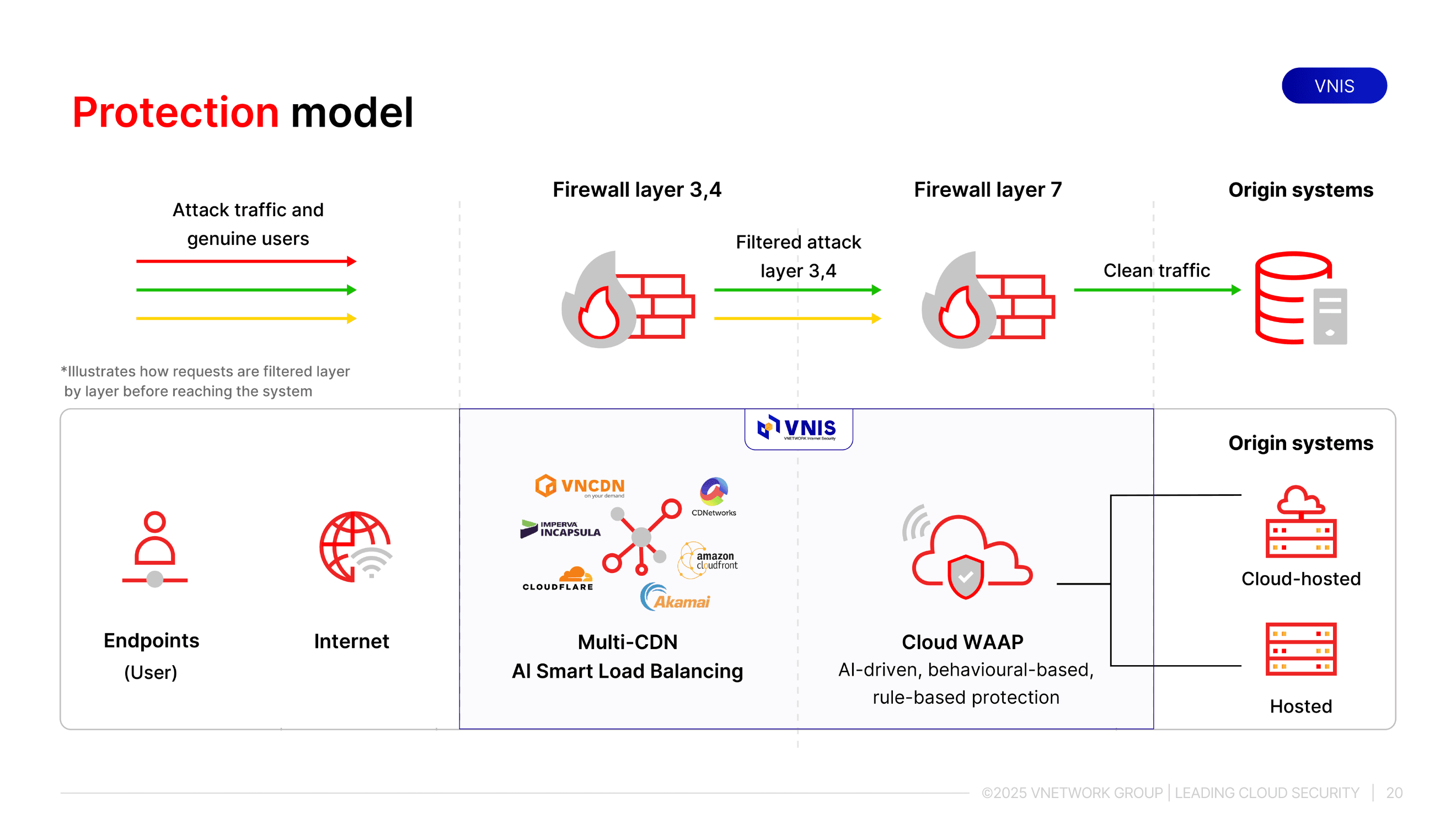
VNIS (VNETWORK Internet Security) is the VNETWORK security and acceleration platform for Web/App/API, providing real-time protection against multi-layer DDoS attacks, malicious bots and vulnerability exploits, including zero-day vulnerabilities. The platform uses AI to detect abnormal behavior early while maintaining performance and user experience.
VNIS protects business systems through two layers, handling attacks from the network infrastructure layer up to the application layer:
PHP2Shell shows that risk can sit at the platform layer, an area businesses often overlook when reviewing website security. The three priorities right now are upgrading PHP to a patched version, restarting services so the patch takes effect, and adding a WAF layer to reduce risk during the rollout. If your business needs advice on protecting its websites and Web/App/API systems against new vulnerabilities, the VNETWORK team of experts is ready to help.
Yes, if the server running WordPress uses an unpatched version of PHP. The vulnerability resides in the core of the PHP interpreter, not in WordPress, so updating WordPress, themes or plugins will not fix it. Businesses need to upgrade the PHP software on the server itself.
No. The vulnerability is triggered when PHP parses multipart/form-data POST requests, before any application code is executed. As long as the PHP SAPI accepts this type of request, the website is exposed, even without a file upload feature.
Updating RPM/DEB packages does not automatically stop running PHP worker processes. The old binary remains in memory until the php-fpm or Apache service is restarted, so the vulnerability persists if this step is skipped.
PHP 7.x, 8.0 and 8.1 have reached end of life and do not receive official patches, so businesses need to migrate to PHP 8.2 or later. While preparing to upgrade, they can use the source-level fixes provided by the PHP security team or updated packages from long-term support vendors, combined with temporary mitigations and a WAF.
No. A WAF helps block known exploit requests and significantly reduces the likelihood of attack, but it can still be bypassed by new exploit variants. Upgrading PHP to a patched version remains the only way to fix the vulnerability completely.