
Common causes of slow website loading
Slow website loading can stem from many different factors, ranging from server infrastructure and website architecture to how content is delivered. Identifying the root cause helps businesses choose the right solution to improve website speed and enhance user experience.

Here are the most common reasons why a website loads slowly today:
1. Weak or overloaded server
A server (a computer used to store and process website data) can be compared to a restaurant kitchen. If the kitchen is too small but must serve too many customers at once, service inevitably slows down.
This typically happens when a website uses cheap shared
hosting (shared hosting), when the server has limited hardware specs such as a low-capacity CPU or RAM, or when traffic spikes but infrastructure cannot scale up in time. As a result, user requests queue up and take longer to process, causing the website to load slowly.
2. Too many plugins or scripts
Plugins (extensions) help websites add functionality such as chatbots, sign-up forms, or analytics tools. However, installing too many plugins or third-party scripts forces the website to load additional files and send more HTTP requests to the server.
This makes the codebase heavier and more complex, increasing page load time. The situation is similar to opening too many apps on a phone at once, causing the device to slow down.
3. Large unoptimized images and videos
Unoptimized images and videos are among the most common reasons for slow page loads. For example, a single uncompressed image can weigh 3 to 5 MB. If a page contains around 10 such images, users would need to load up to 30 to 50 MB of data.
For visitors accessing the site on mobile devices or through unstable internet connections, this large volume of data can significantly slow down page load speed.
4. Server location too far from users
The geographical distance between the server and the visitor directly affects website speed. For instance, if a website hosts its server in the US but most users are accessing from Vietnam, data must travel through multiple international network routes before reaching their devices.
This transmission process introduces latency (network delay), causing the website to respond more slowly and degrading the user experience.
5. Not using a CDN for content delivery
If a website relies solely on a single origin server to serve all users, every access request must be routed directly to that server. As traffic increases, the server can become overloaded, and the geographical distance between users and the server further amplifies network latency and page load times. That is why many businesses today deploy CDN (Content Delivery Network) to distribute data from multiple servers, helping accelerate the website and reduce load on the origin server.
How to fix a slow website? 6 effective solutions
When a website loads slowly, user experience suffers directly and conversion rates can drop. Businesses need to quickly identify the root cause and apply appropriate solutions to improve performance. Here are 6 popular and effective ways to address slow website loading today:
1. Upgrade hosting or server
If the website is currently on shared hosting, businesses should consider upgrading to VPS (Virtual Private Server) or cloud server. These solutions provide more resources in terms of CPU, RAM, and bandwidth, enabling the system to handle high traffic more reliably and reducing instances of slow loading.
2. Optimize website source code
Source code optimization is an important step toward improving website performance. Businesses can merge and compress CSS and JavaScript files, remove unnecessary plugins, and apply lazy loading (loading content on demand) to images. These changes help reduce page size and speed up content rendering.
3. Optimize images and videos
Images and videos account for a large portion of a webpage's file size, so optimization is essential. Businesses should compress images before uploading, use modern formats like WebP instead of JPEG or PNG, and only serve images at the exact dimensions needed for display. Proper optimization can reduce total page size by 30 to 70%.
4. Reduce website latency
Latency refers to the time it takes for data to travel from the server to the user's device. When latency is high, the website responds more slowly. To reduce latency, businesses can place servers closer to user regions or use a content delivery system to shorten data transmission distances, thereby improving access speed.
5. Optimize video and livestream delivery
For websites with video or livestream content, using dedicated transmission technologies is critical to ensure smooth playback and minimize lag. Technologies such as HLS (HTTP Live Streaming) enable stable video delivery across a wide range of devices and network speeds. You can learn more about HLS and CDN HTTP Live Streaming for OTT video to understand how this technology optimizes online video transmission.
In addition, low latency streaming solutions enable viewers to watch content in near real time. These technologies are particularly well suited for live events, sports, or large-scale broadcast programs. Businesses can also explore popular low latency streaming solutions available today to find the right fit for their deployment needs.
6. Use a CDN to speed up the website
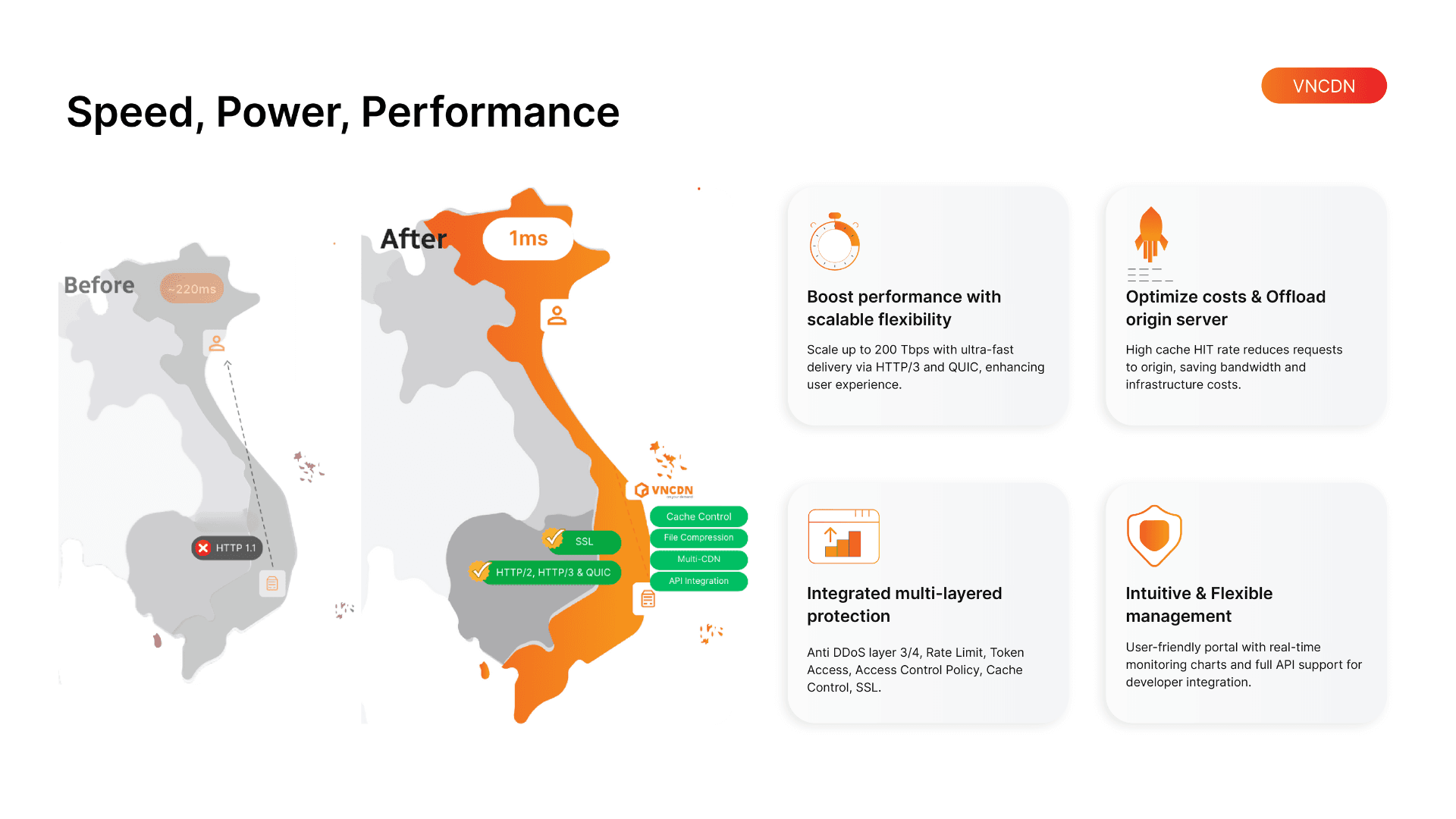
CDN (Content Delivery Network) accelerates website performance by storing copies of content across multiple servers worldwide, known as PoPs (Points of Presence). When a user accesses the site, content is delivered from the nearest server rather than the origin server, reducing network latency, improving page load speed, and easing the load on the main infrastructure. In particular, for websites serving users primarily in Vietnam, using a CDN with infrastructure hosted at domestic ISPs and across the Asia region can deliver noticeably better access speeds. Domestic CDN solutions like VNCDN are often optimized for traffic within Vietnam and the surrounding region, making them well suited for businesses serving local users.
For further reference, see: Top CDN providers: which solution should your business choose?
VNCDN - A comprehensive website acceleration solution for businesses
To thoroughly resolve slow website loading, many businesses today choose to deploy CDN (Content Delivery Network) to optimize content delivery speed. VNCDN is a CDN solution developed by VNETWORK that accelerates websites, improves access performance, and enhances user experience across diverse geographical regions.
- Global website loading acceleration: VNCDN distributes content from the server closest to the user, rather than loading all data from the origin server. This significantly reduces page load time and keeps the website stable even during high traffic from multiple countries.
- Reduced latency and optimized user experience: By shortening the data transmission distance between the server and the visitor, VNCDN reduces network latency. This helps the website respond faster, minimizes lag, and delivers a smoother browsing experience for users.
- Protection against server overload and cyberattacks: VNCDN offloads the origin server by caching and distributing content copies across multiple server nodes. The system also helps mitigate cyberattacks and abnormal traffic, keeping the website running stably.
- Robust CDN infrastructure: VNCDN is built on a large-scale infrastructure designed to ensure fast and reliable content delivery worldwide. This enables businesses to maintain website performance even during peak traffic periods.
- Extensive distribution network: VNCDN currently operates over 2,300 PoPs (Points of Presence) across 146+ countries, with 200+ Tbps of international bandwidth and a server fleet using high-speed SSD/NVMe storage. This wide-reaching network ensures that website content can be delivered quickly and reliably to users in any region.
Website speed not only affects user experience but also has a direct impact on business performance. Deploying optimization solutions such as CDN helps websites operate faster, more stably, and ready to handle high traffic volumes. With powerful infrastructure and a global distribution network, VNCDN is a reliable choice for businesses looking to improve website performance and strengthen their competitive edge in the digital environment.
Case study: VNCDN enables smooth livestreaming for VTV Go
In the online broadcasting space, ensuring stable livestream quality when viewership spikes unexpectedly is a major challenge. Streaming platforms need sufficiently robust transmission infrastructure to maintain smooth video playback and minimize lag during high-traffic events.
A prominent example is VTV Go, the online television platform of Vietnam Television (VTV). During major events such as the FIFA World Cup or the National Day holiday on September 2nd, the system can see millions of concurrent viewers. Without well-optimized infrastructure, users are likely to experience buffering, lag, or interruptions when watching live broadcasts.

To address this challenge, VNETWORK deployed the VNCDN Transmission Acceleration Ecosystem (comprising CDN, HLS Low Latency, and Cloud Storage) to optimize live video content delivery.
- Livestreaming with latency under 3 seconds: This reduces the delay between the broadcast source and the viewer to under 3 seconds, allowing audiences to follow live programs in near real time, which is especially critical for sports events and live broadcast programs.
- Serving millions of concurrent viewers: The system is designed to handle large volumes of traffic, allowing millions of viewers to access simultaneously while maintaining stable performance. This enables the VTV Go platform to meet the high demand for live streaming during large-scale events.
- Minimizing lag during traffic surges: Thanks to the content delivery network and an effective load balancing mechanism, the solution reduces pressure on the origin server and optimizes data transmission, helping to prevent lag or interruptions when viewership spikes.
The VNCDN Transmission Acceleration Ecosystem from VNETWORK enabled viewers to watch live programs on VTV Go smoothly and without interruption. This serves as a strong demonstration of how dedicated livestream transmission infrastructure plays a vital role in delivering a high-quality online viewing experience.
Conclusion
Slow website loading can stem from multiple causes, including underpowered servers, unoptimized source code, large media files, or significant physical distance between the server and users. To improve access speed, businesses need to combine multiple approaches such as upgrading server infrastructure, optimizing source code and images, and reducing network latency to shorten website response time.
Among current solutions, deploying CDN (Content Delivery Network) is widely regarded as one of the most effective ways to quickly and reliably accelerate a website. With global CDN infrastructure, advanced technology, and proven deployment experience across major enterprises, VNCDN by VNETWORK is a compelling choice for businesses looking to optimize website performance and improve user experience in the digital landscape.
FAQ: Frequently asked questions about slow website loading
1. How does a slow website affect a business?
A slow website causes visitors to leave faster, reducing conversion rates and revenue. Furthermore, website speed is a Google ranking factor, so slow loading can harm SEO rankings and reduce a business's ability to reach potential customers.
2. How can I check my website speed?
You can use tools such as Google PageSpeed Insights, GTmetrix, or Lighthouse to test page load speed. These tools analyze website performance and provide specific recommendations for improvement.
3. How does a CDN help speed up a website?
CDN (Content Delivery Network) stores copies of website data across servers worldwide. When a user accesses the site, data is sent from the nearest server, reducing network latency, speeding up page load time, and lowering the load on the origin server.
4. When should a business use a CDN?
A business should use a CDN when its website handles high traffic volumes, serves users across multiple geographical regions, or hosts significant amounts of image and video content. A CDN ensures the website loads quickly and reliably even when traffic increases.
5. What advantages does a domestic CDN offer over an international one?
A CDN with infrastructure hosted at domestic ISPs and across the Asia region typically reduces latency for users in Vietnam. Domestic CDN solutions like VNCDN are optimized for regional traffic, delivering faster and more stable access speeds for websites targeting local audiences.